
My WD Elements started clicking out of nowhere. Every other shop told me the platters were scratched and it was unrecoverable. MDrepairs did a head swap and got back every single file. 2TB of family photos saved. Cannot recommend them enough.
- 4.6 319+ Google reviews
- 2M+ followers
- Serving all 50 states
Clicking Hard Drive Data Recovery
Is your hard drive clicking? Power it off immediately. Clicking means the read/write heads are failing - every additional power cycle scrapes the heads across your platter surfaces, escalating a $1,000 head swap into a $2,500+ scratched platter recovery.
MDrepairs in Lincroft, NJ recovers clicking drives from all brands - Western Digital, Seagate, Toshiba, HGST, and more. Every case starts with a $100 professional diagnostic with careful, controlled power-on to minimize further damage. We serve customers nationwide through our secure mail-in program. No data, no charge on the recovery.
Reviews
What Our Customers Say
Real reviews from customers whose clicking and beeping drives we brought back to life.
Supported Models
Clicking Drives We Recover
Clicking and beeping are symptoms of mechanical failure that can affect virtually any hard drive. Below are some of the most common models we see in our Lincroft, NJ lab. If your drive is not listed, do not worry - we recover data from all hard drive brands and models. Call 732-933-7717 or submit a free quote to get started.
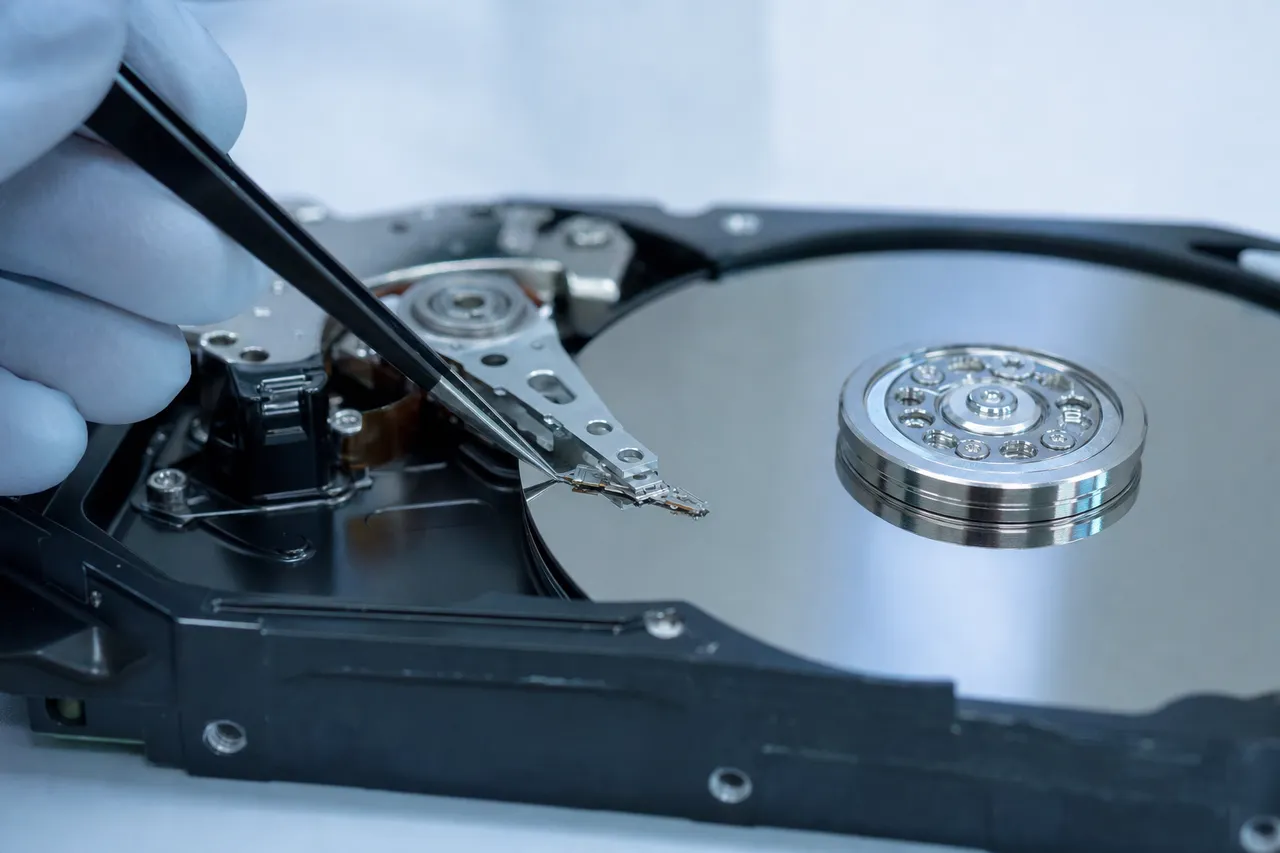
Western Digital
- WD My Passport (all capacities)
- WD My Book
- WD Elements
- WD Easystore
- WD Blue (2.5" & 3.5")
- WD Black Performance
- WD Red NAS
- WD Purple Surveillance
- WD Gold Enterprise
Seagate
- Seagate Barracuda
- Seagate Expansion
- Seagate Backup Plus
- Seagate IronWolf NAS
- Seagate Exos Enterprise
- Seagate FireCuda SSHD
- Seagate One Touch
- Seagate Portable Drive
Toshiba
- Toshiba Canvio Basics
- Toshiba Canvio Advance
- Toshiba MQ Series (laptop)
- Toshiba N300 NAS
- Toshiba X300 Performance
- Toshiba L200 Laptop
HGST, Samsung & More
- HGST Travelstar
- HGST Ultrastar
- HGST Deskstar NAS
- Samsung SpinPoint
- Maxtor DiamondMax
- LaCie Rugged
- G-Technology G-DRIVE
$100 diagnostic · No data, no charge · Free shipping
Why Your Hard Drive Is Clicking
Clicking almost always points to a mechanical fault inside the sealed drive. These are the failure modes we diagnose most often - and why early action matters.
- Power off now
Failed Read/Write Heads
The most common cause of clicking. When one or more read/write heads fail, the drive repeatedly attempts to initialize and falls back to its parking ramp, producing the characteristic click-click-click pattern. Each power cycle causes the failing heads to scrape the platter surface, escalating a recoverable head swap into a platter-level recovery.
- Often recoverable
Stuck Heads (Stiction)
When a drive is powered off abruptly or experiences a drop while running, the heads can stick directly to the platter surface instead of returning to the parking ramp. When you power the drive back on, the motor tries to spin but cannot overcome the friction, producing a beeping or repetitive clicking sound. This requires a clean bench head unstick or full head transplant.
- Power off now
Degraded Heads
Sometimes heads do not fail completely - they degrade over time. A drive with degraded heads may click intermittently, work for a few minutes then stop, or produce read errors on specific platters. These cases are deceptive because the drive may appear functional at first. MDrepairs uses the PC-3000 to perform selective head imaging, reading data from the healthy heads first before the degraded ones fail entirely.
- Often recoverable
Spindle Motor Failure
The spindle motor spins the platters at 5,400 or 7,200 RPM. When the motor seizes or its bearings degrade, the drive may emit a beeping sound as it tries and fails to spin up. In some cases, you will hear a brief spin-up attempt followed by a click as the drive resets. Motor failures on modern drives often require a full platter transplant into a compatible donor chassis.
- Often recoverable
PCB / Electrical Failure
A failed component on the printed circuit board - often a TVS diode, motor controller chip, or preamplifier - can cause clicking by delivering incorrect signals to the head assembly. Power surges, cheap adapters, and incorrect power supplies are common culprits. PCB-related clicking is typically the least expensive to repair, but requires matching the board revision and transplanting the ROM chip containing the drive's unique adaptive data.
- Often recoverable
Firmware Corruption
Hard drives store critical operating instructions in a firmware zone on the platters called the service area. When this firmware becomes corrupted, the drive may click as it fails to read its own initialization modules. The heads are often physically healthy - they simply cannot locate the firmware tracks needed to become ready. MDrepairs uses the PC-3000 to access and repair the service area directly, often resolving the clicking without any physical intervention.
- Power off now
Platter Damage
When clicking is ignored and the drive continues to be powered on, the failing heads can physically scratch the magnetic coating off the platter surface. This creates microscopic debris inside the sealed drive enclosure, which contaminates the remaining heads and causes cascading damage. Platter scratching is the most severe and expensive failure type. The sooner you power off a clicking drive and contact MDrepairs, the better your chances of avoiding platter-level damage.
- Power off now
Bearing Failure
The fluid dynamic bearings inside the spindle motor can degrade over time, especially in drives that have been running continuously for years. Bearing failure causes wobble in the platter rotation, which throws the heads out of alignment and produces clicking or grinding sounds. If caught early, the platters can be transplanted to a donor drive with healthy bearings. If the wobble has caused head contact with the platters, the recovery becomes significantly more complex.
How We Recover Your Data
Every clicking-drive case follows the same controlled, transparent path - from a careful intake to a verified return.
-
Free Quote & Intake
Ship your clicking drive to our Lincroft, NJ lab with free insured shipping, or drop it off in person. We log your case and begin the diagnostic process within one business day of arrival. Never power on a clicking drive again before sending it in.
-
$100 Diagnostic Assessment
We open your drive in our certified clean bench environment and perform a full physical inspection - checking the heads, platters, motor, and PCB. We use the PC-3000 to analyze firmware and electronic health. You receive a detailed report with exactly what failed and a firm recovery quote.
-
Approve or Decline - No Obligation
After the diagnostic, you decide whether to proceed. If you approve, the $100 diagnostic fee is applied toward your total recovery cost. If you decline, you pay only the diagnostic fee and we return your drive. No pressure, no hidden charges.
-
Clean Bench Recovery
For clicking drives, recovery typically involves a head swap using a matched donor drive from our inventory, performed under clean bench conditions. We use the PC-3000 to clone the drive sector-by-sector, employing selective head imaging to maximize data yield even from degraded heads.
-
Data Verification & Return
Once imaging is complete, we verify your recovered files for integrity and provide a file listing for your review. Your data is transferred to a new external drive or cloud storage of your choice and shipped back with free insured shipping. No data, no charge.
Clicking Drive Recovery Pricing
Every clicking drive that continues to run is actively destroying its own data. What starts as a simple $1,000 head swap can escalate to a $2,500 platter recovery after just a few more power cycles. The $100 diagnostic fee is always applied toward your recovery cost, and our no data, no charge policy means you never pay for a failed recovery. Below are our standard pricing tiers for clicking and beeping hard drives. Call 732-933-7717 for a free consultation before shipping your drive.
-
Logical / Firmware Recovery
$650 - $1,200
Data recovery from drives with logical errors, accidental deletion, formatting, file system corruption, or firmware failures. Includes PC-3000 firmware module repair and sector-level imaging.
- Accidental deletion recovery
- File system corruption repair
- Firmware module restoration
- Partition table reconstruction
- Bad sector bypass imaging
$100 diagnostic applied to cost
- Most common
Head Swap / Mechanical Recovery
$1,000 - $2,000
Recovery from clicking, buzzing, or non-spinning drives requiring clean bench work - head replacements, motor repair, stiction recovery, or spindle motor service.
- Failed read/write head replacement
- Motor failure repair
- Stiction recovery (heads stuck to platter)
- Clean bench head transplant with donor
- PC-3000 selective head imaging
$100 diagnostic applied to cost
-
Platter / Severe Damage Recovery
$999 - $2,500+
Recovery from drives with platter surface damage, contamination, scoring from head crashes, or drives that failed at other labs. Includes helium drive recovery ($2,000 - $3,500+).
- Scratched platter recovery
- Contamination and debris removal
- Head crash damage recovery
- Multi-platter transplant
- Conservative imaging around damaged zones
$100 diagnostic applied to cost
All pricing includes the $100 diagnostic fee. No data, no charge. If we can't recover your target files, you only pay the diagnostic fee.
Turnaround Times
Every data recovery case at MDrepairs begins with a $100 diagnostic evaluation - external inspection, PCB testing, motor current analysis, and controlled spin-up with head monitoring. You receive a detailed report with recovery likelihood, expected data yield, and timeline. The $100 is applied toward your final recovery cost. If we cannot recover your target files, you pay only the $100 diagnostic fee - no data, no charge.
- 4 - 5 Weeks Standard No surcharge
Full assessment with recovery options and pricing.
- 5 - 7 Days Priority Rush +$250
Jumps to the front of the queue.
- 1 - 2 Days Urgent Rush +$500
Dedicated technician for time-sensitive cases.
- Fastest Same Day Emergency +$1,000
Immediate start. Highest priority, mission-critical.
Clicking Hard Drive Data Recovery - Recovery Cases
See how our lab handles real data recovery cases - from initial diagnosis through final data delivery.
-
Clicking WD My Passport - Head Stack Replacement
- Drive
- Western Digital My Passport (5TB portable)
- Failure
- Repetitive clicking on power-up - the classic symptom of a failed read/write head stack. The heads could no longer read the servo tracks needed to position themselves over data, causing the drive to click and reset in a loop.
- Recovery
- We converted the USB-only PCB to SATA for PC-3000 compatibility, then performed a full head stack assembly swap using a matched donor. Clean imaging with no complications. All data recovered.
-
Clicking Desktop Drive - Partial Head Degradation
- Drive
- Western Digital WD20EARS (2TB desktop)
- Failure
- Intermittent clicking caused by partial head stack failure - one head degraded while others remained functional. Each power cycle on a clicking drive causes additional platter damage.
- Recovery
- Two-pass recovery: disabled the failing head at firmware level, imaged data from healthy heads, then swapped in a fresh donor stack for remaining data. Full recovery across both passes.
-
Clicking from Stiction - Heads Stuck to Platter
- Drive
- Seagate Rosewood (portable)
- Failure
- Drive disconnected while reading caused heads to land on spinning platters and bond through stiction. On power-up, the motor tried to spin but couldn't overcome the adhesion, producing a clicking/buzzing sound.
- Recovery
- We separated the stuck heads from the platter surface under magnification, reassembled with verified head clearance, and imaged the drive completely. All data recovered.
-
Clicking After Drop - Physical Impact Damage Recovery
- Drive
- Western Digital WD10JMVW (1TB portable)
- Failure
- Impact bent the internal chassis, misaligning heads with platters. Drive clicked repeatedly as heads searched for servo tracks at incorrect positions. Another lab declared it unrecoverable.
- Recovery
- Platter transplant into matched donor chassis restored alignment. Nearly all data recovered from a drive another lab rejected.
Hearing the click? Power it off - $100 diagnostic credited, free insured shipping, no data, no charge.
Everything You Need to Know About a Clicking Hard Drive
Why drives click, what each sound means, how the damage progresses, and exactly what to do - written by the team that recovers these drives every week in our Lincroft, NJ lab.
01 How It Works
What Does a Clicking Hard Drive Mean? The Technical Explanation
When your hard drive starts making a clicking sound, it is telling you that something has gone seriously wrong with its mechanical components. To understand why, you need to know how a hard drive works at a basic level.
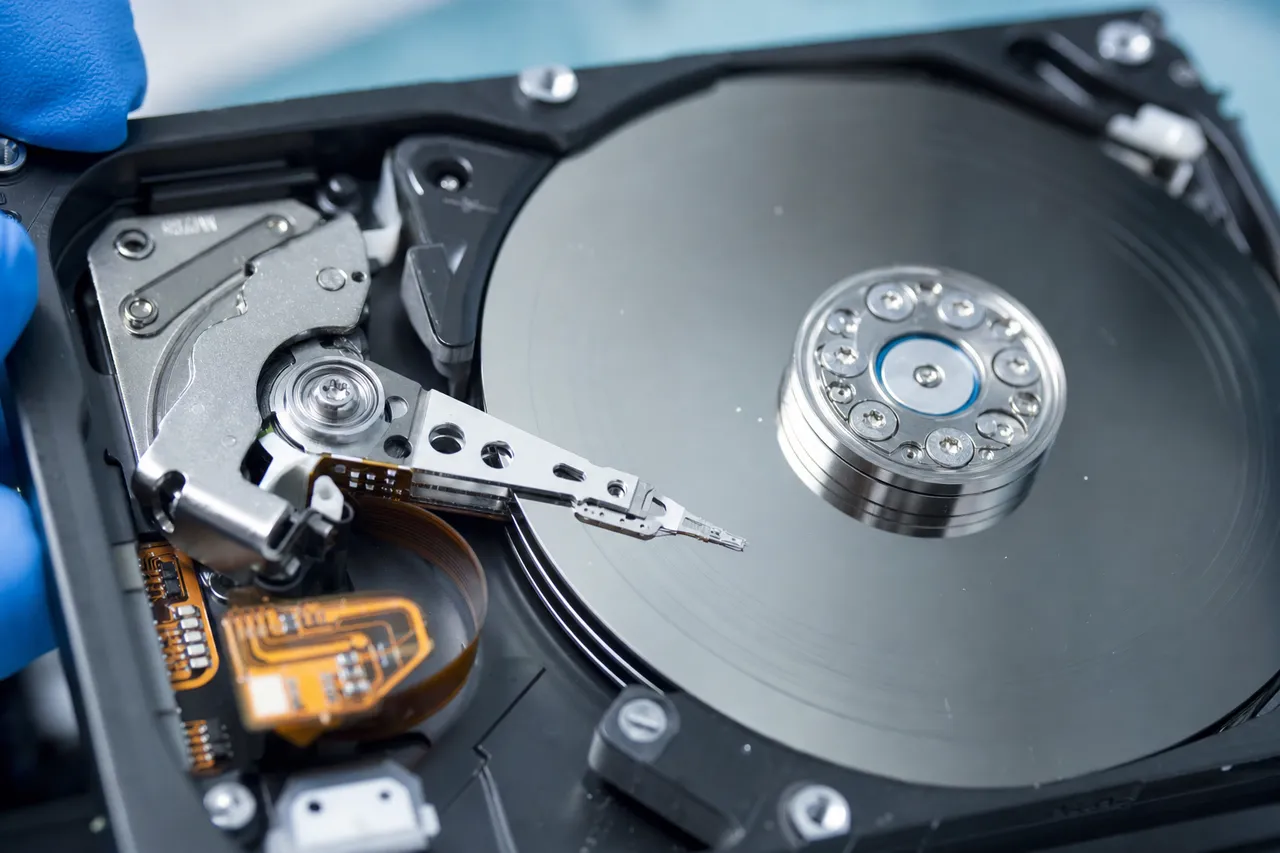
Inside every traditional hard drive (also called an HDD or spinning drive) are one or more circular discs called platters. These platters are coated with a thin magnetic film and spin at extremely high speeds - typically 5,400 or 7,200 revolutions per minute. Floating just nanometers above the platter surface is a set of read/write heads mounted on an actuator arm. These heads read and write data by detecting and altering the magnetic orientation of tiny regions on the platter surface.
The read/write heads fly above the platters on an air bearing - a microscopically thin cushion of air generated by the spinning platters. The gap between the head and the platter is smaller than a fingerprint, a speck of dust, or even a smoke particle. This is why hard drives are sealed in clean environments during manufacturing and why opening a drive outside of a clean room is almost always fatal to the data.
When the drive powers on, the actuator arm moves the heads from their resting position (called the parking ramp or landing zone) to the data area of the platters. The drive then reads its firmware from a reserved area of the platters called the service area. This firmware contains the drive's unique operating instructions - its head maps, defect lists, SMART data, and calibration parameters. If the drive successfully reads its firmware, it becomes "ready" and appears to your computer as a storage device.
Clicking occurs when this initialization process fails. The actuator arm moves the heads to the service area, attempts to read the firmware, fails, and then retracts the heads back to the parking ramp. The drive's controller then tries again, and again, and again - producing the rhythmic click-click-click sound that gives this failure its name.
The reason the drive cannot read the firmware varies. The heads themselves may have physically failed - their sensitive magnetic sensors have degraded or broken, making them unable to detect the magnetic signals on the platter. The firmware zone on the platters may be corrupted, so even healthy heads cannot find valid initialization data. The PCB may be sending incorrect signals to the head assembly. Or the heads may be physically stuck to the platter surface (stiction), preventing the platters from spinning at all.
Regardless of the root cause, clicking is always a sign of a serious problem that requires professional data recovery. At MDrepairs in Lincroft, NJ, we diagnose the specific cause of your drive's clicking using our PC-3000 system and clean bench environment, then apply the appropriate recovery technique. Call 732-933-7717 for a free consultation.
02 Diagnose By Sound
Types of Clicking Sounds and What They Indicate
Not all clicking sounds are the same. The specific pattern, rhythm, and accompanying noises from your hard drive can tell an experienced data recovery technician a great deal about what has failed before even opening the drive. Here is a breakdown of the most common sounds and what they typically indicate.
Rhythmic Click-Click-Click (Every 1-2 Seconds)
This is the most common clicking pattern and is often called the "click of death." The drive powers on, the platters spin up to speed, the heads move from the parking ramp to the data area, fail to read the firmware, and retract back to the ramp. This cycle repeats every one to two seconds. This pattern most commonly indicates failed read/write heads. The heads have lost the ability to read the magnetic signals on the platter surface, so the drive's initialization sequence fails at the same point every time. This is typically a head swap case, falling in the $1,000 to $2,000 range at MDrepairs.
Rapid Clicking or Chattering
A fast, continuous clicking or chattering sound - almost like a playing card in bicycle spokes - usually indicates that the heads are making physical contact with the platter surface. This is called a head crash and is an emergency. Every second the drive remains powered on in this state, the heads are grinding away the magnetic coating that contains your data. If you hear this sound, power off the drive immediately and do not turn it back on. Call MDrepairs at 732-933-7717. Head crash cases may involve platter resurfacing or debris cleanup in addition to a head swap, placing them in the $999 to $2,500+ range.
Beeping (No Spinning Sound)
A beeping sound with no audible platter spin indicates that the motor is trying to start but cannot. The two most common causes are stiction (heads stuck to the platter surface) and spindle motor seizure. In a stiction case, the friction between the stuck heads and the platter is stronger than the motor's torque, so the motor stalls and the drive emits a beeping alarm. In a motor seizure, the bearings inside the spindle have seized or the motor windings have failed. Both conditions require clean bench intervention - either a head unstick/replacement or a platter transplant to a donor chassis.
Single Click Followed by Spin-Down
If the drive clicks once, then the platters spin down and the drive goes silent before trying again, this often points to a PCB or electrical issue. The drive detects an abnormal current or voltage condition and shuts itself down as a protective measure. This can be caused by a failed TVS diode, blown motor controller, or incorrect power supply. PCB-related failures are often the least expensive to repair, falling in the $650 to $1,200 range.
Clicking with Intermittent Detection
Some drives click but are occasionally detected by the computer for brief periods before disappearing again. This pattern suggests degraded heads - heads that are partially functional but inconsistent. The drive can sometimes read enough firmware to become ready, but the heads cannot sustain reliable reading. These cases are tricky because the drive appears to be "almost working," tempting users to keep trying. Every time the degraded heads attempt to read, they may be causing additional damage. MDrepairs uses PC-3000 selective head imaging to extract maximum data from degraded heads before they fail completely.
Grinding or Scraping Sounds
Grinding or scraping sounds are different from clicking and indicate direct physical contact between components. This could be heads dragging on platters, a displaced internal component, or a platter that has become warped or misaligned. Do not power on a drive making grinding sounds under any circumstances. These are the most damage-prone cases and require immediate professional attention.
If your drive is making any of these sounds, the single most important thing you can do is stop powering it on. Contact MDrepairs at 732-933-7717 for a $100 professional diagnostic.
03 Critical Warning
Why You Must Stop Powering On a Clicking Drive Immediately
This is the single most important piece of advice in this entire page, and we cannot stress it enough: if your hard drive is clicking, stop turning it on. Every power cycle is actively destroying your data, and the damage is cumulative and irreversible.
Here is exactly what happens each time you power on a clicking drive with failed heads:
- The platters spin up to full speed - 5,400 or 7,200 RPM depending on the model.
- The failed heads move from the parking ramp to the platter surface - flying just nanometers above the spinning disc.
- The failed heads attempt to read the firmware - dragging across the service area of the platter, potentially scratching the magnetic coating with each pass.
- The read attempt fails - the heads retract to the parking ramp.
- The drive tries again - each retry cycle scrapes the same area of the platter.
- After multiple failed attempts, the drive gives up - you power it off.
- You try again later - repeating the entire damaging cycle.
Each pass of the failed heads across the platter can remove a microscopic layer of the magnetic coating. This coating is where your data is physically stored. Once it is scraped away, that data is gone permanently - no technology on Earth can recover data from a platter that has been scratched down to the bare aluminum or glass substrate.
Worse, the scraped-off magnetic particles do not just disappear. They become airborne debris inside the sealed drive cavity. This debris settles on other areas of the platter and contaminates the remaining heads, causing a cascade of secondary failures. A drive that started with one failed head can end up with all heads destroyed and platter surfaces covered in scratches after just a handful of power cycles.
The financial impact is real and dramatic. At MDrepairs, a standard head swap recovery on a clicking drive with clean platters costs between $1,000 and $2,000. But if those platters have been scratched by repeated power cycles, the recovery becomes a platter-level case costing $999 to $2,500 or more - and the success rate drops significantly.
We see this exact scenario play out every week in our Lincroft, NJ lab. A customer ships in a drive they have been turning on and off for days or weeks, hoping it would "fix itself." By the time we open it in our clean bench, the platters are scored with concentric scratches and contaminated with debris. What could have been a straightforward head swap becomes a complex, expensive, and sometimes impossible recovery.
Common mistakes people make with clicking drives include:
- Repeatedly rebooting the computer - each reboot powers the drive through another damaging cycle
- Running data recovery software - software cannot fix a mechanical problem, and forcing the drive to read only accelerates the damage
- Connecting the drive to different computers - the drive clicks the same way regardless of what computer it is connected to
- Tapping or hitting the drive - this can dislodge the heads entirely or cause them to crash into the platters
- Putting the drive in the freezer - condensation damages the electronics and platters, making recovery harder
- Opening the drive - any dust particles that enter the drive will scratch the platters when it spins
The correct course of action is simple: power off the drive, disconnect it, and call MDrepairs at 732-933-7717. Our $100 diagnostic will tell you exactly what is wrong, and we will give you a firm quote before any recovery work begins. Your data is worth protecting - do not gamble it on one more power cycle.
04 Failure Timeline
Head Crash Progression: How Clicking Drives Get Worse Over Time
A clicking hard drive is not a static problem - it is a progressive one. Without professional intervention, the condition of the drive deteriorates with every power cycle. Understanding this progression helps explain why early action saves both data and money.
Stage 1: Initial Head Failure
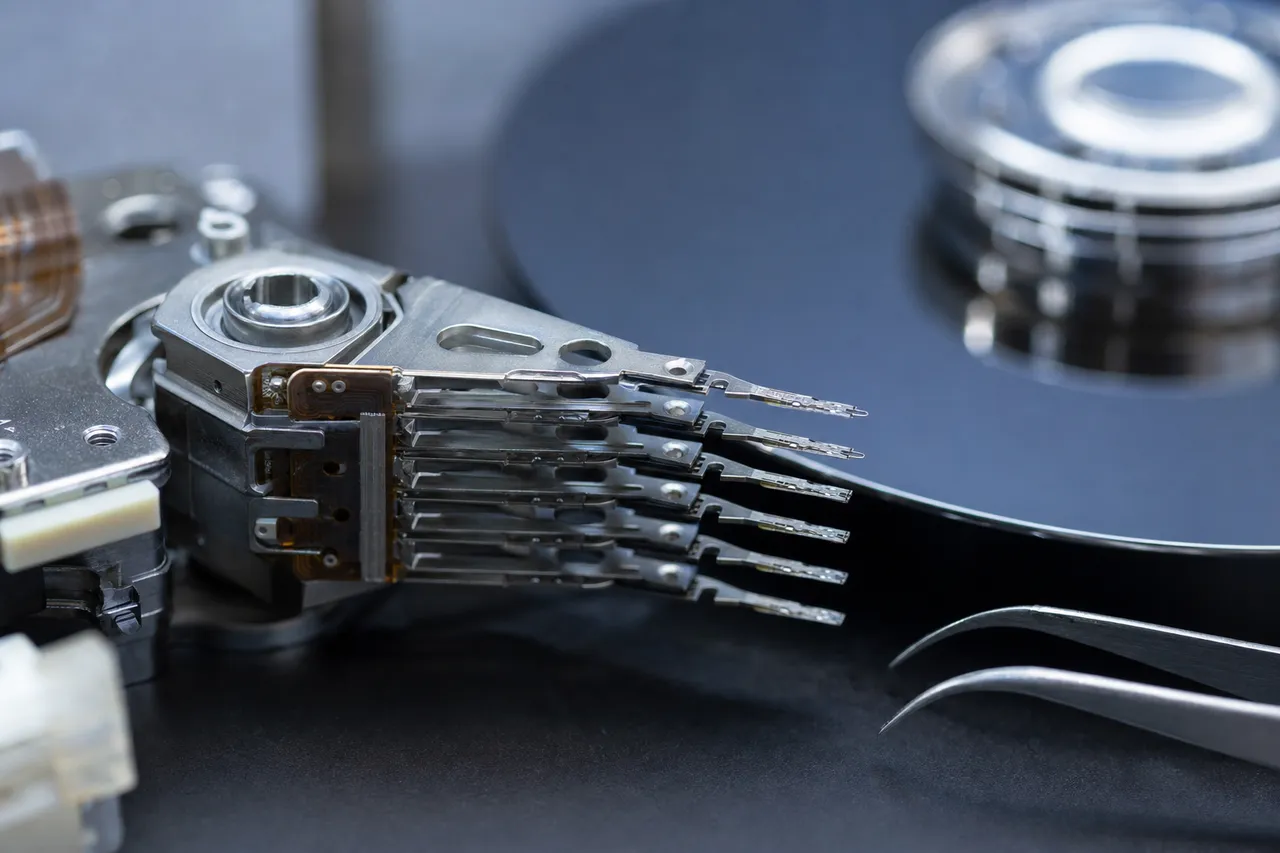
The failure begins when one or more read/write heads lose their ability to read the magnetic signals on the platter. This can happen due to a physical shock (dropping the drive), electrical event (power surge), or simple wear over years of use. At this stage, the platters are typically undamaged. The heads are failing but have not yet made destructive contact with the platter surface. If you send the drive to MDrepairs at this point, the recovery is a clean head swap - opening the drive in our clean bench, removing the failed head assembly, installing a matched donor head assembly, and imaging the platters. Success rates at this stage are very high, typically above 95%, and costs fall in the $1,000 to $1,500 range.
Stage 2: Surface Degradation Begins
If the drive continues to be powered on, the failed heads begin to make intermittent contact with the platter surface during their repeated read attempts. Each contact event removes a small amount of the magnetic coating. You may not notice any change in the clicking pattern, but under magnification, the platter surface shows early signs of wear - slight dulling or faint concentric marks in the firmware zone. At this stage, recovery is still very possible, but the technician must work more carefully. The PC-3000 may need to skip damaged sectors and use multiple imaging passes. Success rates are still good - 85% to 95% - but costs increase to the $1,500 to $2,000 range due to the additional labor and complexity.
Stage 3: Visible Scratching and Debris
After dozens of power cycles, the intermittent head contact becomes sustained. Visible scratches appear on the platter surface - concentric rings that correspond to the tracks the heads were trying to read. The magnetic debris from these scratches is now floating inside the drive, contaminating the other heads and settling on previously undamaged areas of the platter. The drive may now produce grinding sounds in addition to clicking, or it may no longer spin up at all as debris jams the head assembly. Recovery at this stage requires not just a head swap but also debris cleanup and careful platter surface treatment. The data in the scratched zones is permanently lost, but data on undamaged portions of the platter can often still be recovered. Success rates drop to 60% to 80%, and costs rise to the $2,500+ range.
Stage 4: Catastrophic Platter Damage
In extreme cases - drives that have been powered on hundreds of times or left running while clicking - the platter surface can be almost entirely destroyed. The magnetic coating is stripped away in wide bands, the drive cavity is filled with metallic debris, and in the worst cases, the heads have gouged into the aluminum or glass substrate of the platter itself. Recovery at this stage is often impossible, or limited to small fragments of data from the few undamaged areas remaining.
The message is clear: time is the enemy of a clicking drive. The difference between Stage 1 and Stage 4 can be as few as 50 power cycles. At MDrepairs, we encourage every customer with a clicking drive to ship it to our lab as quickly as possible. We offer free insured shipping nationwide, and our Emergency turnaround option (+$1,000) begins recovery the moment your drive arrives. Call 732-933-7717 to start your case today.
05 Sound Guide
Clicking vs. Beeping vs. Grinding: Understanding Hard Drive Failure Sounds
Hard drives can produce a variety of sounds when they fail, and each sound points to a different type of mechanical problem. Knowing the difference between clicking, beeping, and grinding helps you communicate more effectively with your data recovery provider and understand the severity of your situation.
Clicking
Clicking is a rhythmic, repetitive sound produced by the actuator arm as it moves the read/write heads back and forth between the data area and the parking ramp. The typical pattern is: spin up, seek, click, retract, repeat. Clicking almost always indicates a head-related failure - either the heads themselves have failed, the firmware they are trying to read is corrupted, or there is an electrical issue preventing proper head operation. Clicking is by far the most common hard drive failure sound and accounts for the majority of data recovery cases at MDrepairs. The severity ranges from relatively simple (firmware corruption or PCB repair) to complex (multi-head failure with platter damage). The key variable is how many times the drive has been powered on since the clicking started.
Beeping
Beeping sounds different from clicking because there is no audible platter spin. Instead of the whoosh of spinning platters followed by clicking, you hear silence followed by a series of beeps - sometimes a single long beep, sometimes a pattern of short beeps. Beeping indicates that the platters are not spinning. The two primary causes are: Stiction - the read/write heads are physically stuck to the platter surface. The motor tries to spin the platters but cannot overcome the friction of the stuck heads, so it stalls and the drive emits an alarm beep. This is common in 2.5-inch portable drives that have been dropped or stored for long periods. Spindle motor failure - the motor itself has seized due to bearing failure, or the motor control circuitry has failed. The platters cannot spin regardless of head position. The good news about beeping drives is that the platters are often in excellent condition. Because the platters never spun up, the heads never had the chance to scrape the surface. Recovery involves either freeing the stuck heads or transplanting the platters to a donor drive with a functional motor. Success rates for beeping drives are generally very high - 90% or above at MDrepairs.
Grinding
Grinding or scraping sounds are the most alarming and indicate direct, sustained physical contact between the heads and the platter surface. Unlike the intermittent contact that can occur during clicking, grinding means the heads are continuously dragging across the platters, rapidly destroying the magnetic coating. Grinding can occur when: a severe head failure causes the heads to collapse onto the platter surface rather than floating on the air bearing; a physical shock has displaced the head assembly or knocked a platter off its spindle alignment; debris from a previous head crash is now wedged between the heads and platters. If you hear grinding, power off the drive immediately. Do not power it on again. Do not wait to see if it stops. Every second of grinding is causing catastrophic, irreversible damage to the platter surface. Grinding cases are the most complex and expensive to recover, and the success rate depends entirely on how long the drive was allowed to grind before being powered off.
Other Sounds
Some drives produce no unusual sounds at all but are still failing. A drive that hums normally but is not detected by the computer may have a firmware issue, a failed head that does not produce audible clicking, or a PCB failure that prevents the drive from communicating with the host. Silence is not always a good sign - it simply means the failure mode is not producing an audible symptom.
Regardless of what sound your drive is making - or not making - contact MDrepairs at 732-933-7717 for a $100 professional diagnostic. Our $100 diagnostic will pinpoint the exact failure and provide you with a firm recovery quote.
06 Deep Dive
The Click of Death Explained: A Complete Guide
The "click of death" is a term coined in the early days of personal computing to describe the distinctive, ominous sound a hard drive makes when it suffers a catastrophic mechanical failure. The term has become so widely known that it now appears in casual tech conversations, online forums, and even mainstream news coverage of data loss events. But what exactly is the click of death, and how does it differ from normal hard drive sounds?
Normal Hard Drive Sounds vs. the Click of Death
All mechanical hard drives produce some sound during normal operation. You may hear a faint whirring from the spinning platters, soft ticking as the heads move between tracks, or brief chittering during heavy read/write operations. These sounds are normal and expected. The click of death is distinctly different - it is loud, repetitive, and rhythmic, with a consistent interval between clicks. It sounds mechanical and forceful, like a tiny relay clicking on and off inside the drive. The normal seek sounds of a healthy drive are irregular and vary with workload - the heads are moving to different tracks as the computer reads and writes data. The click of death is monotonous because the drive is performing the same failed operation over and over: seek to firmware zone, attempt to read, fail, retract to parking ramp, try again.
Why It Happens
The click of death is the audible manifestation of a failed initialization loop. When you power on a hard drive, the drive's controller executes a startup sequence that includes spinning the platters to operating speed, moving the heads from the parking ramp to the data zone, and reading the firmware stored in the service area. This firmware tells the drive how to operate - where to find data, how to compensate for manufacturing variations, and how to communicate with the host computer. If the heads cannot read the firmware - because the heads are damaged, the firmware is corrupted, or the electronics are malfunctioning - the drive cannot complete its initialization. The controller resets and tries the entire sequence again. Each attempt produces one click as the actuator arm slams the heads from the data zone back to the parking ramp.
Drives Most Commonly Affected
- Seagate Barracuda 7200.11 and 7200.12 series - historically prone to firmware bugs that cause clicking even when the heads are healthy
- Western Digital portable drives (My Passport, Elements) - susceptible to head failure from drops due to their 2.5-inch form factor
- Toshiba MQ series laptop drives - thin profile heads that degrade over time
- HGST/Hitachi Travelstar drives - head preamp failures that produce clicking patterns
- Samsung SpinPoint series - known for bearing failures that progress to clicking
Can the Click of Death Be Fixed?
The click of death cannot be fixed in the traditional sense - you cannot make the drive function normally again as a storage device. But the data on the drive can almost always be recovered by a professional data recovery lab like MDrepairs. The recovery approach depends on the root cause: Head failure - head swap using a matched donor drive, followed by sector-by-sector imaging with the PC-3000. Firmware corruption - direct firmware repair using the PC-3000's firmware module, often without any physical intervention. PCB failure - board swap or component-level repair, with ROM chip transplant. Stiction - clean bench head separation and replacement. At MDrepairs, our success rate on click-of-death drives is approximately 90% when the drive is sent to us before the customer has repeatedly powered it on. That number drops significantly for drives that have been through dozens or hundreds of power cycles. The lesson is simple - the sooner you stop trying to fix it yourself and send it to us, the better your odds. Call 732-933-7717 for a free consultation.
07 In The Lab
The Recovery Process for Clicking Drives: Step by Step
Understanding exactly what happens during a clicking drive recovery can help set your expectations and give you confidence in the process. Here is a detailed walkthrough of how MDrepairs in Lincroft, NJ handles a typical clicking hard drive recovery from start to finish.
Step 1: Intake and Initial Assessment
When your drive arrives at our lab (via free insured shipping or in-person drop-off), we log it into our case management system and assign it a case number. We document the drive's make, model, serial number, capacity, and any symptoms you have described. We also note the drive's physical condition - any visible damage, missing screws, or signs that it has been previously opened. We then connect the drive to a test bench using a write-blocked interface (to prevent any accidental writes to the drive) and attempt to power it on briefly to confirm the clicking behavior and characterize the sound pattern. This initial power-on is kept as short as possible to avoid causing additional damage.
Step 2: Clean Bench Inspection
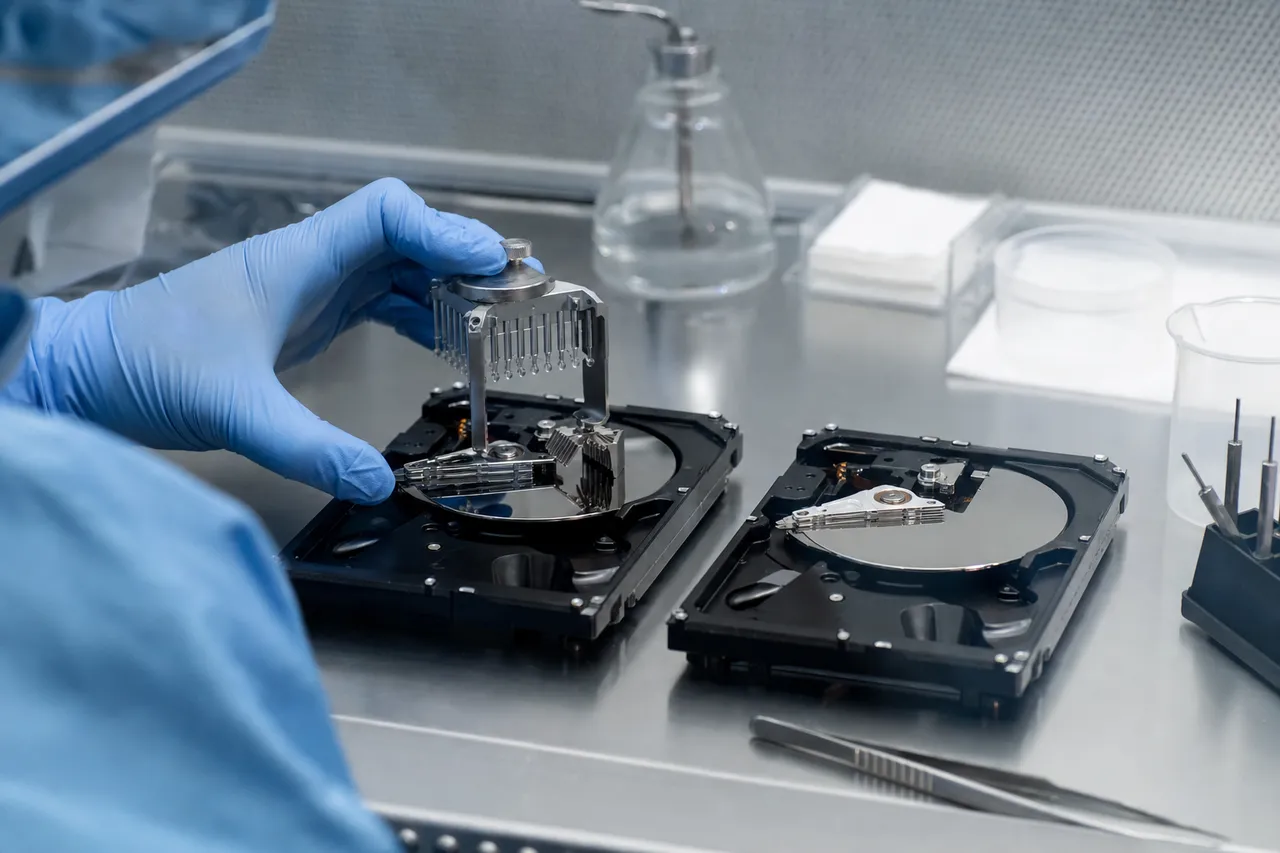
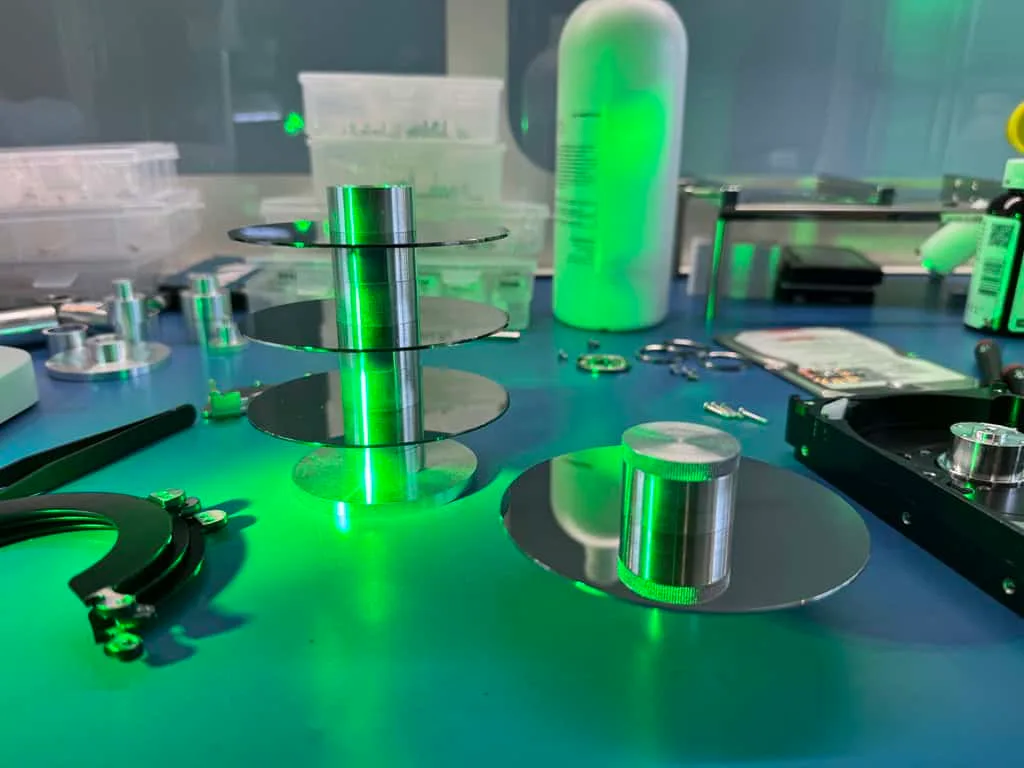
We open the drive inside our certified clean bench - a particle-controlled environment that filters airborne contaminants down to sub-micron levels. Even a single dust particle inside an open hard drive can cause a head crash, so this step is critical. With the drive open, we visually inspect the heads, platters, and internal components using magnification. We look for signs of head contact with the platter surface (scratches, scoring, debris), head deformation or damage visible under magnification, stiction (heads stuck to the platter), platter condition (clean and mirror-smooth, or showing signs of wear), foreign debris inside the drive cavity, and damaged or displaced internal components (ramp, spacer rings, top clamp). This visual inspection tells us a great deal about the severity of the failure and helps us develop a recovery plan.
Step 3: Donor Drive Selection and Head Swap
If the diagnosis confirms failed heads (which it does in the majority of clicking cases), we need to perform a head swap. This requires a compatible donor drive - a working drive of the same model, firmware revision, and head configuration. Hard drive heads are not interchangeable between models; even drives of the same model but different manufacturing dates may have incompatible head assemblies. MDrepairs maintains an extensive donor drive inventory in our Lincroft, NJ lab, which allows us to match most common drives without delay. For less common models, we source donors from our supplier network, typically within 24 to 48 hours. The head swap itself is performed inside the clean bench. We remove the failed head assembly from the patient drive, install the donor head assembly, and reassemble the drive. This process requires extreme precision - the heads must be perfectly aligned with the platters and the actuator arm must move freely without contact.
Step 4: PC-3000 Imaging
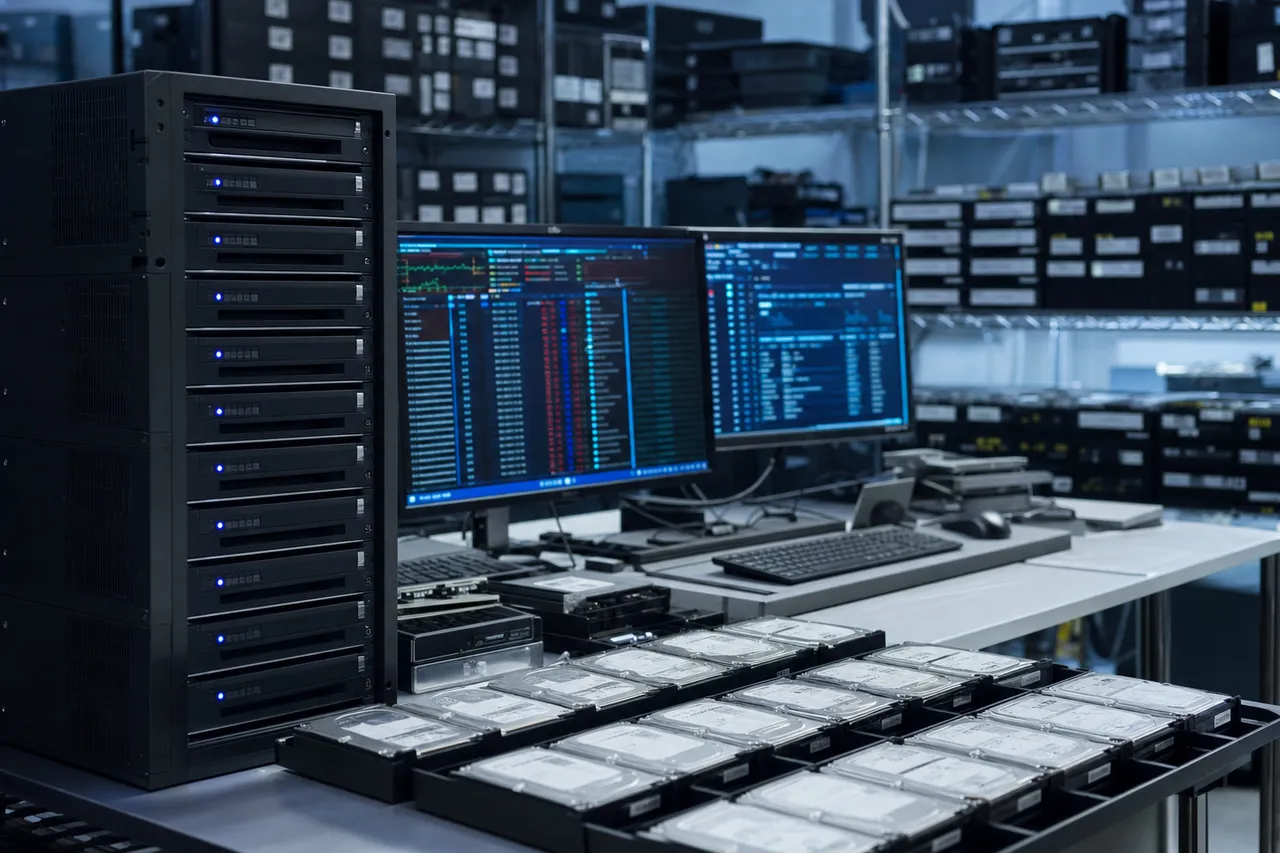
With the new heads installed, we connect the drive to our PC-3000 system - a professional data recovery tool manufactured by ACE Lab. The PC-3000 can communicate directly with the drive's firmware, allowing us to bypass firmware errors that might prevent the drive from becoming ready, perform selective head imaging (reading data from healthy heads first before attempting degraded ones), create multiple imaging passes with different parameters to maximize data yield, handle bad sectors gracefully (skipping problem areas and returning to them later), and image the drive at the sector level directly to a healthy target drive or image file. The imaging process can take anywhere from a few hours to several days, depending on the drive's capacity, the condition of the platters, and the health of the donor heads. We monitor the process closely and adjust parameters in real time to optimize recovery.
Step 5: Data Verification and Delivery
Once imaging is complete, we mount the image and verify the recovered file system. We generate a file listing showing all recovered folders, files, and their sizes. We check critical files for integrity - opening documents, viewing photos, and verifying database files are not corrupted. We then contact you with the results: what percentage of data was recovered, the condition of specific files you identified as priorities, and your options for data delivery. We can transfer your recovered data to a new external drive, upload it to your cloud storage, or both. Your drive and the recovery media are shipped back to you with free insured shipping.
Throughout this entire process, our no data, no charge policy applies. If we cannot recover your target files, you pay only the $100 diagnostic fee. Call MDrepairs at 732-933-7717 to start your recovery today.
08 Outcomes
Clicking Hard Drive Recovery Success Rates
One of the first questions people ask when their hard drive starts clicking is, "What are the chances of getting my data back?" The answer depends on several factors, but the overall picture is encouraging - especially if you act quickly.
Overall Success Rates at MDrepairs
Across all clicking and beeping hard drive cases at MDrepairs, our overall success rate - defined as recovering the customer's target files in usable condition - is approximately 85% to 90%. This figure includes cases at every severity level, from simple firmware fixes to complex platter damage recovery.
When we break this down by severity, the picture becomes clearer:
- Firmware/electrical clicking: 95%+ success rate. The heads and platters are physically healthy; we just need to fix the firmware or PCB to restore access.
- Head failure with clean platters: 90% to 95% success rate. The most common scenario. We swap the heads and image the platters. High success because the data surface is undamaged.
- Head failure with minor platter degradation: 80% to 90% success rate. The platters show early signs of wear from limited power cycling. Most data is recoverable, but some sectors in the damaged zones may be lost.
- Significant platter damage: 50% to 75% success rate. Visible scratching, debris contamination. Recovery is partial - we can extract data from the undamaged portions of the platters, but files stored in the scratched zones are permanently lost.
- Catastrophic platter damage: 10% to 40% success rate. Extensive scratching, gouging, or delamination of the magnetic coating. Recovery may be limited to fragments of files or specific sectors that happen to be on undamaged areas.
What Affects Success Rates
The single biggest factor in recovery success is how many times the drive was powered on after it started clicking. A drive that was powered off immediately and shipped to our lab has dramatically better prospects than one that was rebooted 50 times over two weeks. Other factors that affect success rates include drive model and age (some drive families have more robust platter coatings than others; newer drives with glass platters can be more fragile than older aluminum-platter models), original failure cause (firmware and electrical failures have the highest success rates because the platters are undamaged; mechanical failures like head crash and stiction carry more risk), previous repair attempts (drives that have been opened outside a clean environment, frozen, or had "fix" attempts by unqualified shops are harder to recover; contamination from improper handling can cause secondary damage), and data location on platters (if the damaged area happens to be on the outer tracks where the file system metadata is typically stored, the impact on recovery is disproportionately large even if the physical damage is small).
How We Maximize Success Rates
- Selective head imaging: the PC-3000 allows us to read from specific heads independently. If a drive has 4 heads and only heads 1 and 3 are working, we image those heads first before attempting the damaged ones.
- Multiple imaging passes: we run multiple passes with different timeout and retry settings. The first pass grabs the easy sectors; subsequent passes use more aggressive settings to coax data from marginal areas.
- Prioritized sector reading: if you tell us which files are most important (family photos, business databases, etc.), we can prioritize imaging the disk areas where those files are likely stored.
- Head tuning: in some cases, we can use the PC-3000 to adjust the head's operating parameters (bias voltage, read threshold) to improve read performance from degraded heads.
No legitimate data recovery company can guarantee a 100% success rate on every case. But at MDrepairs, we are transparent about our capabilities, honest about the prognosis for your specific drive, and committed to our no data, no charge policy. If we cannot recover your files, you pay only the $100 diagnostic. Call 732-933-7717 to discuss your case.
09 Myth vs Fact
Myths About Fixing a Clicking Hard Drive at Home
The internet is full of "hacks" and "tricks" for fixing clicking hard drives at home. These range from well-intentioned but misguided suggestions to outright dangerous advice that will destroy your data permanently. Let us set the record straight on the most common myths.
Myth 1: Put the Hard Drive in the Freezer
This is perhaps the most persistent and damaging myth in data recovery. The theory is that cooling the drive causes the metal components to contract, temporarily freeing stuck heads or tightening loose connections. In reality, putting a hard drive in the freezer causes condensation to form on the platters and electronics when the drive is removed and reaches room temperature. This moisture can short-circuit the PCB, corrode the head contacts, and leave water spots on the platter surface that cause additional read failures. Even if you wrap the drive in a plastic bag (as some versions of this myth suggest), moisture still forms on the cold surfaces inside the sealed drive cavity when it warms up. We have received drives at MDrepairs that were frozen and defrosted multiple times - they invariably have corroded components and moisture damage on top of their original failure, making recovery more difficult and expensive.
Myth 2: Tap or Hit the Drive to Unstick the Heads
This advice has its origins in the era of mainframe disk drives, when a sharp tap could sometimes free a stuck actuator on a large, robust drive mechanism. Modern hard drives are precision instruments with tolerances measured in nanometers. Tapping or striking a modern drive can dislodge the heads from their arm, cause the heads to crash into the platters, knock the platters off their spindle alignment, or break the delicate flex cable connecting the head assembly to the PCB. We have seen drives arrive at our lab with shattered platters from customers who hit them with a screwdriver. Do not tap, hit, shake, or drop your clicking drive.
Myth 3: Open the Drive and Manually Move the Heads
Some online guides suggest opening the hard drive and using a toothpick, needle, or other tool to manually move the heads away from the platter surface. This is catastrophically bad advice. First, opening a hard drive outside a clean environment introduces dust and particles that will scratch the platters the moment they spin. Second, the heads are incredibly fragile - touching them with any tool, even gently, can bend or break the delicate slider that contains the read/write element. Third, if the heads are stuck to the platter (stiction), pulling them free without the proper technique can rip the magnetic coating right off the platter. At MDrepairs, we open drives inside a certified clean bench and use specialized tools designed specifically for head manipulation. This is not something that can be replicated on a kitchen table with household tools.
Myth 4: Run Data Recovery Software
When a drive is clicking due to mechanical failure, data recovery software is useless at best and destructive at worst. Recovery software works by reading the drive through the operating system's normal interface. If the drive cannot read its own firmware (which is why it is clicking), no software can force it to produce data. What the software does instead is keep the failing drive powered on for hours as it repeatedly times out on every read attempt - giving the damaged heads maximum opportunity to scrape the platter surface. Data recovery software is designed for logical failures - accidental deletion, formatting, file system corruption on a physically healthy drive. It is not a substitute for mechanical data recovery.
Myth 5: Replace the PCB (Circuit Board)
Swapping the PCB from a matching drive is sometimes suggested as a DIY fix. While PCB failure can cause clicking, simply swapping boards between drives has not worked since the early 2000s. Modern drives store unique adaptive data (calibration values, defect maps, head parameters) on a ROM chip soldered to the PCB. Swapping the board without transplanting the ROM chip will, at best, result in the drive not initializing, and at worst, can overwrite critical firmware data on the platters. Even if you manage to swap the ROM chip (which requires micro-soldering skills), a PCB swap only helps if the PCB was actually the problem. If the real issue is failed heads or firmware corruption, the new board changes nothing - and you have now introduced additional risk from handling the drive's electronics.
Myth 6: Leave the Drive Powered Off for a While and Try Again Later
Sometimes people notice that a clicking drive will occasionally work after being left off for several hours or days. This can happen with degraded heads - the heads cool down during the off period and temporarily function better when first powered on. But this is not a fix; the heads are still degrading, and each successful power-on is a borrowed-time event. Copying data during these brief windows of functionality is risky because the drive can fail mid-transfer, and the stress of sustained reading accelerates the head degradation. If your drive occasionally works, do not attempt to copy data yourself. Contact MDrepairs at 732-933-7717 immediately. We can image a drive with intermittently functioning heads much more safely using the PC-3000, which can handle sudden head failures gracefully without the data loss risk of a standard file copy.
The Only Correct Action
When your hard drive clicks, the only correct action is to power it off, disconnect it, and contact a professional data recovery lab. At MDrepairs, our $100 diagnostic tells you exactly what is wrong and what it will cost to recover your data. No guessing, no internet myths, no additional damage. Call 732-933-7717 or submit a free quote online.
10 Next Steps
When to Seek Professional Help for a Clicking Hard Drive
Not every hard drive problem requires professional data recovery. A drive that is slow, produces occasional errors, or has been accidentally formatted may be recoverable with software tools. But a clicking hard drive is different. Clicking is a mechanical symptom that cannot be resolved with software, firmware updates, or any DIY technique. Here is how to know when you need professional help - and when to call MDrepairs.
You Need Professional Recovery If:
- Your drive makes a rhythmic clicking or ticking sound - this is the hallmark of a head failure or firmware read failure. No software or home fix will resolve this.
- Your drive beeps when powered on and the platters do not spin - this indicates stiction or motor failure, both of which require clean bench work.
- Your drive makes grinding or scraping sounds - this is a head crash in progress. Power off immediately and call 732-933-7717.
- Your drive clicks and is not detected by any computer - the drive cannot complete its initialization sequence and needs professional diagnosis.
- Your drive worked briefly after clicking but now has stopped entirely - the degraded heads have likely failed completely. Further power cycles will only cause platter damage.
- Your drive was dropped, hit, or exposed to water before it started clicking - physical damage requires physical repair in a clean environment.
- Another shop or technician told you the drive is unrecoverable - many shops lack the tools and expertise for head swap recovery. MDrepairs frequently recovers drives that other shops have declared dead.
Choosing the Right Data Recovery Provider
Not all data recovery companies are equal, and choosing the wrong one can cost you your data permanently. Here is what to look for: Clean bench or cleanroom - any shop performing head swaps must have a particle-controlled environment. Ask to see their setup. If they open drives on a regular workbench, find another provider. PC-3000 or equivalent professional tools - the PC-3000 by ACE Lab is the industry standard for professional data recovery. Shops without it are limited in what they can recover. MDrepairs is fully equipped with PC-3000 systems. Donor drive inventory - head swaps require compatible donor drives. A shop with an extensive inventory can start your recovery immediately instead of waiting days for a donor to arrive. Transparent pricing - you should receive a firm quote after diagnosis, before any recovery work begins. Beware of shops that quote a low price upfront and then increase it after they have your drive. No data, no charge policy - reputable labs do not charge for failed recoveries (beyond the diagnostic fee). At MDrepairs, if we cannot recover your target files, you pay only the $100 diagnostic. Track record and reviews - look for real customer reviews, case studies, and evidence of successful recoveries. MDrepairs has a 4.6 rating and over 2 million followers across YouTube, TikTok, and Instagram who have watched us perform real recoveries in real time.
What to Do Before Sending Your Drive
- Stop powering it on immediately. Do not try "one more time." Every power cycle matters.
- Document what happened. Write down when the clicking started, what you were doing, and how many times you have powered it on since. This helps us plan the recovery.
- Note your priority files. Do you need everything, or are there specific folders or file types that are most important? Telling us upfront helps us prioritize our imaging strategy.
- Do not open the drive. Even if you are curious, do not remove the screws. Exposing the platters to unfiltered air introduces contaminants that complicate recovery.
- Package the drive carefully. Use anti-static bags if available, wrap in bubble wrap, and ship in a padded box. We provide free insured shipping labels - request one when you call 732-933-7717 or submit a free quote online.
The Cost of Waiting
We understand that data recovery is an unexpected expense, and some people hesitate to send their drive in right away. But waiting is the most expensive choice you can make with a clicking drive. Every day the drive sits is a day where you might be tempted to try it again, or a well-meaning friend might suggest a DIY fix that causes additional damage. At MDrepairs, our $100 diagnostic gives you a definitive answer within days of receiving your drive. You will know exactly what is wrong, what it will cost to recover, and what your chances of success are. There is no obligation to proceed - if the cost is more than you are comfortable with, you pay only the $100 and get your drive back. But you will have the information you need to make an informed decision, and your drive will not have suffered any additional damage in our care. Call MDrepairs at 732-933-7717 today. The sooner we have your clicking drive in our hands, the better your chances of a full recovery at the lowest possible cost.
Secure Mail-In Hard Drive Recovery from Anywhere
Free 2nd-Day-Air prepaid labels to all 50 states - the same in-house cleanroom expertise as our in-person service, with real-time status updates. Your drive is typically in our Lincroft, New Jersey lab within 2 - 3 business days, and return shipping is free too.
- Free prepaid label, both ways
- Fully insured, 2nd-Day-Air UPS
- Real-time status updates
Free 2nd-Day-Air UPS shipping covers the USA, excluding islands.
How Mail-In Works
- 1
Contact Us
Request a free quote and we’ll send you a prepaid, insured shipping label - printed right on the mail-in form.
- 2
Ship Your Drive
Pack your drive securely and drop it at any UPS location. Shipping is free both ways - free 2nd-Day-Air UPS, fully insured.
- 3
We Recover Your Data
Your drive is diagnosed and recovered by our lead technician Joseph Montanti using PC-3000 and DeepSpar tools in our professional clean-bench environment.
- 4
Data Returned
Your recovered data ships back on a new drive - free 2nd-Day-Air UPS, insured, and verified before it leaves our lab.
Data Privacy & Chain of Custody
Your data is handled under strict chain-of-custody procedures from intake to secure destruction.
-
Intake Logging
Every drive is photographed and logged with a unique case number, serial, model, and condition on arrival.
-
Restricted Access
Only your assigned technician handles your drive. No shared workstations, no exceptions.
-
No Browsing Data
We never open or view your files. Integrity is verified through checksums and file structure only.
-
Secure Delivery
Data is transferred to a new drive and shipped back to you. All copies are purged after confirmation.
-
Drive Return
Your new drive is returned with your recovered data.
What You Receive After Recovery
-
Your Recovered Data
Your files are delivered on a new external hard drive shipped directly to you, or we send you a password-protected download link for secure retrieval. We include a file listing so you can verify everything before we purge our copies.
-
Your Original Drive
After recovery is complete, you choose what happens to your original drive - we can return it to you, hold it for a specified period, or securely destroy it. All copies of your data on our systems are purged after you confirm receipt.
-
Ongoing Support
Need help accessing your recovered files, transferring data to a new device, or setting up backups to prevent future data loss? Our team is available after delivery to help you get back on track.
Talk to the engineer who does the head swap - not a call center.
Frequently Asked Questions
Straight answers on clicking drives - cost, turnaround, success rates, and exactly what to do the moment you hear the click.
-
Why is my hard drive clicking?
A clicking hard drive is attempting and failing to read its firmware. The read/write heads move to the data area, fail to read, and retract to the parking ramp - producing the clicking sound. The most common cause is failed or degraded read/write heads, but firmware corruption, PCB failure, and stiction can also produce clicking. Regardless of the cause, clicking is a serious mechanical symptom that requires professional data recovery.
-
Can data be recovered from a clicking hard drive?
Yes. MDrepairs successfully recovers data from clicking hard drives in approximately 85% to 95% of cases, depending on severity. The key factor is how quickly you stop powering on the drive and send it to a professional lab. Drives sent promptly with clean platters have the highest success rates.
-
How much does clicking hard drive data recovery cost?
At MDrepairs, clicking drive recovery ranges from $650 to $2,500+ depending on the severity. Firmware and electrical fixes run $650 to $1,200. Head swap recovery (the most common) costs $1,000 to $2,000. Severe platter damage cases range from $999 to $2,500+. All pricing includes the $100 diagnostic fee, and our no data, no charge policy means you only pay if we recover your files.
-
Can I recover data from a clicking drive with software?
No. Data recovery software works by reading the drive through normal interfaces. If the drive is clicking because of a mechanical failure, it cannot respond to read requests - software will simply force the damaged heads to keep scraping the platters for hours, causing more damage. Software is only appropriate for logical failures like accidental deletion on a physically healthy drive.
-
Will putting my hard drive in the freezer fix the clicking?
No. The freezer trick is a persistent myth that causes additional damage. When the cold drive returns to room temperature, condensation forms on the platters and electronics, causing corrosion and moisture damage. This makes professional recovery more difficult and expensive. Never freeze your hard drive.
-
Should I keep trying to power on my clicking hard drive?
Absolutely not. Every time you power on a clicking drive, the failed heads scrape across the platter surface, causing cumulative and irreversible damage. A $1,000 head swap can become a $2,500 platter recovery after repeated power cycles. Power off the drive immediately and contact MDrepairs at 732-933-7717.
-
What is the click of death?
The "click of death" is a term for the repetitive clicking sound a hard drive makes when it cannot read its firmware and complete its startup sequence. The actuator arm moves the heads to the data area, the read attempt fails, and the heads retract to the parking ramp - repeating this cycle every one to two seconds. It typically indicates failed read/write heads but can also be caused by firmware corruption or PCB issues.
-
What is the difference between clicking and beeping?
Clicking means the platters are spinning but the heads cannot read. Beeping means the platters are not spinning at all - either because the heads are stuck to the platter surface (stiction) or the spindle motor has failed. Both require professional recovery, but beeping drives often have better outcomes because the platters were never exposed to failed head contact.
-
How long does clicking hard drive recovery take?
MDrepairs offers four turnaround options: Standard (4-5 weeks, no surcharge), Priority Rush (5-7 days, +$250), Urgent Rush (1-2 days, +$500), and Emergency (same day, +$1,000). Because clicking drives are time-sensitive, we recommend Priority Rush or faster for best results.
-
What is a head swap?
A head swap is the process of replacing the failed read/write head assembly in your drive with a compatible head assembly from a donor drive. This must be performed inside a clean bench to prevent particle contamination. The donor heads must match the patient drive's model, firmware revision, and head configuration. MDrepairs maintains an extensive donor inventory for same-day head swaps on common models.
-
What should I do right now if my hard drive is clicking?
Power off the drive immediately. Disconnect it from your computer. Do not try to power it on again. Do not attempt any DIY fixes. Call MDrepairs at 732-933-7717 or submit a free quote on our website. We will provide a free insured shipping label so you can send the drive to our Lincroft, NJ lab. The sooner we receive it, the better your chances of a full recovery at the lowest possible cost.
-
What is stiction?
Stiction occurs when the read/write heads become physically stuck to the platter surface - usually after a drop, sudden power loss, or prolonged storage. The molecular attraction between the smooth head slider and the smooth platter creates enough friction to prevent the motor from spinning the platters. The drive produces a beeping sound as the motor stalls. Recovery requires carefully separating the heads from the platter in a clean bench environment.
-
What causes hard drive heads to fail?
Head failure can be caused by physical shock (dropping the drive), electrical events (power surges, using the wrong adapter), manufacturing defects, thermal stress, and normal wear over years of operation. 2.5-inch portable drives are especially vulnerable to drop damage because they are designed to be carried and are more frequently subjected to impacts.
-
Do you recover data from external hard drives that are clicking?
Yes. External hard drives (WD My Passport, Seagate Expansion, Toshiba Canvio, LaCie Rugged, etc.) contain the same mechanical hard drives as internal models and are subject to the same failures. We remove the drive from the external enclosure and perform the same clean bench recovery process. External drives are actually the most common clicking drives we receive at MDrepairs.
-
Is there a warranty on recovered data?
MDrepairs provides your recovered data on a new external drive or via cloud upload. We retain a secure backup of your recovery for 30 days after delivery in case you need a second copy. Our no data, no charge policy ensures you only pay if we successfully recover your target files.
-
Can you recover data if other shops said it was unrecoverable?
Frequently, yes. Many repair shops and IT service providers lack the specialized tools (PC-3000, clean bench, donor inventory) needed for mechanical data recovery. A drive they declare unrecoverable may be a routine head swap for MDrepairs. We successfully recover data from drives other shops have turned away on a regular basis. The only concern is whether the previous shop caused additional damage by opening the drive or attempting repairs in a non-clean environment.
-
How do I ship my clicking hard drive to MDrepairs?
Call 732-933-7717 or submit a free quote on our website, and we will provide a prepaid, insured shipping label. Package your drive in an anti-static bag (if available), wrap it in bubble wrap, and place it in a sturdy box with padding on all sides. We receive drives from all 50 states and provide free insured return shipping with your recovered data.
-
What is the PC-3000?
The PC-3000 is a professional data recovery system manufactured by ACE Lab in Russia. It communicates directly with a hard drive's firmware and electronics at a level far below what any consumer software can access. The PC-3000 can repair firmware corruption, perform selective head imaging (reading from specific heads independently), bypass bad sectors, and clone drives sector-by-sector. It is the industry standard for professional data recovery labs worldwide, and MDrepairs is fully equipped with PC-3000 hardware and software.
-
What is selective head imaging?
Selective head imaging is a technique used with the PC-3000 that allows the technician to read data from specific heads independently. In a drive with multiple heads where only some have failed, we image the healthy heads first to capture as much data as possible. We then attempt the degraded or damaged heads separately, using optimized parameters. This approach maximizes data recovery even when some heads are non-functional.
-
My hard drive clicks a few times then stops. Is it still failing?
Yes. A drive that clicks a few times and then becomes ready has degraded heads - heads that are partially functional but deteriorating. The drive may work intermittently now, but the heads will continue to degrade until they fail completely. Do not rely on intermittent functionality. Back up any accessible data immediately and contact MDrepairs for a professional evaluation before the heads fail entirely.
-
Will my hard drive work again after recovery?
No. Data recovery is a one-time extraction of your data from a failed drive. The original drive should never be used as a storage device again, even if it appears to function after the recovery process. The donor heads installed during recovery are not guaranteed for long-term reliability - they are used solely to extract your data. We return your recovered data on a new, healthy drive.
-
Can clicking be caused by a bad USB cable or power supply?
In rare cases, an inadequate power supply (especially with USB-powered portable drives connected to low-power USB ports) can cause clicking-like symptoms. Before sending your drive for recovery, try connecting it to a different USB port - ideally a port directly on the computer rather than a hub. If the clicking persists with a known-good power source, the drive has a mechanical failure and needs professional recovery.
-
Do you offer same-day clicking drive recovery?
Yes. Our Emergency turnaround option (+$1,000 surcharge) begins recovery immediately upon arrival at our Lincroft, NJ lab. For local customers who can drop off in person, same-day diagnostic and recovery initiation is available. For shipped drives, we begin work the moment FedEx delivers your package. Call 732-933-7717 to arrange Emergency turnaround.
-
What brands of clicking hard drives does MDrepairs recover?
MDrepairs recovers data from all hard drive brands, including Western Digital, Seagate, Toshiba, HGST (Hitachi), Samsung, Maxtor, LaCie, and G-Technology. We maintain donor drives for the most common models and can source donors for less common drives within 24 to 48 hours. There is no brand or model we will turn away.
-
Is my data kept confidential during recovery?
Absolutely. MDrepairs handles all customer data with strict confidentiality. We do not browse, share, or copy your personal files. Our technicians access only the minimum data necessary to verify recovery integrity (confirming file counts, checking that key files are not corrupted). Your drive and recovered data are stored securely in our lab during the recovery process, and secure backups are deleted 30 days after delivery.
Talk To A Technician
Ready to Recover Your Data?
$100 professional diagnostic on every case. No data, no charge. Free insured shipping nationwide. Call us directly at 732-933-7717 or get started online.