2M+ followers watch us recover data on YouTube, TikTok & Instagram - watch real cases ↗

SSD Data Recovery

MDRepairs provides professional SSD data recovery service for dead, failed, and undetected solid state drives - every brand, every form factor. Whether your SSD is not showing up in BIOS, your external SSD stopped working, or you need to recover deleted files from an SSD, we handle it all.

We recover data from Samsung EVO and PRO, Crucial MX and BX, Western Digital Blue and Black, Kingston, Intel, Sabrent, SK Hynix, and every other SSD manufacturer using PC-3000 SSD diagnostics, firmware reconstruction, and chip-off NAND extraction. SATA SSDs, NVMe and M.2 drives, external and portable SSDs, mSATA, and U.2 enterprise drives - we handle them all.

Our Lincroft, NJ lab in Monmouth County serves customers nationwide through our secure mail-in program with free insured shipping - plus walk-in service for local customers in Red Bank, Middletown, Holmdel, and the surrounding area. Free quote on every case. No data, no charge.

Start Here - 60-Second Triage

Can Data Be Recovered From a Dead SSD?

Yes - in most cases. A dead or undetected SSD has almost always failed at the controller or firmware level, and the NAND flash chips that actually hold your files survive intact. What you should do next depends entirely on which of these two situations you're in:

Deleted files - the SSD still works

Software might help - but act fast

Recovery software MAY find something here - but on an SSD it usually comes back empty, and that isn't the software's fault. The operating system sends a TRIM command within seconds to minutes of a deletion, and the controller physically erases those blocks in the background. Whatever TRIM has already reached is gone for good; whatever it hasn't reached can still be saved. Our guide on recovering deleted files from an SSD covers the full decision tree.

Cut power NOW - pull the cable. A normal shutdown gives TRIM one last pass.
SSD dead or not detected

Software can't help - this is lab work

If the drive no longer appears in BIOS or Disk Management, no recovery software on earth can help - nothing you install can talk to a drive your computer can't see. The failure lives in the controller, firmware, or board, and the fix is physical: vendor-mode firmware repair on PC-3000 SSD, or chip-off extraction where the NAND chips are desoldered and read directly. The good news: your files almost always survive in the NAND, untouched, waiting to be read.

Stop re-plugging it into other computers - each power cycle deepens firmware corruption.

A real direct flash recovery showing pad access, soldering, and raw flash readout.
Follow Our Work

Professional SSD Data Recovery Lab Backed By 2M+ Followers

MDRepairs is an advanced data recovery lab equipped to handle complex SSD and flash failures, and we prove our work on camera. The featured Short is an SD card direct flash recovery: Joseph removes the coating with a laser, exposes the copper pads, solders to a reader adapter, and reads the flash directly. It is not an SSD case, but it shows the same NAND-level discipline we use when failed SSD controllers, firmware faults, or board damage block normal access to your data.

  • 1.1M+ YouTube Subscribers
  • 400K+ TikTok Followers
  • 290K+ Instagram Followers
  • 470K+ Facebook Followers
(732) 933-7717
Reviews

What Our Customers Say

  • Professional hard drive recovery service. They recovered all my data from a clicking Seagate drive in under two weeks. Transparent pricing and great communication throughout.
    Chris Hillerich Google Review
  • Recovered over 81,000 photos from my failed external hard drive that two other shops said was unrecoverable. Worth every penny.
    Ronald Estes Google Review
  • Recovered all photos from my failed hard drive. The team was professional and kept me updated at every step. Highly recommend.
    Anar V Google Review
  • Sent in a dead WD My Passport. They diagnosed it within 48 hours and recovered everything - 3TB of work files I thought were gone forever. Fast turnaround and fair price.
    Marcus T Google Review
  • My Seagate Barracuda started clicking and I panicked. MDRepairs did a head swap and got every single file back. They even showed the process on their YouTube channel. Incredible work.
    Jessica L Google Review
  • Two other data recovery companies turned me down. MDRepairs took my scratched platter case and recovered almost everything. Can't recommend them enough.
    David K Google Review
Pricing

How Much Does SSD Data Recovery Cost?

SSD data recovery costs $300 to $2,500: logical recovery on a working drive runs $300 - $800, firmware and controller repair $799 - $1,500, and chip-off NAND extraction $999 - $2,500. The $100 diagnostic is applied toward whichever tier your case needs.

SSD data recovery pricing depends on the failure type, SSD architecture, and recovery method required. Every case starts with a $100 diagnostic that is applied toward your recovery cost.

Every case starts here

All pricing includes the $100 diagnostic fee. No data, no charge - if we cannot recover your target files, you pay only the diagnostic fee.

See full pricing

Logical Recovery

$300 - $800

Accidental deletion, formatting, file system corruption, or partition damage on a functionally healthy SSD. Data is recovered through sector-level imaging and file carving techniques.

  • Deleted file and folder recovery
  • Formatted SSD data recovery
  • NTFS, APFS, ext4, HFS+ reconstruction
  • RAW partition recovery

Chip-Off NAND Recovery

$999 - $2,500

Catastrophic controller or board failure requiring physical removal of NAND flash chips. Chips are desoldered, read individually on specialized hardware, and data is reconstructed from raw NAND dumps.

  • NAND chip desoldering and reading
  • ECC error correction
  • XOR/RAID interleave reconstruction
  • Scrambler and encryption reversal
  • Wear leveling table rebuild

Final price confirmed after diagnostic - no surprises.

Timeline

SSD Data Recovery Turnaround Times

SSD recovery turnaround depends on the complexity of the failure and recovery method required. Chip-off cases require additional time for NAND reading and data reconstruction. Rush options are available for all service tiers - the tiers below are how soon we begin, not the full recovery time.

  • 4 - 5 weeks

    Standard

    No surcharge

    Full assessment with recovery options and pricing. The typical wait before your SSD reaches our bench in the standard queue, measured from receipt.

  • 5 - 7 days

    Priority Rush

    +$250

    Your SSD jumps to the front of the queue. Ideal for business-critical data where a few days matter.

  • 1 - 2 days

    Urgent Rush

    +$500

    Dedicated technician for time-sensitive cases, with expedited handling from the moment it lands.

  • Fastest

    Same Day

    Emergency

    +$1,000

    Immediate start. Highest priority, mission-critical situations that can’t wait.

The times above are how soon we begin diagnosing your SSD - not the full turnaround. Recovery time is quoted after diagnostics, and depends on the failure (see below). Mail-in adds free 2nd-Day-Air UPS each way (USA, excluding islands).

Recovery Time

What Affects SSD Recovery Time?

Once work starts, the failure type sets how long the recovery itself takes

  • Logical & Firmware

    Fastest

    Accidental deletion, formatting, corrupted partitions, and controller firmware/translator faults. No physical NAND work - typically the quickest turnaround once on the bench.

  • Controller Failure

    Moderate

    A failed SSD controller blocks access to otherwise-healthy NAND. We use PC-3000 SSD and controller-specific firmware tools to restore communication and image the drive - more involved than a logical case, faster than full chip-off.

  • Chip-Off / NAND

    Longest

    When the controller cannot be revived, we read the raw NAND directly - desoldering the chips, dumping each one, then reconstructing the data through XOR, ECC, and interleave de-scrambling. Chip-off cases need the most time for NAND reading and data reconstruction.

  • Shipping Time

    Free · 2nd-day air

    Mail-in ships free 2nd-Day-Air UPS both ways (USA, excluding islands) - you print the prepaid label right on the mail-in form. Local New Jersey customers who drop off at our Lincroft lab skip transit entirely.

Call 732-933-7717
Mail-In Service

Secure Mail-In SSD Recovery from Anywhere

Free 2nd-Day-Air prepaid labels to all 50 states - the same in-house lab expertise as our in-person service, with real-time status updates. Your SSD is typically in our Lincroft, New Jersey lab within 2 - 3 business days, and return shipping is free too.

  • Free prepaid label, both ways
  • Fully insured, 2nd-Day-Air UPS
  • Real-time status updates
Mail-In Your SSD

Free 2nd-Day-Air UPS shipping covers the USA, excluding islands.

How Mail-In Works
  1. 1

    Contact Us

    Request a free quote and we’ll send you a prepaid, insured shipping label - printed right on the mail-in form.

  2. 2

    Ship Your SSD

    Pack your SSD securely in an anti-static bag and drop it at any UPS location. Shipping is free both ways - free 2nd-Day-Air UPS, fully insured.

  3. 3

    We Recover Your Data

    Your SSD is diagnosed and recovered by our lead technician Joseph Montanti using PC-3000 SSD, chip-off equipment, and specialized NAND reading tools in our professional lab.

  4. 4

    Data Returned

    Your recovered data is shipped back on a new drive - free 2nd-Day-Air UPS, insured, fast and secure, and verified before it leaves our lab.

Professional SSD Data Recovery Lab in Lincroft, NJ

Located at 644 Newman Springs Road, Suite A in Lincroft, Monmouth County, New Jersey - our lab is equipped with PC-3000 SSD, chip-off NAND extraction hardware, and controller-specific firmware tools. Walk-in drop-off available for local NJ customers.

Security Protocol

Data Privacy & Chain of Custody

Your data is handled under strict chain-of-custody procedures from intake to secure destruction.

  1. Intake Logging

    Every SSD is photographed and logged with a unique case number, serial, model, controller type, and condition on arrival.

  2. Restricted Access

    Only your assigned technician handles your SSD. No shared workstations, no exceptions.

  3. No Browsing Data

    We never open or view your files. Integrity is verified through checksums and file structure only.

  4. Secure Delivery

    Data is transferred to a new drive and shipped back to you. All copies are purged after confirmation.

  5. SSD Return or Destruction

    Your original SSD is returned or securely destroyed per your instructions. Recovered data ships on new media.

Dead SSD? Stop plugging it in - free insured shipping to the lab, $100 diagnostic credited, no data, no charge.

How It Works

What is SSD Data Recovery?

SSD data recovery is the process of extracting inaccessible, lost, or corrupted data from a solid state drive that has failed electronically, at the firmware level, or from NAND degradation - including completely dead SSDs that are not detected by your computer.

If you're searching for "SSD repair," what you most likely need is SSD data recovery - repairing the drive to a working state is rarely possible or advisable, but recovering the data from it almost always is.

Solid state drives store data electronically in NAND flash memory chips - there are no moving parts, no spinning platters, and no read/write heads. Instead, data is written to billions of individual flash cells organized into pages and blocks, managed by a controller chip that acts as the brain of the SSD. When the controller fails, firmware corrupts, or NAND cells degrade beyond their error correction threshold, your files become trapped inside the flash chips even though the data is physically still there.

SSD data recovery involves bypassing or replacing the failed controller logic to extract raw data from the NAND chips. This is fundamentally different from hard drive data recovery - there are no mechanical parts to swap. Instead, recovery requires electronic diagnostics, firmware-level intervention using PC-3000 SSD, or physical chip-off extraction where NAND chips are desoldered and read directly on specialized hardware.

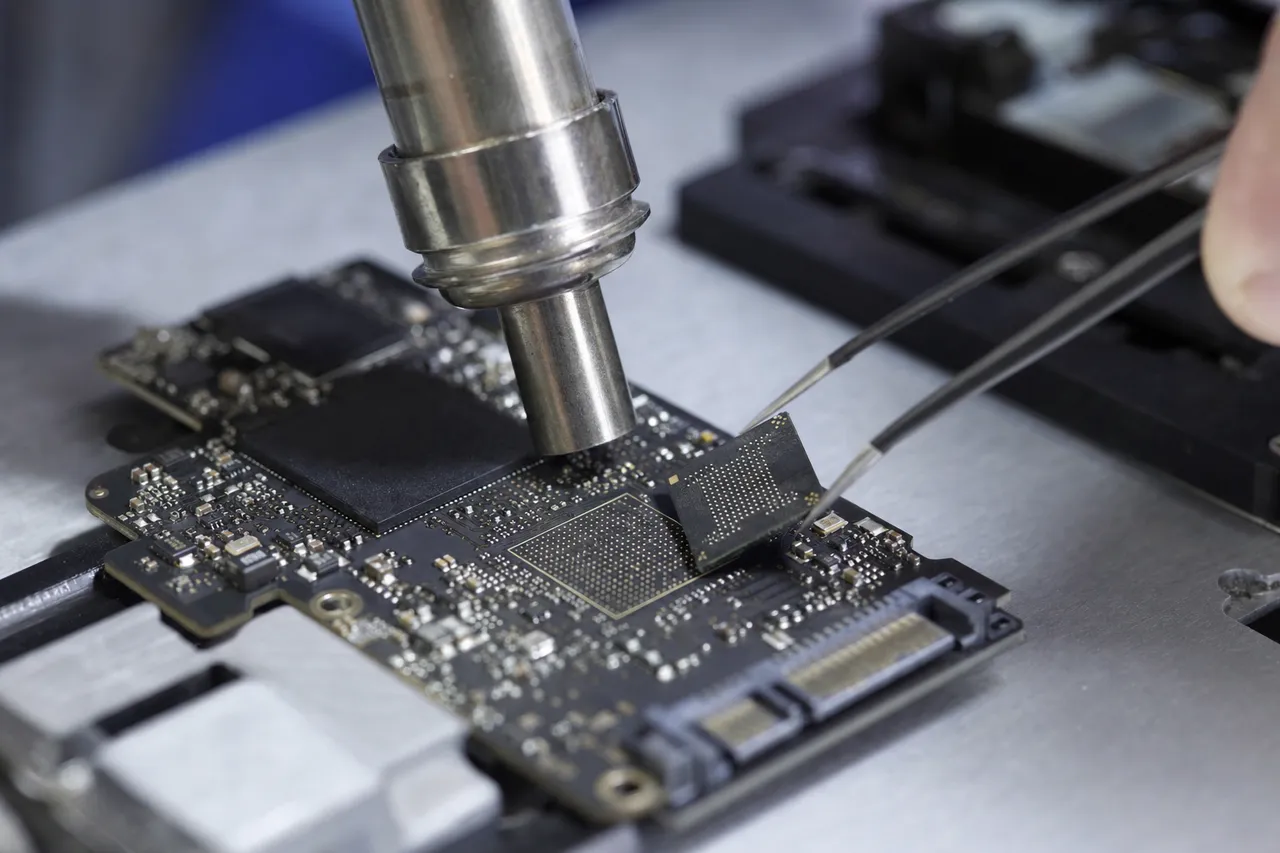
Technician performing chip-off NAND extraction on a failed solid state drive circuit board with precision tools
Chip-off NAND extraction: the failed controller is bypassed and the raw flash is read directly.
I've been recovering data from failed SSDs since founding MDRepairs, and the most important thing I tell every customer is: your data is almost certainly still there. In the vast majority of cases, a dead SSD or a failed SSD has suffered a controller or firmware failure - the NAND flash chips that store your files are physically intact.
Joseph Montanti, Founder & Lead Technician
  • Logical Deleted files, formatted partitions, corrupted file systems.
  • Firmware & Controller SSD not detected, wrong capacity, read-only state, busy state.
  • NAND-Level Cell degradation, uncorrectable bit errors, wear-out failure.

SSD failures are categorized into three types: logical (deleted files, formatted partitions, corrupted file systems), firmware and controller (SSD not detected, wrong capacity, read-only state, busy state), and NAND-level (cell degradation, uncorrectable bit errors, wear-out failure). The recovery approach depends entirely on which layer has failed - and attempting the wrong approach can make data permanently unrecoverable, especially on drives with TRIM enabled.

SSD data recovery success rates are highest for controller and firmware failures - which represent the majority of cases we handle - because NAND flash chips almost always survive intact even when the controller dies. For these failure types, our lab consistently achieves successful recoveries using PC-3000 SSD diagnostics and chip-off NAND extraction.

Call 732-933-7717 $100 diagnostic, credited toward recovery - no data, no charge.
Anatomy

Inside an SSD: Components That Fail

Understanding the internal architecture of a solid state drive explains why SSD failures are fundamentally different from hard drive failures - and why recovery requires entirely different tools and techniques.

  • NAND Flash Memory

    The storage chips where your data physically lives. NAND cells hold electrical charges representing your data. When cells wear out or develop uncorrectable bit errors, data becomes inaccessible - requiring chip-off extraction to read the raw flash contents directly.

  • Controller

    The processor that manages all SSD operations - wear leveling, garbage collection, TRIM, error correction, and the Flash Translation Layer (FTL) that maps logical addresses to physical NAND locations. Controller death is the most common SSD failure and the most complex to recover from.

  • DRAM Cache

    Stores the Flash Translation Layer (FTL) mapping table that tells the controller where every piece of data is physically stored across the NAND chips. If the DRAM loses power before syncing to NAND, the mapping table can become corrupted - causing the SSD to appear empty or undetected.

  • PCB & Interface

    The circuit board connecting the controller to your computer via SATA, NVMe (PCIe), or USB. Power surges and electrical damage can fry the interface circuitry while leaving NAND chips intact - making chip-off extraction the recovery path. SATA and NVMe interfaces require different diagnostic approaches.

  • Firmware & FTL

    The internal software managing wear leveling, garbage collection, bad block management, and the critical Flash Translation Layer. FTL corruption means the controller can no longer locate your data across the NAND chips - the data exists but the map to find it is destroyed. PC-3000 SSD tools can reconstruct these tables.

  • Power Loss Protection Capacitors

    Enterprise and high-end consumer SSDs include capacitors that provide enough power during unexpected shutdown to flush cached data from DRAM to NAND. Budget SSDs lack this protection - making them vulnerable to FTL corruption and partial write failures from sudden power loss.

Call 732-933-7717 Electronic diagnostics, firmware repair & chip-off NAND extraction.
Identify Your Problem

What's Happening to Your SSD?

SSD failures present differently than hard drive failures - there's no clicking or beeping because there are no moving parts. Here are the most common symptoms and what they indicate about the underlying failure.

Call 732-933-7717
  • SSD Not Detected / Not Showing Up

    Your computer doesn't see the SSD at all - the SSD is not showing up in BIOS, not recognized in Disk Management, or invisible in Device Manager. Whether your SSD is not showing up in BIOS after a power event or simply not recognized by Windows, this typically indicates controller failure, dead PCB components, or complete firmware corruption. The NAND chips almost certainly still contain your data.

    Professional recovery required
  • SSD Shows Wrong Capacity

    Your 1TB SSD reports as 0MB, 8MB, or some other incorrect size. This is a telltale sign of firmware corruption - the controller has lost its configuration tables and has reverted to a raw or factory state. Data is intact but the SSD has lost the ability to present it.

    Firmware-level repair needed
  • SSD Read-Only or Write-Protected

    The SSD is detected and data is visible, but you cannot write new data or delete files. The controller has entered a fail-safe mode because NAND cells have exceeded their endurance threshold. Your data is currently accessible but the SSD is dying - back up immediately before the controller locks further.

    Back up now, recovery if locked
  • SSD Suddenly Dead After Power Event

    Power surge, lightning strike, plugged into a bad USB hub, or laptop battery died during write - now the SSD is completely unresponsive. Electrical damage typically destroys controller or interface circuitry while NAND chips survive intact. This is one of the most recoverable SSD failure types.

    Chip-off likely needed
  • Blue Screen Crashes & Freezing

    Frequent BSODs with storage-related errors (KERNEL_DATA_INPAGE_ERROR, CRITICAL_PROCESS_DIED, PAGE_FAULT_IN_NONPAGED_AREA), random system freezes, or applications crashing during disk operations. The SSD's NAND is developing uncorrectable read errors that the controller's ECC engine cannot fix.

    Degradation in progress
  • Disappearing Files or Corrupted Data

    Files randomly vanish, open as garbled data, or folders appear empty despite showing used space. This indicates FTL mapping table corruption, NAND cell degradation, or TRIM-related data destruction. Stop using the SSD immediately - every write operation can overwrite recoverable data.

    Stop use immediately

Recognize your SSD's symptoms? Don't keep powering it on - every attempt can overwrite recoverable data. Get a free quote, or call 732-933-7717 to speak with a technician.

Understanding the Problem

Types of SSD Failures We Recover

SSD failures are categorized by which layer of the drive architecture has failed. Each failure type requires a different recovery approach, different tools, and different levels of expertise.

732-933-7717
  • Hardware

    Controller Death

    The controller chip - the SSD's processor - has failed completely. The drive is not detected by any computer. This is the most common SSD failure. Recovery requires either replacing the controller with an identical model (rare and risky) or chip-off NAND extraction where each flash chip is physically removed, read on dedicated hardware, and the data reconstructed from raw dumps using the original controller's algorithms.

  • Firmware

    FTL (Flash Translation Layer) Corruption

    The mapping table that translates logical block addresses to physical NAND locations has become corrupted - typically from unexpected power loss on SSDs without power loss protection capacitors. The SSD may show 0 bytes capacity, wrong model name, or enter an infinite busy loop. PC-3000 SSD can rebuild FTL tables from redundant metadata scattered across the NAND.

  • Hardware

    Power Surge Damage

    Electrical spikes from lightning, faulty power supplies, or bad USB hubs destroy voltage regulators, controller circuitry, or interface components on the SSD's PCB. NAND flash chips are remarkably resilient to power surges because they store data as trapped electrical charges in insulated cells. Even when the PCB is visibly burned, chip-off extraction typically recovers the data from intact NAND.

  • Firmware

    Bad Block Management Failure

    Every SSD tracks worn-out and defective NAND blocks in a bad block table. When this table corrupts or overflows, the controller can no longer safely map data around bad blocks and may lock the drive into a read-only or unresponsive state. Firmware-level repair involves rebuilding these tables using vendor-specific PC-3000 SSD protocols.

  • Hardware

    Interface Failure

    The SATA or NVMe interface circuitry has failed while the controller and NAND remain functional. Common on M.2 drives that experience socket damage from improper installation or on SSDs in MacBooks with proprietary connectors. Recovery may involve PCB-level repair or chip-off extraction depending on the extent of the damage.

  • Logical

    Deleted Files & Formatting

    Trying to recover deleted files from an SSD is more challenging than from a hard drive because of TRIM. When TRIM is enabled (default on all modern operating systems), the OS tells the SSD to erase deleted file blocks in the background - making those blocks permanently unrecoverable. Recovery success depends entirely on whether TRIM has already executed. If you need to recover deleted files from an SSD or recover data after formatting, act immediately and do not continue using the drive.

  • Firmware

    NAND Wear-Out & Cell Degradation

    Every NAND flash cell has a finite number of program/erase (P/E) cycles - TLC cells endure roughly 1,000-3,000 cycles, QLC around 500-1,000. As cells degrade, the SSD's internal ECC (error correction code) compensates until errors exceed the correction threshold. At that point, data becomes unreadable through normal channels. Chip-off extraction with advanced ECC reconstruction can often recover data that the controller has given up on.

  • Hardware

    Encryption Complications

    Most modern SSDs use hardware AES-256 encryption - all data written to NAND is encrypted by the controller using a key stored in a secure area. If the controller dies, the encryption key dies with it unless it can be preserved. Samsung SSDs and Apple T2/M-series MacBook drives are particularly affected. We also recover data from BitLocker-encrypted and FileVault-encrypted SSDs where the software encryption layer adds additional complexity on top of hardware encryption. Recovery must work through the original controller path to maintain the encryption chain.

  • Hardware

    Water & Liquid Damage

    Spilled liquid, flood damage, or humidity exposure can corrode SSD PCB components, short-circuit the controller, or damage the interface connector - but NAND flash chips are remarkably resilient to liquid exposure because data is stored as trapped electrical charges inside sealed silicon cells. Even SSDs submerged in water can often be recovered through chip-off extraction after the NAND packages are cleaned and dried. Do not power on a water-damaged SSD - corrosion accelerates when electricity flows through wet circuitry.

  • Hardware

    Overheating & Thermal Failure

    Sustained high temperatures cause NAND flash cells to lose charge retention faster, controller throttling to become permanent, and solder joints on BGA packages to develop micro-fractures. NVMe drives in poorly ventilated laptops and gaming PCs are especially vulnerable - the controller can reach 100C+ under sustained workloads. Thermal damage is cumulative and often presents as intermittent detection issues before complete failure. Recovery focuses on stabilizing the controller at reduced clock speeds to extract data before thermal shutdown.

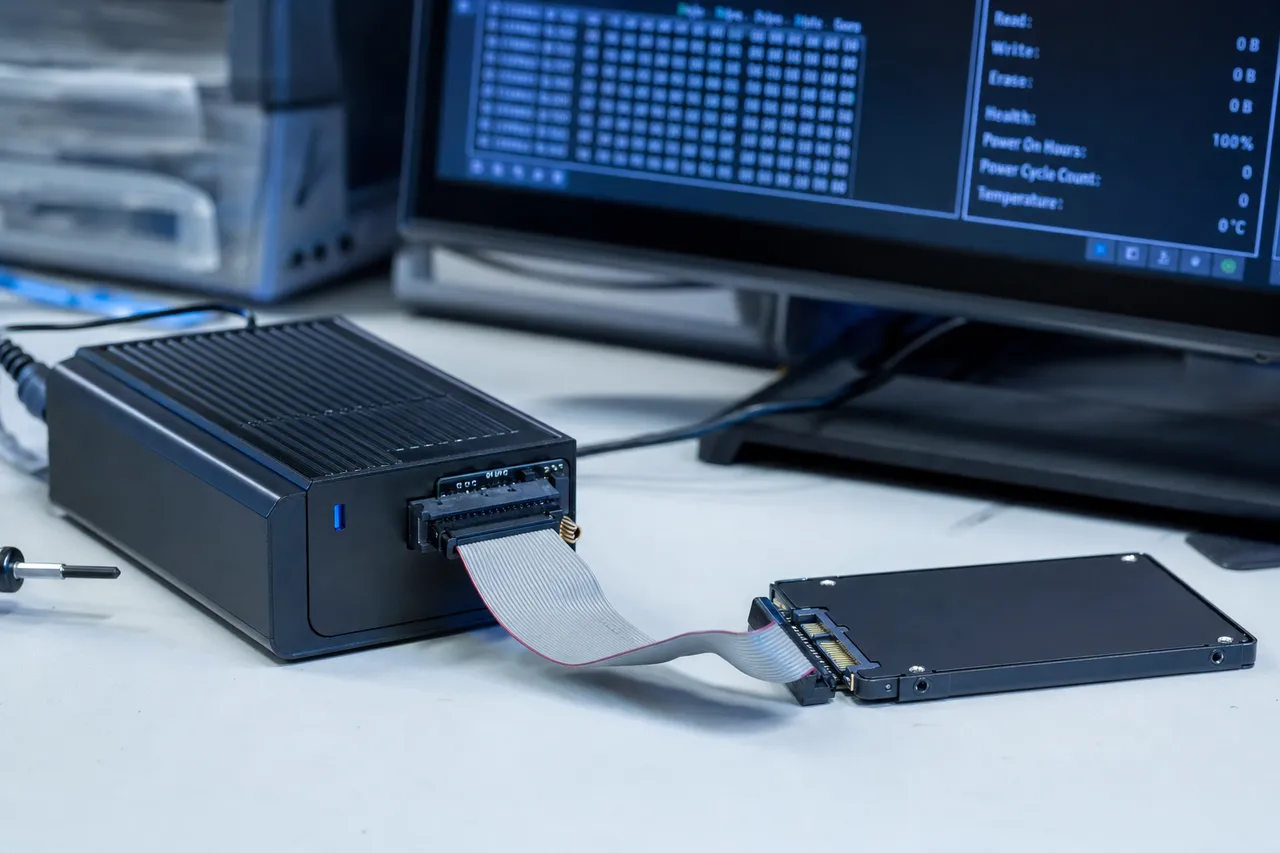
A solid state drive connected to a professional SSD firmware-recovery diagnostic device, with controller-level diagnostics on the monitor behind it
Controller-specific firmware recovery on a PC-3000 SSD bench - one platform per family.
Technical Deep Dive

Advanced Failure Modes by SSD Family

Different SSD controllers and NAND architectures fail in predictable, controller-specific ways. Our technicians maintain current expertise across every major SSD platform to maximize recovery success.

  • Samsung Elpis & Phoenix Controllers: Encryption Lock

    Samsung 870 EVO, 980 PRO, and 990 PRO SSDs use Samsung's proprietary controllers with hardware AES-256 encryption enabled by default. When the controller fails, the encryption key becomes inaccessible - making chip-off extraction useless without first recovering the key from the controller's secure storage. PC-3000 SSD Samsung modules can extract the encryption metadata needed to decrypt the NAND contents after chip-off. See our guides on Samsung 860 EVO recovery and SATAFIRM S11 firmware failures for model-specific details.

  • Phison Controllers: Scattered FTL Architecture

    Phison E12, E16, and E18 controllers (used in Sabrent Rocket, Corsair MP600, Kingston KC3000, and many other brands) distribute FTL metadata across multiple NAND chips in a proprietary pattern. When the FTL corrupts, reconstruction requires understanding Phison's specific interleaving algorithm and metadata layout. PC-3000 SSD's Phison module handles this, but chip-off cases require manual NAND dump assembly following Phison's page layout.

  • Silicon Motion Controllers: Sudden Death Syndrome

    Silicon Motion SM2259, SM2262, and SM2263 controllers (used in Crucial MX500, ADATA, Team Group, and many budget SSDs) are known for sudden complete failure without warning - the SSD transitions from working perfectly to completely dead in a single power cycle. Recovery typically requires chip-off extraction because the controller failure is catastrophic and non-repairable.

  • SandForce Controllers: Compression Complications

    Older SSDs using SandForce SF-2281 controllers (Kingston SSDNow, OCZ Vertex, many 2012-2016 era SSDs) used real-time data compression before writing to NAND. This means raw NAND dumps must be decompressed using SandForce's proprietary algorithm during chip-off recovery - without this decompression step, the recovered data appears as random noise.

  • Apple T2 & M-Series: Soldered Encrypted Storage

    MacBook Pro, MacBook Air, and Mac mini models from 2018 onward use Apple's T2 or M-series chips with soldered NAND storage that is hardware-encrypted to the specific security chip. MacBook data recovery for these models requires repairing the logic board at the component level to restore the original encryption chain - chip-off extraction alone cannot recover the data because the NAND contents are encrypted and the key is locked to the Apple silicon.

  • QLC NAND Drives: Endurance-Related Failures

    Budget SSDs using QLC (4 bits per cell) NAND - including Samsung 870 QVO, Crucial P3, and Intel QLC drives - store more data per cell at the cost of dramatically lower endurance. QLC cells endure roughly 500-1,000 write cycles versus 3,000+ for TLC. These drives fail earlier from cell degradation, and the narrower voltage margins make data reconstruction from degraded cells significantly more difficult during chip-off recovery.

Brand Expertise

SSD Data Recovery Service by Manufacturer

We maintain controller-specific tooling and NAND reading capabilities for every major SSD manufacturer. Each brand uses different controllers, NAND architectures, and firmware implementations that require specialized knowledge for successful recovery.

732-933-7717
  • Most common in our lab

    Samsung SSD Data Recovery

    The most popular SSD brand globally and the most common in our lab. We recover data from the 860 EVO, 870 EVO, 870 QVO, 980, 980 PRO, 990 PRO, 990 EVO, T5, T7, and PM series enterprise drives. Samsung uses proprietary Elpis and Phoenix controllers with always-on AES-256 encryption, making controller failure recovery particularly challenging. Our PC-3000 SSD Samsung module can extract encryption metadata and reconstruct FTL tables specific to Samsung's firmware architecture. For catastrophic failures, our chip-off process preserves the encryption chain data needed to decrypt raw NAND contents.

    Samsung Recovery Details
  • Silicon Motion controllers

    Crucial / Micron SSD Data Recovery

    We recover data from the Crucial MX500, BX500, P1, P2, P3, P3 Plus, P5 Plus, T500, and Micron enterprise drives (5300, 7300, 7400 series). Crucial consumer SSDs primarily use Silicon Motion controllers, which are prone to sudden death failure - working perfectly one moment and completely dead the next. The MX500 is one of our most frequently recovered SSDs. Micron enterprise drives use proprietary controllers with different firmware and recovery procedures. PC-3000 SSD has dedicated modules for both Silicon Motion and Micron controller architectures.

    Crucial Recovery Details
  • We recover data from WD Blue SN570, SN580, WD Black SN770, SN850X, WD Green, WD Red SA500, My Passport SSD, and legacy SanDisk models (Ultra, Extreme, Extreme PRO, SSD Plus). Western Digital acquired SanDisk in 2016 and uses a mix of in-house and SanDisk-derived controllers. WD NVMe drives use proprietary controllers that require WD-specific PC-3000 SSD modules. SanDisk portable SSDs (Extreme, Extreme PRO) are popular for photography and videography - failures from drops and cable damage are common.

    WD / SanDisk Recovery Details
  • Multiple third-party controllers

    Kingston SSD Data Recovery

    We recover data from Kingston A400, A2000, KC3000, NV1, NV2, FURY Renegade, and legacy HyperX models. Kingston uses a variety of third-party controllers - Phison, Silicon Motion, and historically SandForce - depending on the specific model and production run. This means the same model number can use different controllers in different batches, requiring careful identification before recovery. Our PC-3000 SSD platform covers all controller variants used across Kingston's lineup.

    Kingston Recovery Details
  • PCIe / M.2 / U.2

    NVMe & M.2 SSD Data Recovery

    We provide M.2 SSD data recovery and NVMe data recovery for all solid state drives regardless of brand - M.2 2280, M.2 2230 (Steam Deck, Surface, compact laptops), and U.2 enterprise form factors. NVMe drives operate over the PCIe bus rather than SATA, requiring PCIe-specific diagnostic tools and interface hardware. Popular NVMe drives we recover include Samsung 980/990 PRO, WD Black SN850X, Sabrent Rocket, Corsair MP600, Kingston KC3000, SK Hynix P41, and Intel 670p/680p. NVMe failures from BIOS updates, secure erase gone wrong, and PCIe lane negotiation errors require specialized firmware-level intervention.

    NVMe Recovery Details
  • Intel, SK Hynix, Sabrent & more

    Other SSD Brands

    We also recover data from Intel SSDs (660p, 670p, 680p, Optane, DC series), SK Hynix (P31 Gold, P41 Platinum), Sabrent (Rocket, Rocket Q, Rocket 4 Plus), Corsair (Force, MP series), ADATA (SU800, XPG), PNY, Team Group, Transcend, Lexar, and enterprise drives from Seagate (Nytro), Kioxia (Exceria), and HPE. Regardless of brand, every SSD recovery starts with identifying the specific controller and NAND configuration to determine the optimal recovery path.

Know When to Stop

DIY Recovery vs. Professional SSD Data Recovery

If you're wondering how to recover data from a failed SSD, some scenarios can be handled at home with software while others require professional lab work. Unlike hard drives, there is no middle ground - if the SSD's controller or firmware has failed, no software can help.

Safe to Try at Home

Only attempt these if your SSD is still detected in BIOS and Disk Management, you accidentally deleted files or formatted the drive, or the file system shows as RAW. SMART status should show no critical errors.

  • Try a different cable, port, or enclosure. M.2 adapters, USB enclosures, and SATA cables fail more often than SSDs. Test with a known-good connection before assuming the SSD is dead.
  • Check BIOS/UEFI before booting the OS. If the SSD appears in BIOS but not in Windows, the issue may be a driver, partition, or file system problem - not hardware failure.
  • Use read-only recovery software on a detected SSD. If the SSD is recognized, tools like R-Studio, PhotoRec, or Disk Drill can scan for recoverable files. Success depends heavily on whether TRIM has already erased deleted blocks.
  • Check SMART data with CrystalDiskInfo. Look at "Percentage Used" (wear indicator), "Reallocated NAND Block Count," and "Uncorrectable Error Count." Rising errors mean the SSD is degrading - back up immediately.

Do Not Do This

  • Do not run TRIM manually or use disk optimization. Windows "Optimize Drives" sends TRIM commands to SSDs, permanently erasing deleted file blocks. Disable automatic optimization on any SSD you're trying to recover data from.
  • Do not attempt a firmware update on a failing SSD. Firmware updates on a degraded SSD frequently brick the drive completely, converting a potentially recoverable situation into a chip-off case that costs 2-3x more.
  • Do not run Secure Erase or factory reset. These commands instruct the SSD controller to cryptographically erase the encryption key, rendering all NAND contents permanently unrecoverable - even with chip-off extraction.
  • Do not continue using the SSD after data loss. SSDs don't just overwrite deleted data during new writes - they also run garbage collection and wear leveling in the background, which can destroy recoverable data even when you're not actively writing files.

Stop - Call a Professional

If your SSD is not detected in BIOS, shows wrong capacity (0MB, 8MB), is locked in read-only mode, was damaged by power surge, liquid, or physical impact, failed after a firmware update or secure erase, is from a MacBook with T2/M-series chip, or SMART reports high uncorrectable errors - no software can help. The failure is at the controller, firmware, or hardware level, and recovery requires specialized tools like PC-3000 SSD or physical chip-off extraction.

(732) 933-7717
Critical Concept

Does TRIM Permanently Erase Deleted Files?

Yes - once TRIM executes, deleted files are gone for good: the controller physically resets the flash blocks, and no software or lab can read what no longer exists. On a modern OS that window is seconds to minutes. But TRIM only touches deleted or formatted files on a WORKING drive - a failed controller never executes it, so a dead SSD's data survives untouched.

TRIM is the single most important factor that separates SSD data recovery from hard drive data recovery - and understanding it can save your data.

On a traditional hard drive, deleting a file only removes the pointer to it - the actual data remains on the platters until something new overwrites it. This is why hard drive data recovery after deletion is typically straightforward and successful.

SSDs work differently. Because flash memory must erase an entire block before it can write new data to any page within that block, SSDs use a background process called garbage collection to pre-erase blocks that no longer contain valid data. TRIM is the command that the operating system sends to the SSD telling it which blocks are no longer in use - giving the controller permission to erase them during idle time.

On Windows 7 and later, macOS 10.10.4 and later, and all modern Linux distributions, TRIM is enabled by default. When you delete a file, the OS sends a TRIM command within seconds to minutes. Once the SSD's controller executes that TRIM command and garbage collection erases the blocks, the data is permanently and irrecoverably gone - no software, no chip-off extraction, and no lab in the world can recover it.

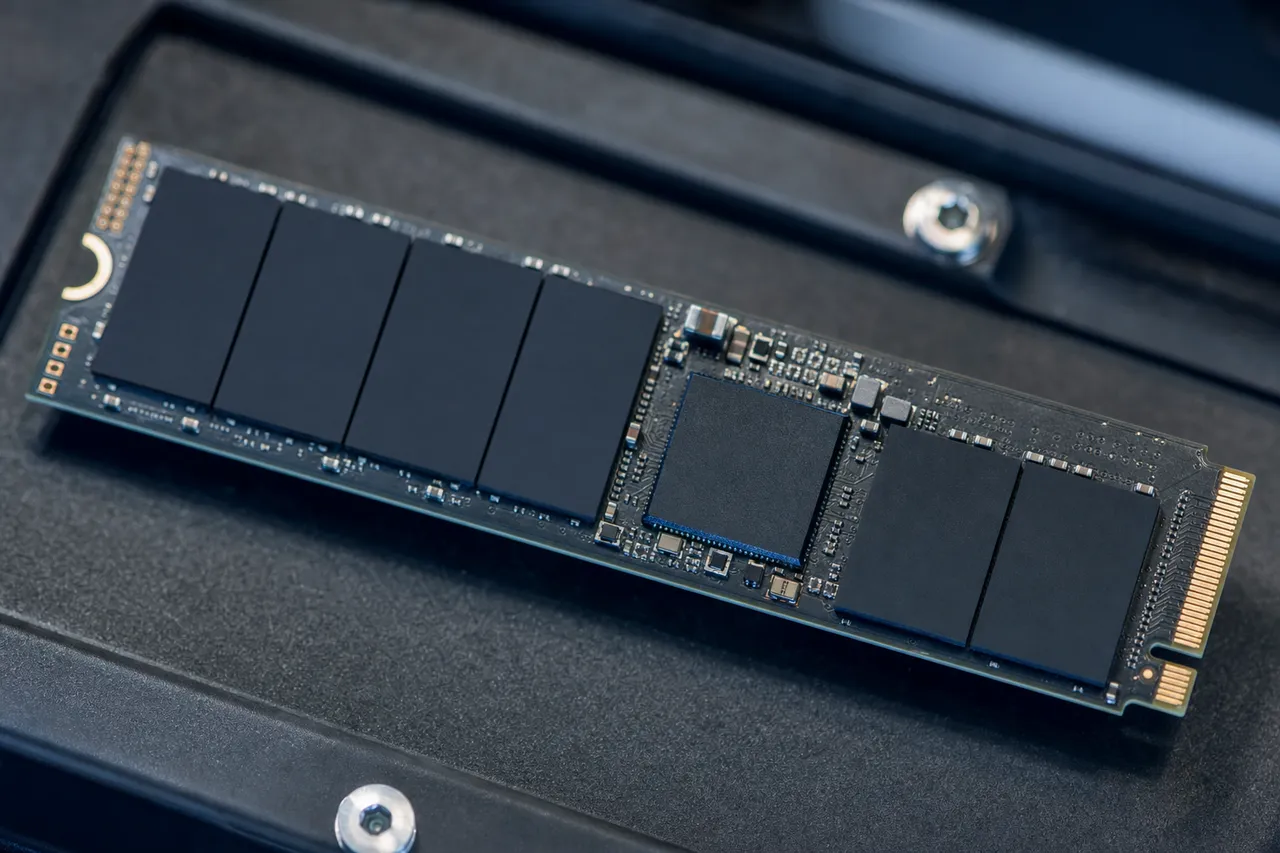
Macro view of the NAND flash memory chips and controller inside an opened M.2 NVMe solid state drive
Your files physically live in these NAND flash chips - TRIM is the only thing that erases them.

Hard drive

Deleted data lingers on the platters until overwritten - recovery after deletion is usually straightforward.

Solid state drive

TRIM tells the controller which blocks to pre-erase during idle time - so deleted data can vanish in seconds.

SSD vs HDD

SSD Data Recovery vs. Hard Drive Data Recovery

Solid state drives and hard drives fail in fundamentally different ways, require different tools, and have different recovery success factors. Here's what you need to know.

732-933-7717

Hard Drive Recovery

Storage medium
Magnetic platters with mechanical read/write heads. Data persists magnetically regardless of power state.
Common failures
Clicking heads, seized motors, scratched platters, PCB damage. Failures are audible and progressive.
Recovery approach
Physical component replacement (head swaps, motor transplants) on a clean bench, then sector-level imaging with PC-3000.
Deleted file recovery
Highly successful - data remains on platters until physically overwritten by new data. No TRIM equivalent exists.
Encryption
Rarely hardware-encrypted (except WD My Passport). Most drives store data unencrypted on platters.

SSD Recovery

Storage medium
NAND flash memory chips with electronic controller. Data is stored as trapped electrical charges.
Common failures
Controller death, firmware corruption, NAND wear-out, power surge damage. Failures are silent and often instantaneous.
Recovery approach
Firmware repair via PC-3000 SSD, or chip-off NAND extraction where chips are physically desoldered and read on dedicated hardware.
Deleted file recovery
Challenging - TRIM erases deleted blocks within seconds to minutes. Recovery success depends entirely on whether TRIM has executed.
Encryption
Almost always hardware-encrypted. AES-256 is standard on modern SSDs, complicating any recovery that bypasses the controller.
Prevention

Early Signs Your SSD is Failing

SSDs can fail without warning, but many show subtle symptoms weeks or months before catastrophic failure. Recognizing these signs gives you time to back up your data.

  • Degrading Performance

    An SSD that was fast when new but has become noticeably slower - especially during writes - may be running out of healthy NAND blocks. The controller is spending more time on error correction and garbage collection as cells degrade.

  • SMART Wear Indicator Warnings

    CrystalDiskInfo or your SSD manufacturer's tool reports "Percentage Used" approaching 100%, increasing "Reallocated NAND Block Count," or declining "Available Spare" below threshold. These metrics indicate the SSD is running out of healthy storage cells.

  • Frequent Application Crashes

    Applications freezing or crashing during read/write operations, especially programs that work with large files (video editors, databases, virtual machines), indicate the SSD is producing read errors that the OS cannot handle gracefully.

  • File Corruption & Read Errors

    Opening a document, photo, or video and finding it corrupted - garbled text, broken images, unplayable media - means the NAND cells storing that file have developed uncorrectable bit errors. This problem only gets worse over time.

  • Boot Failures & BIOS Disappearance

    Your computer intermittently fails to boot or the SSD disappears from BIOS and reappears after power cycling. The controller is experiencing intermittent failures that will eventually become permanent. Back up your data immediately while the SSD is still accessible.

Experiencing any of these? Read our guide on recovering data from a dead SSD, call 732-933-7717, or get a free quote before the SSD fails completely.

Compatibility

Supported SSD Types & Form Factors

We recover data from every SSD form factor, interface, and protocol used in consumer and enterprise environments.

SATA SSDs (2.5-inch)
Samsung
860 EVO, 860 PRO, 870 EVO, 870 QVO, 850 EVO, 850 PRO, 840 EVO, 840 PRO.
Crucial / Micron
MX500, BX500, MX300, MX200, M550, Micron 5300, 5400 enterprise series.
Western Digital / SanDisk
WD Blue SATA, WD Green, WD Red SA500, SanDisk SSD Plus, Ultra 3D, SanDisk X600.
Kingston
A400, KC600, UV500, HyperX Savage, HyperX Fury.
Other SATA
Intel 545s, ADATA SU800, PNY CS900, Transcend SSD230, Team Group, Lexar NS100.
NVMe & M.2 SSD Data Recovery
Samsung NVMe
980, 980 PRO, 990 PRO, 990 EVO, 970 EVO Plus, 970 PRO, 960 EVO, PM9A1.
Western Digital NVMe
WD Black SN770, SN850X, SN770M (2230), WD Blue SN570, SN580, SN5000.
Crucial NVMe
P5 Plus, P3, P3 Plus, T500, T700, P2.
Other NVMe
Kingston KC3000, NV2, SK Hynix P41 Platinum, Sabrent Rocket, Corsair MP600, Intel 670p/680p, ADATA XPG.
External & Portable SSD Data Recovery
Samsung Portable
T5, T7, T7 Shield, T7 Touch, T9.
SanDisk / WD Portable
Extreme Portable SSD, Extreme PRO Portable, WD My Passport SSD.
Apple / MacBook SSDs
Apple proprietary SSD modules, T2/M-series integrated storage. MacBook recovery details
M.2 2230 (Compact)
Steam Deck, Microsoft Surface, Framework Laptop, Dell XPS compact SSDs - WD SN740, SN770M, Kioxia BG5.
Gaming Console SSDs
PS5 internal SSD, PS5 expansion NVMe, Xbox Series X/S internal storage, Steam Deck M.2 2230 SSD. We recover save files, game data, screenshots, and video captures from gaming console SSDs.
Enterprise & Server SSDs
Micron 5300/5400/7300/7400, Samsung PM series, Intel DC/Optane, Seagate Nytro, Kioxia PM6/PM7, HPE enterprise SSDs. We also handle SSD RAID arrays from servers and NAS devices.
mSATA
Legacy mSATA drives from older ultrabooks and embedded systems - Samsung 850 EVO mSATA, Crucial M500 mSATA, Intel 525.

Portable SSDs use the same NAND and controllers as internal models, just packaged in an external enclosure with a USB bridge chip. Sometimes the USB enclosure fails while the internal SSD is fine - we test for this during diagnostics before recommending a full recovery.

Talk to the engineer who does the chip-off work - not a call center.

Case Files

Real SSD Recovery Cases

Every recovery we perform is documented from intake through data delivery. Here are representative cases that illustrate the range of SSD failures we handle and the recovery methods we use.

  • CASE-001 RECOVERED
    100% recovered

    Samsung 870 EVO 1TB Controller Death

    Symptoms
    SSD stopped being detected overnight. Not visible in BIOS, Device Manager, or Disk Management. No prior warning signs - was working normally the day before.
    Diagnosis
    Samsung Elpis controller failed completely. PCB power rails and NAND chips tested healthy. Controller unable to initialize, preventing any access to the Flash Translation Layer and stored data.
    Recovery
    Performed chip-off extraction: desoldered four Samsung NAND packages using BGA rework station, read each chip on a dedicated NAND reader, extracted Samsung encryption metadata from controller secure storage area, decrypted and reassembled raw dumps using Samsung-specific FTL reconstruction algorithms.
    Result
    Complete recovery - all files, folders, and directory structure intact. Over 800GB of client photography work recovered.
  • CASE-002 RECOVERED
    98.4% recovered

    WD Black SN850X 2TB Power Surge Damage

    Symptoms
    Lightning strike caused power surge through gaming PC. SSD completely dead - not detected in BIOS. Visible burn marks on the M.2 connector end of the PCB.
    Diagnosis
    Surge destroyed voltage regulator ICs and the WD proprietary NVMe controller. NAND packages tested intact - flash cells retained their charge states. Encryption key located in controller OTP (one-time programmable) area needed extraction.
    Recovery
    Chip-off extraction of BiCS5 NAND packages. Recovered encryption key material from damaged controller using microprobe techniques. Decrypted and reconstructed 2TB of data from raw NAND dumps with WD-specific page layout and interleaving algorithms.
    Result
    98.4% recovery - game saves, personal documents, and 400GB of video recordings. Minor file loss in sectors where NAND had marginal pre-existing wear.
  • CASE-003 RECOVERED
    100% recovered

    Crucial MX500 500GB Firmware Corruption, 0MB Capacity

    Symptoms
    SSD detected in BIOS but reported 0MB capacity. Disk Management showed an uninitialized disk with 0 bytes. Customer had experienced an unexpected shutdown the previous day.
    Diagnosis
    Power loss during FTL metadata update corrupted the Silicon Motion SM2259 controller's mapping tables. The controller reverted to a factory-like state, losing all knowledge of where data was stored across the NAND.
    Recovery
    Used PC-3000 SSD Silicon Motion module to enter vendor mode, extracted raw FTL metadata from NAND system pages, rebuilt the translation table, and restored proper drive initialization. Full imaging completed without chip-off.
    Result
    100% recovery - all data including 300GB of RAW photography files with intact directory structure.
  • CASE-004 RECOVERED
    100% recovered

    Samsung 980 PRO 2TB Encryption Key Recovery

    Symptoms
    NVMe SSD intermittently disappeared from system, then stopped being detected entirely. Video editing workstation with active client projects and no recent backup.
    Diagnosis
    Samsung Elpis controller experiencing progressive failure - DRAM cache interface degrading. Controller entered safe mode but could not maintain stable communication. Hardware AES-256 encryption meant NAND contents were encrypted to this specific controller's key.
    Recovery
    Stabilized controller communication using PC-3000 SSD in safe mode at reduced clock speeds. Extracted encryption key material and FTL tables before controller failed completely. Completed full NAND image through the controller path, preserving encryption chain. No chip-off needed.
    Result
    100% recovery - 1.8TB of 4K ProRes video footage, After Effects project files, and client deliverables. All file permissions and metadata preserved.
  • CASE-005 RECOVERED
    100% recovered

    Kingston A2000 1TB Failed BIOS Update Brick

    Symptoms
    Customer attempted a firmware update through Kingston SSD Manager that interrupted during write. SSD became completely unresponsive - not detected by any system.
    Diagnosis
    Interrupted firmware write corrupted the Phison E12 controller's boot ROM. Controller unable to initialize, stuck in a pre-boot failure state. NAND contents intact but controller firmware partially overwritten.
    Recovery
    Used PC-3000 SSD Phison module to force the controller into factory mode, reflashed a clean firmware build matching the original version, then rebuilt FTL tables from NAND metadata. Controller restored to functional state with original data intact.
    Result
    100% recovery - Windows installation, applications, documents, and game library fully intact with original folder structure.
  • CASE-006 RECOVERED
    100% recovered

    SanDisk Extreme PRO Portable SSD Drop + USB Failure

    Symptoms
    Photographer dropped portable SSD on concrete at a wedding venue. USB-C connector physically damaged, SSD not detected on any computer or cable.
    Diagnosis
    Impact damaged the USB-C bridge board and cracked solder joints connecting the bridge chip to the internal NVMe SSD module. Internal NVMe SSD and NAND chips tested healthy - only the interface circuitry was damaged.
    Recovery
    Bypassed the damaged USB bridge entirely by removing the internal M.2 NVMe module and connecting it directly to PC-3000 SSD via a standard M.2 interface. Full imaging completed at native NVMe speeds.
    Result
    100% recovery - 1.2TB of wedding photos (RAW + JPEG) with complete folder structure and metadata. Delivered same week due to straightforward interface bypass.
Prevention

How to Prevent SSD Data Loss

SSDs are reliable, but they are not invincible. These practices significantly reduce your risk of catastrophic data loss from SSD failure.

  • Use a UPS or Surge Protector

    Power surges and unexpected shutdowns are the leading cause of SSD firmware corruption. A UPS (uninterruptible power supply) protects against both - and allows your SSD's power loss protection capacitors to safely flush cached data during a power event.

  • Follow the 3-2-1 Backup Rule

    Maintain three copies of important data on two different media types with one copy offsite. SSDs make excellent primary drives but should never be your only copy - controller failures are instantaneous and unpredictable. Use an external hard drive or cloud backup as your second copy.

  • Monitor SMART Health Data

    Check your SSD's SMART data monthly using CrystalDiskInfo (Windows) or DriveDx (Mac). Watch "Percentage Used" (should be well under 100%), "Reallocated NAND Block Count" (should be low or zero), and "Available Spare" (should be above threshold). Replace the SSD when wear indicators approach their limits. Our guide to checking drive health covers SSD-specific SMART attributes in detail.

  • Keep Firmware Updated (Carefully)

    Manufacturer firmware updates fix bugs and improve reliability - but only apply them when your system is stable and on reliable power. Never update firmware during a storm, on battery power, or on an SSD showing health warnings. A failed firmware update is one of the most common causes of complete SSD brick.

  • Don't Fill Your SSD Past 80%

    SSDs need free space for wear leveling, garbage collection, and overprovisioning. Running an SSD at near-full capacity forces the controller to work harder, accelerates NAND wear, and increases the risk of FTL table corruption. Keep at least 15-20% of capacity free at all times.

  • Avoid Cheap Power Supplies & USB Hubs

    Low-quality power supplies deliver dirty power with voltage spikes that damage SSD controllers over time. Budget USB hubs can also cause voltage irregularities for portable SSDs. Use a reputable PSU rated for your system's wattage and powered USB hubs for external SSDs.

Already experiencing symptoms? Call 732-933-7717 or get a free quote.

Questions & Answers

SSD Data Recovery FAQ

Straight answers on cost, turnaround, TRIM, chip-off, and how we get your data back from a failed SSD - drawn from the questions we hear every day.

  • SSD data recovery pricing depends on the failure type and recovery method required. Logical recovery (deleted files, formatting, corruption) on a functioning SSD ranges from $300 - $800. Firmware and controller-level recovery using PC-3000 SSD ranges from $799 - $1,500. Chip-off NAND extraction for catastrophic controller or board failure ranges from $999 - $2,500. Every case starts with a $100 diagnostic evaluation that is applied toward the recovery cost. Our no data, no charge guarantee means you only pay the diagnostic fee if we cannot recover your target files. Read our full SSD data recovery cost breakdown for detailed pricing by brand and failure scenario.
  • Yes - dead SSD recovery is one of our most common services. A dead SSD that is not detected by any computer has almost always failed at the controller or PCB level, not the NAND flash chips where your data is stored. The NAND cells retain their electrical charges (and your data) for years even without power. Recovery involves either repairing the controller path using PC-3000 SSD firmware tools, or performing chip-off extraction where the NAND chips are physically removed and read on dedicated hardware. The data is then reconstructed from raw NAND dumps using the controller's specific algorithms for wear leveling, interleaving, and error correction. Success rates for dead SSD recovery are high because NAND chip failure is rare - it's almost always the controller or interface that dies. Learn more in our guide on how to recover data from an SSD.
  • Yes - in most cases. The overwhelming majority of SSD failures happen at the controller or firmware level, and the NAND flash chips that actually hold your files survive intact. A failed SSD is recovered either by repairing the firmware path with PC-3000 SSD (the drive is placed into its controller's vendor service mode and the translation tables are rebuilt), or by chip-off extraction: physically removing the NAND chips, reading them directly, and reconstructing your files from the raw dumps. The genuinely unrecoverable cases are narrow - files deleted on a healthy drive after TRIM executed, a completed secure erase, or physically destroyed NAND. Everything else is worth a diagnostic: the $100 evaluation gives you a case-specific answer, and no data means no charge.
  • Yes. Once the operating system sends the TRIM command and the SSD's garbage collection erases the flagged blocks, those files are permanently gone - no software and no lab can bring them back, because the flash cells have been physically reset. On modern Windows, macOS, and Linux, TRIM fires within seconds to minutes of a deletion. Two important limits: TRIM only applies to deleted or formatted files on a drive whose controller still works, and it needs power and idle time to run. That is why the correct move after an accidental deletion is to cut power immediately - pull the cable or hold the power button (a normal shutdown gives TRIM one last pass) - and keep the drive off until it is evaluated. And if your SSD failed rather than files being deleted, TRIM is irrelevant: the dead controller never executed it, and your data is still sitting in the NAND.
  • Usually, yes. An SSD that no longer appears in BIOS or Disk Management has a controller or firmware problem, not a data problem - and recovery software cannot help, because no software can talk to a drive the computer can't see. In the lab, the drive is placed into its controller's vendor mode with PC-3000 SSD so the firmware and translation tables can be repaired, or the NAND chips are read directly by chip-off extraction when the controller is truly dead. Stop re-plugging the drive into different computers and cables - repeated power cycles can deepen firmware corruption. Send it in for the $100 diagnostic instead; if the files can't be recovered, you don't pay for the attempt.
  • It depends on what failed. If you accidentally deleted files and TRIM has already executed, those specific blocks are permanently erased and unrecoverable by any means. However, TRIM only affects deleted or formatted data. If your SSD has failed at the controller, firmware, or hardware level - which is the vast majority of SSD recovery cases we handle - TRIM is irrelevant because the controller stopped functioning before it could process any TRIM commands. Your data sits untouched in the NAND chips. For accidental deletion, your recovery window depends on how quickly you power off the SSD. TRIM executes within seconds to minutes on modern operating systems. If you act immediately (pull power, do not shut down cleanly), some or all of the deleted data may survive.
  • Turnaround depends on the recovery method. Logical recovery from a functioning SSD typically takes 1 - 3 business days of active work. Firmware repair via PC-3000 SSD takes 3 - 7 business days. Chip-off NAND extraction is the most time-intensive: desoldering and reading each chip takes 1 - 2 days, followed by 3 - 7 days for data reconstruction from raw NAND dumps depending on the controller complexity and number of chips. Total turnaround including free 2nd Day Air shipping both ways to our Lincroft, NJ lab via our nationwide mail-in program is typically 2 - 4 weeks for standard cases. Rush options are available: Priority Rush 5 - 7 days (+$250), Urgent Rush 1 - 2 days (+$500), Emergency Same-Day (+$1,000).
  • An SSD showing 0 bytes, 0MB, or 8MB capacity in Disk Management has experienced firmware corruption - specifically, the controller has lost its configuration tables that define the drive's capacity and geometry. This is extremely common on SSDs using Silicon Motion controllers (Crucial MX500, many Kingston, ADATA, and budget SSD brands) and often occurs after unexpected power loss. The good news: this is one of the most recoverable SSD failure types. Your data is completely intact in the NAND chips - the controller has simply lost the metadata that tells it how much storage it has and where data is mapped. PC-3000 SSD can enter the controller's vendor mode, access the raw firmware area, rebuild the configuration and FTL tables, and restore proper drive initialization - often without requiring chip-off extraction at all.
  • Recovery depends on the format type and whether TRIM has executed. A quick format only erases the file system metadata (partition table, directory entries) - data blocks remain in NAND. However, the OS immediately sends TRIM commands for all blocks marked as free after formatting. If the SSD's garbage collection has already erased those blocks, the data is gone. A full format on Windows 10+ writes zeros to every sector AND triggers TRIM - making recovery extremely difficult. A secure erase destroys the encryption key, rendering all NAND contents permanently unrecoverable. For the best recovery chance after accidental formatting: immediately power off the SSD (pull the power, do not shut down cleanly), do not reconnect it to any computer, and contact our lab. The faster you act, the less data TRIM and garbage collection have destroyed.
  • Chip-off recovery is the process of physically removing NAND flash memory chips from an SSD's circuit board and reading them directly on specialized hardware, bypassing the failed controller entirely. The process involves: desoldering each NAND BGA (ball grid array) package using a precision rework station at controlled temperatures to avoid damaging the flash cells, cleaning and reballing the chip pads, reading each chip on a dedicated NAND reader that communicates directly with the flash memory, then reconstructing your data from the raw NAND dumps using the original controller's specific algorithms for page layout, interleaving, ECC (error correction), scrambling, and wear leveling. Chip-off is the recovery method of last resort - used when the controller is dead and cannot be repaired. It requires knowledge of the specific controller's data layout, which varies between Samsung, Phison, Silicon Motion, Marvell, and other controller manufacturers.
  • For basic logical recovery on a functioning SSD (deleted files, formatting), some competent shops can help using consumer software. For any controller, firmware, or hardware failure - SSD not detected, wrong capacity, dead after power surge - local shops and Geek Squad cannot perform recovery in-house. They lack PC-3000 SSD modules, chip-off desoldering equipment, NAND readers, and the controller-specific knowledge needed for firmware repair or raw NAND data reconstruction. They typically accept your SSD and ship it to a third-party lab at markup. Questions to ask any recovery provider: Do you have PC-3000 SSD? Can you perform chip-off NAND extraction in-house? Do you have Samsung/Phison/Silicon Motion specific modules? Ship directly to a specialized lab like MDRepairs through our mail-in program.
  • Yes. If we cannot recover your target files, there is zero charge for the recovery attempt - you only pay the $100 diagnostic fee. We never charge for unsuccessful recovery work. Before beginning any recovery, we provide a detailed quote with our honest assessment of recovery likelihood and the specific failures identified. You decide whether to proceed. Before delivering recovered data, we provide a complete file listing so you can verify that your important files were recovered before approving payment. This guarantee applies to all SSD recovery types - logical, firmware, controller, and chip-off - at our Lincroft, NJ lab.
  • Yes, with important caveats. Most modern SSDs - including all Samsung, Crucial, and WD models - use always-on hardware AES-256 encryption. The controller automatically encrypts all data written to NAND using a key stored in a secure area of the controller. For firmware-level recovery where the controller is still partially functional, PC-3000 SSD can extract data through the controller path, preserving the encryption chain transparently. For chip-off extraction, we must first recover the encryption key material from the controller before reading the NAND - without the key, raw NAND dumps are encrypted gibberish. This is possible on most controllers but adds complexity. The exception is Apple T2/M-series MacBook storage - the encryption key is bound to the Apple silicon chip, and recovery requires repairing the logic board to access data through the original security chain.
  • We recover data from every SSD manufacturer: Samsung (860/870 EVO, 970/980/990 PRO, T5/T7/T9 portable), Crucial/Micron (MX500, BX500, P3/P5 Plus, T500/T700), Western Digital/SanDisk (Blue, Black, Green, Red, Extreme Portable), Kingston (A400, A2000, KC3000, NV2, FURY), Intel (660p, 670p, 680p, Optane, DC enterprise), SK Hynix (P31 Gold, P41 Platinum), Sabrent (Rocket, Rocket Q), Corsair (Force, MP series), ADATA (SU800, XPG), PNY, Team Group, Transcend, Lexar, Kioxia, and enterprise drives from Seagate (Nytro) and HPE. We maintain controller-specific PC-3000 SSD modules for Samsung, Phison, Silicon Motion, Marvell, SanDisk/WD, and Intel architectures, plus chip-off capabilities for all NAND flash types (TLC, QLC, SLC, MLC).
  • Several factors make SSD recovery more complex than hard drive recovery. First, SSDs use hardware encryption by default - data in the NAND chips is encrypted, so bypassing the controller means dealing with encryption. Hard drives store data unencrypted on platters. Second, SSDs scatter data across multiple NAND chips using complex interleaving, wear leveling, and garbage collection algorithms that vary by controller manufacturer - reconstructing data from raw NAND dumps requires reverse-engineering these controller-specific algorithms. Third, TRIM actively erases deleted data, closing the recovery window for deletion cases. Fourth, SSD controllers are proprietary and failure modes vary dramatically between Samsung, Phison, Silicon Motion, and other manufacturers - there's no universal approach. Despite these challenges, professional SSD recovery success rates are high for controller and firmware failures because NAND flash chips are remarkably durable and retain data independently of the controller.
  • The recovery approach differs primarily at the interface and controller level. SATA SSDs (2.5-inch form factor) communicate over the SATA III protocol at up to 550 MB/s. They typically use Silicon Motion, Phison, or Marvell controllers. PC-3000 SSD connects via SATA and has mature, well-documented modules for all major SATA controllers. NVMe SSDs (M.2 2280, M.2 2230, U.2 form factors) communicate over PCIe lanes at up to 7,000+ MB/s. They use Samsung Elpis, Phison E18/E26, WD proprietary, or other PCIe-optimized controllers. NVMe recovery requires PCIe interface hardware and controller-specific modules. Chip-off extraction procedures are similar for both, but NVMe drives often use newer NAND generations with different page sizes and ECC requirements. Our lab handles both - PC-3000 SSD with SATA and NVMe interfaces, plus chip-off for all form factors.
  • Chip-off extraction - which involves desoldering NAND chips - is physically irreversible and would void any remaining warranty. However, firmware-level recovery through PC-3000 SSD is non-destructive and does not modify the drive in any way that would be detectable. More importantly, the Magnuson-Moss Warranty Act (15 U.S.C. 2302) prohibits manufacturers from voiding warranties solely because an independent service provider performed work. In practice, most failed SSDs are either out of warranty already or the warranty only covers hardware replacement - manufacturers send a new blank drive and do not recover your data. If your SSD has failed and you need the data, professional recovery is the only option regardless of warranty status. Your data is worth more than a replacement drive.
  • The single most effective prevention is maintaining current backups - because SSD failures are often instantaneous with zero warning. Use a UPS or surge protector to prevent the #1 cause of SSD firmware corruption (power events). Monitor SMART health data monthly using CrystalDiskInfo - watch "Percentage Used," "Reallocated NAND Block Count," and "Media Wearout Indicator." Keep your SSD below 80% capacity to maintain healthy wear leveling and overprovisioning. Apply firmware updates only on stable power. Avoid cheap power supplies and USB hubs that deliver dirty voltage. For mission-critical data, follow the 3-2-1 backup rule: three copies on two different media types with one copy offsite. An SSD can die without warning - a backup is the only guarantee. Read our complete data loss prevention guide.
  • MacBook SSD recovery depends on the model year. Pre-2018 MacBooks use removable proprietary SSD modules that can be extracted and connected to PC-3000 SSD using Apple-specific adapters. 2018 and later MacBooks with T2 or M-series chips use soldered NAND storage that is hardware-encrypted to the specific security chip on the logic board. Recovery for T2/M-series models requires repairing the logic board at the component level to restore the encryption chain - the data cannot be accessed by removing chips because the encryption key is bound to the Apple silicon. MDRepairs is one of the few labs that performs T2/M-series MacBook board-level recovery in-house.
  • Step 1: Stop using it immediately. Do not attempt to reinstall the OS, run diagnostics, update firmware, or power cycle repeatedly. Each action risks triggering TRIM, garbage collection, or further firmware corruption. Step 2: Do not run Secure Erase or any disk utility. These can permanently destroy data. Step 3: Note your SSD brand, model, and capacity - this helps us prepare the correct diagnostic tools before your SSD arrives. Step 4: Contact MDRepairs. Call 732-933-7717 or request a free quote. We'll provide a prepaid insured shipping label. Step 5: Pack and ship. Place the SSD in an anti-static bag, wrap in bubble wrap, and ship using the provided label. Your SSD arrives at our Lincroft, NJ lab within 2 - 3 business days and we begin diagnostics immediately.
  • Success rates vary significantly by failure type. Controller failures on SSDs without hardware encryption: very high success rate - NAND chips are almost always intact. Firmware corruption (0MB capacity, wrong model): high success rate - PC-3000 SSD can typically rebuild FTL tables without chip-off. Controller failures on encrypted SSDs (Samsung, Apple): high success rate when encryption key is recoverable, lower when it's not. NAND wear-out with uncorrectable ECC errors: variable - depends on degradation severity. Deleted file recovery with TRIM enabled: low success rate if TRIM has already executed. We don't publish an inflated blanket success number because it would be misleading. Instead, the $100 diagnostic gives you an honest, case-specific assessment of what's recoverable before you commit to paying for the full recovery.
  • Often yes. We regularly receive SSDs declared unrecoverable by other labs and successfully recover the data. Common reasons other labs fail: they lack PC-3000 SSD modules for the specific controller (Samsung Elpis, Phison E18, WD proprietary), they don't have chip-off capability for BGA NAND desoldering and reading, they lack the controller-specific algorithms needed for raw NAND data reconstruction, or they attempted a firmware update that made the situation worse. SSD recovery is a niche specialization - many labs that excel at hard drive head swaps have minimal SSD capability. Send it for a free quote - our $100 diagnostic tells us exactly what's possible and what recovery method is needed.
  • NAND flash cells retain data without power for years under normal conditions - the industry specification is 1 year at 30°C for consumer SSDs and 3 months at 40°C for enterprise drives. In practice, consumer SSDs retain data for much longer - especially TLC and MLC NAND. However, heavily worn NAND cells with many P/E cycles have reduced charge retention. An SSD that was already near end-of-life when it was powered off may lose data faster than a lightly used drive. For this reason, we recommend shipping your SSD to our lab promptly rather than leaving it sitting for months - not because data loss is imminent, but because sooner is always safer for worn drives.
  • We serve clients in all 50 states through our mail-in SSD data recovery program with free prepaid insured shipping. Your SSD typically arrives at our Lincroft, New Jersey lab within 2 - 3 business days via 2nd Day Air. SSD data recovery is identical regardless of your location - the recovery happens in our lab using PC-3000 SSD and chip-off equipment. There is no benefit to finding "SSD data recovery near me" - the best results come from specialized equipment and controller-specific expertise, not physical proximity. We also provide direct drop-off service at our 644 Newman Springs Road, Suite A, Lincroft, NJ 07738 lab for local New Jersey customers.
Resources

SSD Recovery Guides & Resources

Educational resources to help you understand SSD data recovery, make informed decisions, and protect your data.

How to Recover Data From an SSD

Our complete guide to SSD data recovery covers the differences between logical, firmware, and physical SSD failures, what recovery methods apply to each, when DIY software can help versus when professional lab work is required, and how TRIM affects your recovery chances. We explain the chip-off extraction process, controller-specific recovery approaches for Samsung, Phison, and Silicon Motion architectures, and how to maximize your recovery odds before shipping your SSD to a lab.

Recovering Data From a Dead SSD

When your SSD is completely undetected - not visible in BIOS, Disk Management, or any computer - it doesn't mean your data is gone. Our dead SSD recovery guide explains why most dead SSDs have failed at the controller or PCB level while NAND chips remain intact, what recovery methods are used (PC-3000 SSD firmware repair vs. chip-off extraction), how encryption affects dead SSD recovery, and what to do (and not do) before sending your SSD to a professional lab.

SSD Data Recovery Cost Guide

Our detailed SSD data recovery cost breakdown covers pricing for every failure type - logical recovery ($300 - $800), firmware and controller repair ($799 - $1,500), and chip-off NAND extraction ($999 - $2,500). We compare SSD recovery costs to hard drive, phone, and other device recovery, explain what factors affect pricing, and detail our diagnostic process so you understand exactly what you're paying for.

NVMe SSD Data Recovery

NVMe SSDs use the PCIe bus rather than SATA, requiring different diagnostic interfaces and controller-specific knowledge. Our NVMe SSD data recovery page covers M.2 2280, M.2 2230 (compact form factor used in Steam Deck, Surface, and Dell XPS), and U.2 enterprise drives. We explain NVMe-specific failure modes including PCIe lane negotiation errors, thermal throttling failures, and BIOS update bricks that are unique to the NVMe protocol.

Partnership Program for IT Professionals

If you manage IT infrastructure or run a technology services business, our partnership program offers priority scheduling, volume pricing, and dedicated account management for SSD data recovery cases. As SSDs replace hard drives in business environments, SSD failures are becoming the most common recovery request from MSPs and IT departments. We handle the specialized controller diagnostics, chip-off extraction, and encrypted SSD recovery that most IT shops cannot perform in-house.

About MDRepairs

MDRepairs is a specialized data recovery lab based in Lincroft, New Jersey, serving customers nationwide through our free insured mail-in program. Our lab is equipped with ACE Laboratory PC-3000 (HDD and SSD modules), chip-off NAND extraction and reading equipment, a BGA rework station, and controller-specific firmware tools for Samsung, Phison, Silicon Motion, Marvell, SanDisk/WD, and Intel architectures. Every recovery is documented on camera and published on our YouTube channel with over 2 million subscribers - providing full transparency into our process, equipment, and results.

Can You Recover Deleted Files From an SSD?

Usually not. Our guide on recovering deleted files from an SSD explains how TRIM permanently erases deleted data within seconds, why this makes SSD deletion recovery fundamentally different from hard drive deletion recovery, and the rare exceptions where recovery might still work.

Ready to recover your SSD data?

Call 732-933-7717 Contact Us Online
Talk To A Technician

Ready to Recover Your SSD Data?

Every recovery starts with a free quote and our no data, no charge guarantee. Call us directly at 732-933-7717 or get started online - we provide free insured shipping both ways.