2M+ followers watch us recover data on YouTube, TikTok & Instagram - watch real cases ↗

Laptop Repair · Middletown NJ

Laptop Repair in Middletown, NJ

Fast, honest laptop repair for every Windows brand, Dell, HP, Lenovo, Acer, ASUS and MSI. From a cracked screen, a swollen battery or a charging port that won't hold, to a laptop that won't turn on, our Lincroft NJ techs fix it right, with a free estimate, a price you approve first, and a 90-day warranty. Walk in or call (732) 933-7717.

(732) 933-7717
  • Most laptops 24-72 hours
  • 90-day warranty
  • Walk-ins welcome
  • Free estimate
Watch us work

The lab 2 million people already watch

Lead technician Joseph Montanti films real recovery cases, from head swaps and chip-offs to water damage and board-level repairs, watched by millions across YouTube, TikTok, Instagram and Facebook. The same hands and the same bench that earned hundreds of millions of views are the ones your laptop lands on when you walk into our Lincroft lab.

1.1M+ YouTube
470K+ Facebook
400K+ TikTok
290K+ Instagram
Your local laptop shop

The shop Middletown trusts for laptop repair

MDrepairs is a local laptop repair shop serving Middletown and all of Monmouth County from our lab at 644 Newman Springs Road in Lincroft. We fix every kind of Windows laptop, from everyday Dell, HP and Lenovo machines to Acer, ASUS, MSI, Samsung and Toshiba, and gaming and business laptops too, with fair quotes, quality parts, and service you can count on.

What sets us apart is who is behind the bench. We are the data-recovery lab that millions of people follow online, where lead technician Joseph Montanti documents real repairs and recoveries watched hundreds of millions of times. That same component-level skill goes into every laptop repair, including board-level charging-port and power work most shops send away. When you walk in, you talk to the person who actually fixes your laptop. For a free quote in the Middletown NJ area, call 732-933-7717 or use our online quote form.

We keep the whole process simple and fair. Every laptop repair begins with a flat diagnostic so you know exactly what is wrong before you spend anything on the fix, and you get a clear, written price you approve before any work starts, no surprises on the invoice and no pressure to add things you do not need. Most laptop repairs are finished within 24 to 72 hours, with same-day service on quick jobs like a battery swap or a tune-up, and rush turnaround when you are in a hurry. And because your information is precious, we treat your data with care on every single job, handling it confidentially and backing it up before any work that could put it at risk.

What we fix

Every common laptop problem, one local shop

From cracked screens to dead batteries, here are the laptop repairs Middletown and Monmouth County customers bring to us most. Don't see your issue? It is still worth a free quote, call 732-933-7717.

  • Cracked laptop screen replacement

    Smashed or black display, dead pixels, lines or flicker. We fit the exact LCD, touch or OLED panel your model needs and test it before you collect it.

  • Broken hinge & lid repair

    A loose, stiff or snapped hinge can crack the lid and tear the screen cable. We rebuild hinges and the screw bosses that strip out inside the lid.

  • Keyboard & trackpad replacement

    Sticky, dead or wrong-character keys and an unresponsive trackpad. We swap full keyboard and trackpad assemblies across every major brand.

  • Charging port & DC jack repair

    A laptop that only charges at an angle or not at all usually needs a charging-port repair, the connector resoldered or replaced at the board.

  • Battery replacement

    A battery that drains fast or a dangerous swollen, bulging pack. We remove it safely and fit a quality replacement so it holds a full charge again.

  • Laptop won’t turn on

    No-power diagnosis covering the adapter, charging circuit, power button, RAM and board-level power faults, fixed at the root, not guessed at.

  • Liquid & water damage rescue

    Spilled coffee, water or soda. We open it fast, clean corrosion from the board, and repair or replace the parts the spill took out.

  • Slow laptop tune-ups & upgrades

    An SSD and a memory upgrade make an old laptop feel new. We also clear malware, refresh the OS and cut boot times from minutes to seconds.

  • Overheating & fan repair

    A laptop that runs hot, throttles or sounds like a jet. We clean the cooling system, re-paste the processor and replace failed fans.

  • Virus & malware removal

    Pop-ups, ransomware, browser hijackers and adware removed while your documents, photos and programs stay intact and backed up first.

Every Windows brand

Brand-by-brand laptop repair

Every laptop brand has its own quirks, the faults it tends to develop and the parts that wear first. Our techs know them. Here are the repairs we do most across the major Windows laptop makers, all from our Lincroft NJ bench.

Dell

Dell laptops, from Inspiron and XPS to Latitude and Vostro, land on our bench constantly. The slim XPS line rewards a careful screen and battery swap, and rugged Latitude business machines are workhorses worth keeping running for years.

  • Cracked Inspiron and XPS screen replacement
  • Charging port and DC-jack repair (a common Dell fault)
  • Swollen battery replacement on XPS and Latitude
  • Keyboard and palm-rest replacement
  • No-power and board-level power-fault diagnosis
  • SSD and RAM upgrades for a big speed jump

HP

HP Pavilion, Envy, Spectre, EliteBook and ProBook laptops are among the most common machines we see. Hinges and charging are the usual culprits, and an SSD upgrade transforms an older Pavilion into a fast, dependable everyday laptop.

  • Broken hinge and cracked-lid repair (a signature HP issue)
  • Cracked Pavilion, Envy and Spectre screen replacement
  • Charging port and power-jack repair
  • Battery replacement and no-charge fixes
  • Keyboard replacement and spill cleanup
  • Fan, overheating and thermal-paste service

Lenovo

Lenovo ThinkPad, IdeaPad, Yoga and Legion laptops are built to be serviced, which makes them very rewarding to repair. ThinkPads in particular are worth keeping alive with the right upgrades long after a cheaper laptop would be scrapped.

  • ThinkPad and IdeaPad keyboard replacement
  • Cracked screen and Yoga touchscreen replacement
  • Yoga 2-in-1 hinge and flip-mechanism repair
  • Battery replacement and charging-port repair
  • Legion gaming-laptop cooling and thermal service
  • SSD and RAM upgrades (ThinkPads love them)

Acer

Acer Aspire, Swift, Nitro and Predator laptops are popular and very repairable. A cracked screen or a tired battery is rarely a reason to replace the whole machine when the fix costs a fraction of a new one.

  • Cracked Aspire and Swift screen replacement
  • Battery replacement and no-power fixes
  • Charging port and DC-jack repair
  • Hinge and bezel repair
  • Nitro and Predator gaming cooling service
  • SSD and memory upgrades

ASUS

ASUS ZenBook, VivoBook, TUF and ROG laptops, especially the gaming line, run hot and benefit from regular cooling service. We also handle their screens, batteries, keyboards and charging ports day in and day out.

  • ROG and TUF gaming overheating and thermal repaste
  • Cracked ZenBook and VivoBook screen replacement
  • Battery replacement and charging-port repair
  • Keyboard and trackpad replacement
  • Fan replacement and dust-clog cleaning
  • SSD and RAM upgrades for speed and storage

MSI

MSI gaming laptops are powerful and thermally demanding. Cooling, charging and screens are the jobs we see most, and a proper thermal service can dramatically lower temperatures and quiet down screaming fans.

  • Gaming overheating and thermal-paste service
  • Cracked high-refresh screen replacement
  • Battery replacement and charging-port repair
  • Per-key backlit keyboard replacement
  • Fan replacement and deep cooling cleanup
  • NVMe SSD and RAM upgrades

We also service Samsung, Toshiba and Microsoft Surface laptops, plus custom and gaming builds. In Middletown specifically, see our dedicated Dell laptop repair, HP laptop repair and Lenovo laptop repair pages. Whatever the make or model, the same bench and the same 90-day warranty cover it. If your laptop is an Apple machine, see our MacBook repair page instead.

Cracked screen repair

Laptop screen replacement, what it costs and why

Cracked laptop screen repair is our most common job, and the price comes down almost entirely to which type of panel your laptop uses. Here is how they differ, so you know what to expect before we quote you.

  • Standard LCD panels

    The most common laptop display. Non-touch matte or glossy panels are usually the most affordable to replace, and we keep the popular sizes moving quickly.

  • Touchscreen & 2-in-1 displays

    Touch panels fuse the glass, digitizer and LCD, so the whole assembly is replaced as a unit. Common on convertibles and many modern HP and Lenovo models.

  • High-resolution & OLED

    QHD, 4K, high-refresh gaming and OLED panels cost more than a basic LCD but are very much worth replacing on a premium laptop rather than scrapping the machine.

Whatever panel your laptop uses, we identify the exact part it needs and give you a firm written price before any work begins. A cracked screen almost never means a new laptop, the display is a replaceable part, and replacing it costs a fraction of buying a new machine while keeping all your files and software exactly where they are.

Repair or replace?

Is it worth repairing your laptop?

We will always give you a straight answer. As a rule of thumb, if the fix costs less than about half the price of a comparable new laptop and the rest of the machine is sound, repairing is the smart move, especially with an SSD upgrade that makes an older laptop feel new.

Usually worth repairing

  • The fault is a single part, a screen, battery, keyboard, charging port or fan, and the rest of the laptop is healthy.
  • The repair costs less than about half the price of a comparable new laptop.
  • The laptop is only a few years old and still does what you need once it is fixed and upgraded.
  • You want to keep your existing setup, your software and your files exactly as they are.

Replacement may make sense

  • The motherboard is dead on a laptop that is already old and would cost more to fix than it is worth.
  • You need a big jump in performance for heavy gaming, video work or modern software the hardware cannot handle.
  • Repeated failures across multiple parts signal the laptop is genuinely at the end of its life.

Either way, the diagnostic tells us exactly what is going on. If repairing isn't worth it, we will say so, and we can still help you move your files to a new laptop so nothing is lost. The mistake we see most often is people scrapping a laptop that only needed an eighty-dollar battery or a quick SSD upgrade, and the opposite, sinking real money into a machine that was always going to keep failing. Our job is to keep you from either one. We have no interest in selling you parts you do not need, and because we are the lab that recovers data for people across the country, our reputation depends on giving you the honest answer, not the expensive one.

Before you visit

What to do before you bring your laptop in

A few simple things make your repair faster and protect your data. None of them are required, when in doubt, just bring the laptop in and we'll take it from there.

  1. Bring the charger

    Always bring the power adapter so we can test the charging circuit and rule the charger in or out. If you have a spare known-good charger, that helps too.

  2. Power off a wet laptop now

    If it took a spill, hold the power button to shut it down, unplug it, and do not try to turn it back on. The sooner we see a liquid-damaged laptop, the better the odds.

  3. Note what it’s doing

    A quick description, cracked screen, won’t charge, very slow, dead keys, blue screen, and when it started helps us diagnose faster. A photo of any error is gold.

  4. Know your password (if you can)

    If you remember your login it speeds up testing. If you do not, that is fine, we can still diagnose the hardware and talk through the options with you.

Laptop repair, in depth

A closer look at the laptop repairs we do every day

The faults below are the ones we see most in Middletown and across Monmouth County. Here is how we diagnose and fix each one, why most of them cost far less than a new laptop, and what you can expect when you bring your machine to our Lincroft lab.

01 / The number-one laptop repair

Laptop screen replacement, done right

A cracked or dead laptop screen is the single most common repair that walks into our Lincroft shop, and in nearly every case the screen alone is replaceable for a fraction of the price of a new laptop.

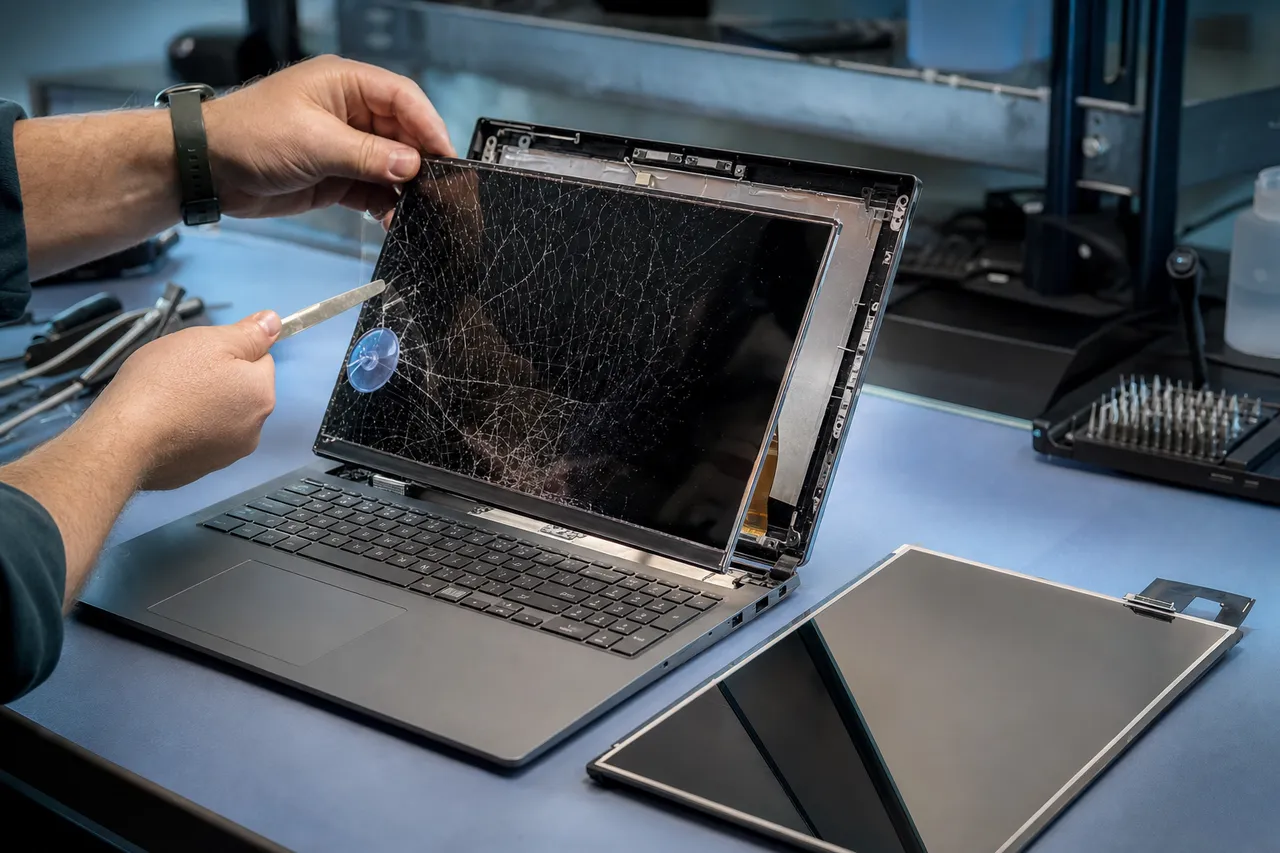
A technician lifting a cracked, spider-webbed laptop LCD panel away from the lid with a pry tool and suction cup, a replacement panel beside it

Laptop screens fail in a few familiar ways. A drop or a knock leaves the glass smashed and spider-webbed. A laptop carried by the screen, or with a hinge that has gone bad, can crack the panel or pinch the cable until the display fills with lines, goes black, or flickers. Dead pixels, a backlight that has dimmed, and an image that only appears at certain lid angles are all panel or cable faults we fix every week. The good news is that the display is a discrete part: we replace it without touching the rest of your laptop, so all your files, programs and settings come back exactly as they were.

The key to a screen repair done right is fitting the exact panel your laptop was built for. Laptop displays vary in size, resolution, connector type, mounting, brightness and whether they are touch-enabled, and using the wrong one leads to a dim image, a loose fit, or touch that no longer works. We identify the precise panel your model needs, source a quality replacement, and fit it so the new screen looks and behaves exactly like the original. Then we test brightness, color, touch where applicable, and the hinge and cable routing before the laptop goes back to you.

Because the screen is the part that takes the most physical abuse, it is also where a careful local repair shop earns its keep over a cheap mail-away swap. We check the hinge and the display cable at the same time, since a screen that cracked because of a failing hinge will simply crack again if the hinge is not addressed. We make sure the bezel seats properly and that no clips are broken. Small details like these are the difference between a screen that lasts and one that fails in a few months, and they are exactly the kind of thing you get when you hand the laptop to the person who repairs it.

If your screen is part of a touchscreen or a 2-in-1 convertible, the glass, digitizer and LCD are usually fused into one assembly that is replaced as a unit, and we handle those just as readily. Premium QHD, 4K, high-refresh gaming and OLED panels cost more than a basic LCD, but on a laptop worth keeping they are well worth replacing rather than scrapping the whole machine. Whatever panel your laptop uses, we will quote it clearly up front so you know the cost before any work begins, and you decide.

02 / Stop a small crack getting worse

Broken hinges, loose lids and cracked chassis

A laptop hinge that has gone stiff, loose or crunchy is more than an annoyance, left alone it is one of the fastest ways to destroy a screen and a lid, and it is very fixable.

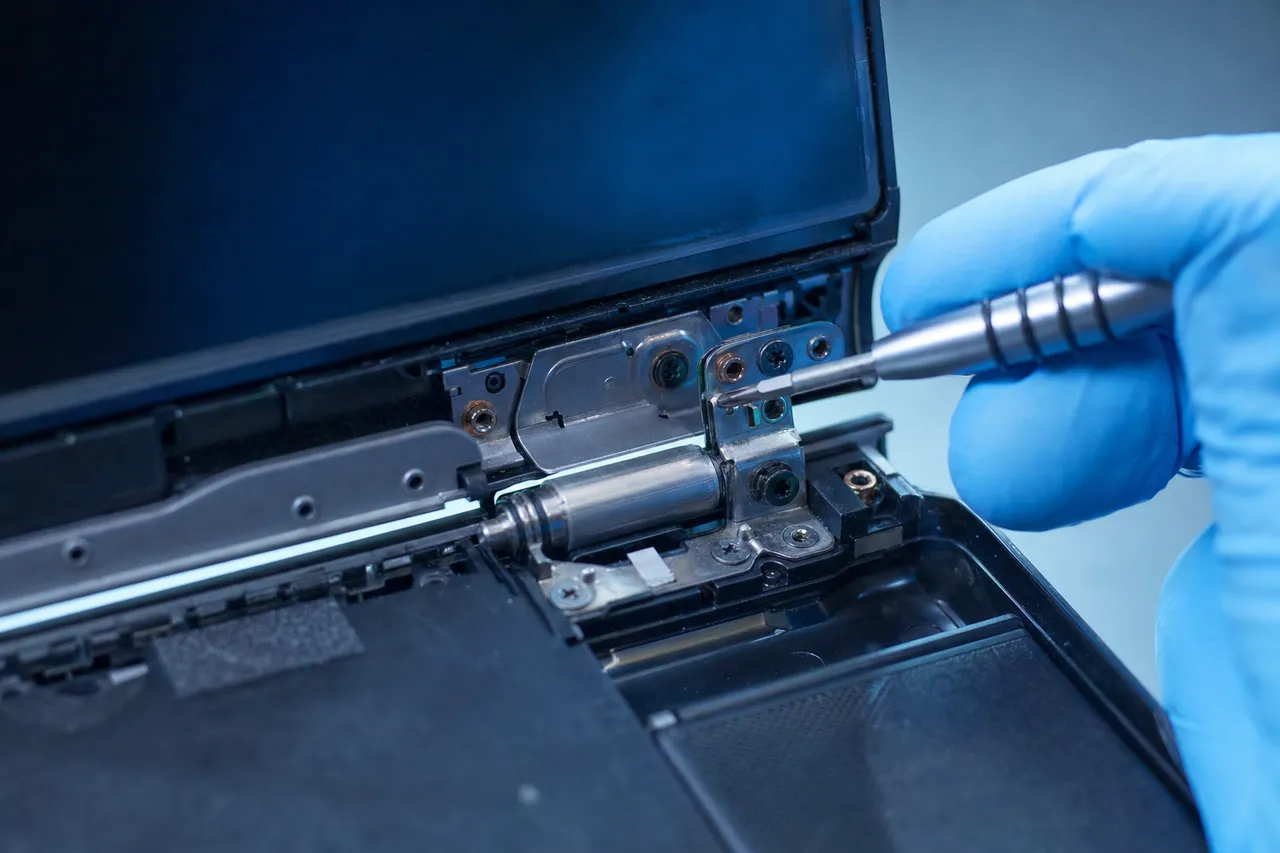
Extreme close-up of a laptop hinge mechanism with the bezel removed, a gloved hand tightening the metal hinge bracket with a precision screwdriver

Inside the lid of most laptops, the metal hinges are anchored to plastic posts called screw bosses. Over thousands of open-and-close cycles, those posts can crack and the hinge starts to pull free. Once that happens, opening the lid puts strain on the wrong places: the bezel lifts, the plastics flex and crack, and in the worst case the hinge levers against the display panel until the screen itself cracks or the cable tears. People often arrive thinking they only have a wobbly lid, when in fact the hinge is days away from taking the screen with it.

We repair laptop hinges by getting inside the lid and the base, replacing the hinge brackets where needed, and rebuilding or reinforcing the screw bosses that have stripped or cracked so the hardware has something solid to anchor to again. We replace damaged bezels and back covers, re-route the display cable cleanly, and make sure the lid opens with smooth, even tension and stays where you put it. The result is a laptop that feels solid again, not one held together with tape and hope.

Chassis and case damage often comes along for the ride. A laptop that has been dropped can have a cracked palm rest, a bent frame, a broken corner, or a flexing bottom cover. We replace and repair these housing parts so the laptop is structurally sound, the ports line up, and nothing rattles or pinches the cables inside. A solid chassis is not just cosmetic, it protects the expensive parts within.

The most important thing with a hinge problem is timing. Caught early, a hinge repair is a straightforward, affordable job. Left until the lid is flapping and the screen has cracked, it becomes a hinge repair plus a screen replacement plus possibly a cable. If your laptop is getting harder to open, making a cracking sound, or showing a gap where the screen meets the base, bring it in before a small repair turns into a big one. We will tell you honestly how far along it is and what it takes to set it right.

03 / Type and click like new

Keyboard and trackpad replacement

A laptop you cannot type on properly is a laptop you cannot really use. Sticky keys, dead keys, doubled letters and a trackpad that ignores you are all everyday repairs for us.

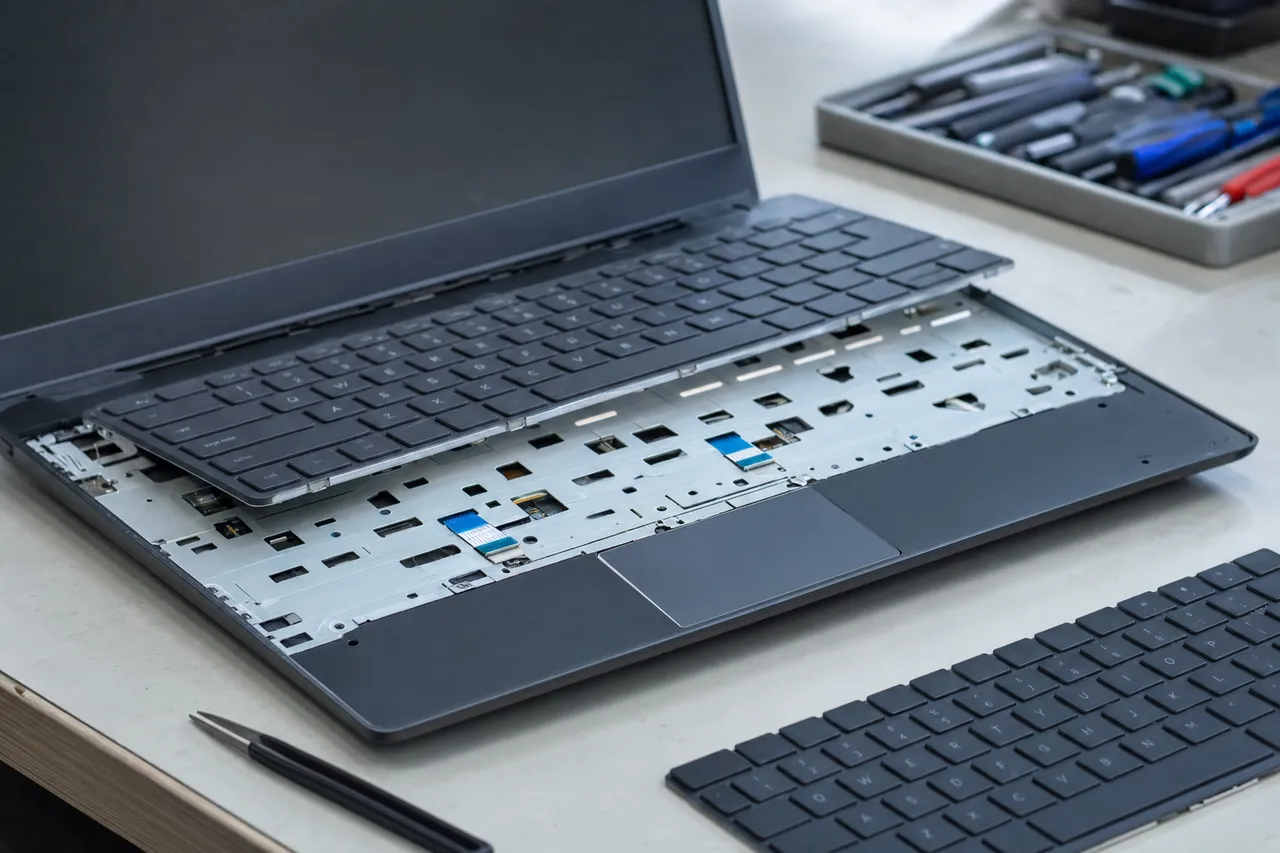
A laptop with its keyboard deck lifted on a workbench exposing the ribbon connector and trackpad assembly, a replacement keyboard and toolkit beside it

Laptop keyboards fail for a handful of reasons. Everyday wear leaves certain keys mushy or unresponsive. A spill can short out the membrane beneath the keys so that whole rows die or type the wrong characters. A single popped keycap or a broken scissor clip can make one key refuse to sit flat. And sometimes the keyboard itself is fine and the real problem is a ribbon cable that has worked loose from its connector, which is a quick and inexpensive fix. The diagnostic tells us which of these it is so you are not paying for a part you do not need.

When a keyboard genuinely needs replacing, we fit a full replacement assembly for your specific laptop. On many laptops the keyboard is integrated into the top case or palm rest, so the repair involves more than popping in a new set of keys, and getting it right means careful disassembly and reassembly so the trackpad, power button and ribbon connections all work afterward. We do that work properly and test every key before the laptop goes back to you.

Trackpads have their own failures: a surface that has stopped registering taps, erratic or jumpy cursor movement, a click that no longer presses, or a pad that has lifted at one corner. We replace trackpad assemblies and reseat their connections, and we also rule out the simple causes first, like a driver issue or a setting, so you get the right fix. If you rely on an external mouse because the trackpad died, a repair gets you back to a laptop that works the way it should.

Spill-damaged keyboards deserve a special note. If liquid got into the keyboard, the keys are often only the first casualty, the same spill may have reached the board underneath. When we open a laptop with a liquid-damaged keyboard we check for corrosion deeper inside and clean it before it spreads, so you are not back in a month with a bigger problem. Bring a spill in fast and we can usually stop the damage at the keyboard rather than letting it reach the motherboard.

Laptop giving you trouble? Get a free quote from a real local technician.

Call (732) 933-7717
04 / Hold a charge again

Batteries, charging ports and no-power faults

A laptop that will not charge or will not turn on is alarming, but charging and power faults are some of the most common, and most repairable, problems we see.

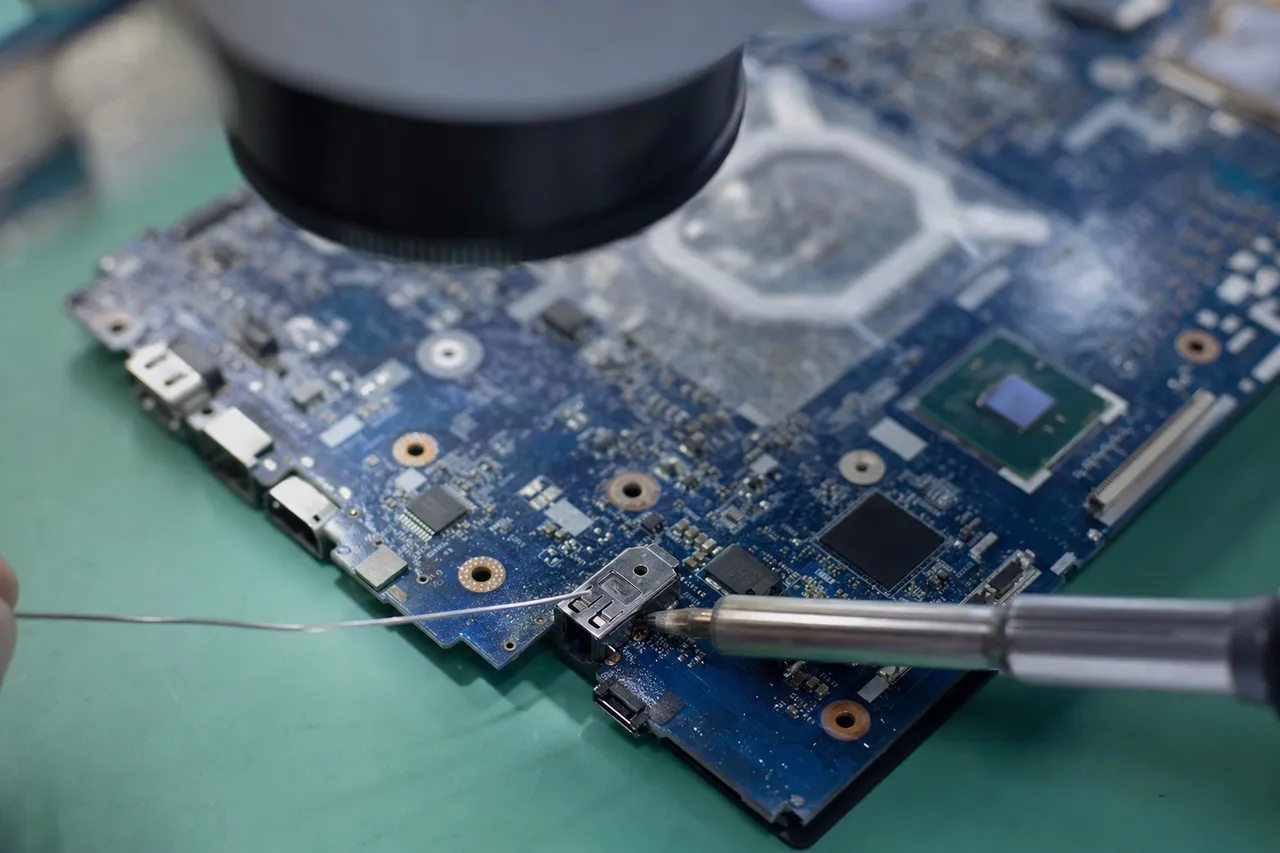
Close macro of a laptop motherboard under a microscope with a soldering iron reflowing the DC charging power jack connector

Charging trouble usually starts at one of three places: the charger, the charging port, or the battery. We test the adapter first, because a frayed cable or a failed power brick is the easiest fix of all. If the charger is good, the trail often leads to the charging port itself. The DC jack or USB-C port on a laptop takes a lot of mechanical stress every time the cable is plugged in and tugged, and over time the connector can crack or its solder joints can fatigue. That is why a laptop that only charges when the plug is held at a certain angle almost always needs a charging-port repair, the connector resoldered or replaced right on the board. This is board-level work that many shops will not attempt and instead send away, and it is exactly the kind of repair our data-recovery bench is equipped to do in-house.

Batteries wear out, it is simply chemistry. A battery that used to last hours but now dies in twenty minutes, or a laptop that shuts off the instant you unplug it, needs a new battery. We fit quality replacement batteries so your laptop is portable again instead of chained to an outlet. Just as important, we handle swollen batteries safely. A battery that has puffed up and bulges against the trackpad or warps the bottom cover is a genuine safety hazard, it must never be punctured or forced, and it should be replaced promptly. We remove a swollen battery carefully, dispose of it properly, and fit a safe new one.

When a laptop shows no sign of life at all, the no-power diagnosis widens to the board. A machine that is completely dead, or that lights up for a second and shuts off, or powers on but never reaches the screen, points to a power fault on the motherboard. Our component-level experience means we can often trace and repair the board itself rather than condemning the whole laptop, the kind of work that sets a real repair lab apart from a parts-swapping counter.

There is one case where a power fault matters even more: when the files on the laptop are not backed up. A laptop that will not turn on does not mean your data is gone, in most cases the drive is perfectly healthy and only the laptop around it has failed. Because data recovery is our core specialty, we can safely pull your documents, photos and work off a dead laptop and either move them to a repaired machine or hand them back on a drive. So even in the rare case a laptop is truly beyond economical repair, you do not lose what mattered most.

05 / Act fast, save the laptop

Liquid and water damage rescue

A spilled drink does not have to be the end of your laptop. With fast action and the right cleaning, many liquid-damaged laptops come back to full health.

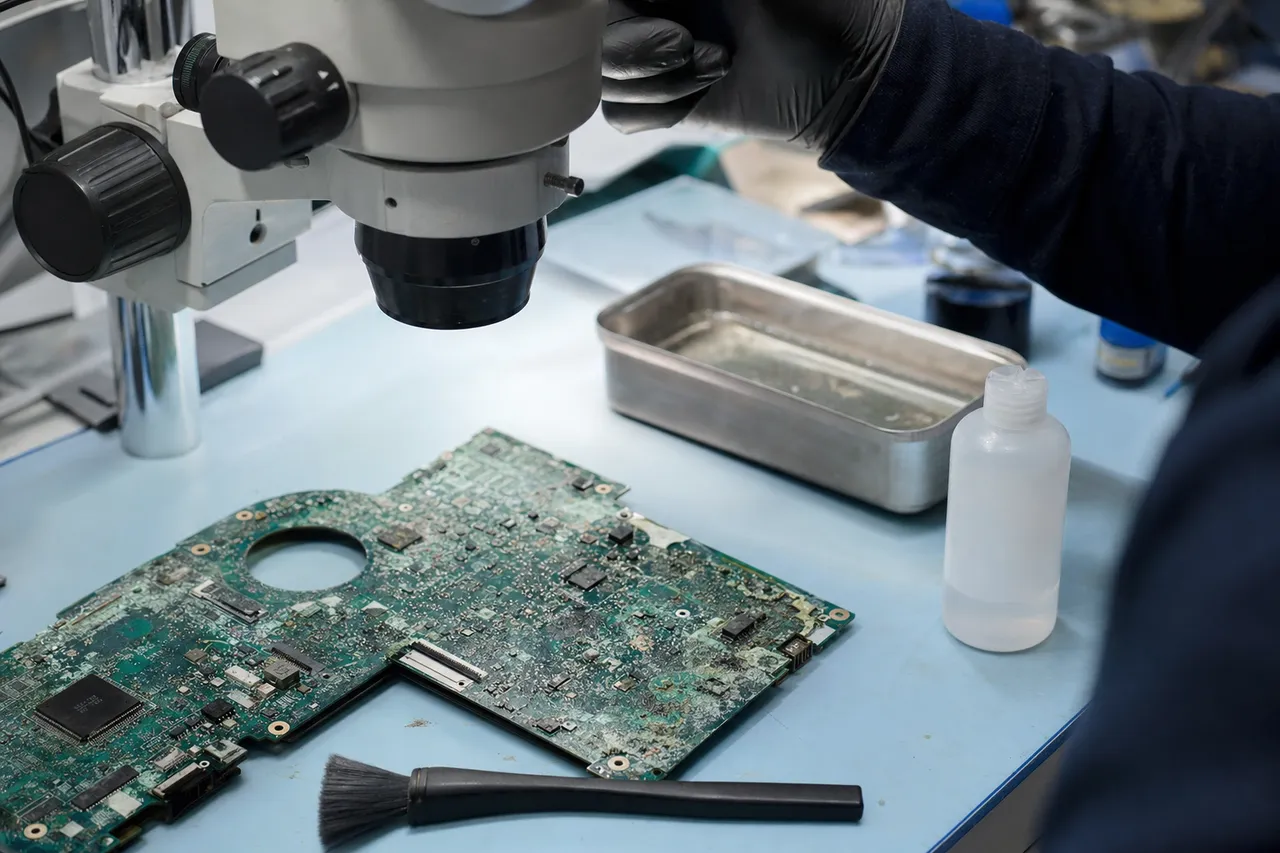
A liquid-damaged laptop motherboard with visible corrosion under a microscope, beside an ultrasonic cleaning tray and an isopropyl alcohol bottle

The damage from a spill is rarely the liquid itself, it is the corrosion that follows. Water, coffee, soda and juice carry minerals and sugars that, once they dry on a circuit board, eat away at the tiny connections and components over days and weeks. That is why what you do in the first minutes matters so much. If your laptop takes a spill, hold the power button to shut it down immediately, unplug it, and do not try to turn it back on to see if it still works, that is the surest way to short something out. Then bring it to us as quickly as you can. The sooner we open it and clean it, the more of it we can save.

In the shop, we open the laptop fully and inspect every board for liquid tracks and corrosion. We clean affected areas, and where a board needs it we use ultrasonic cleaning and proper solvents to lift residue from under chips and connectors that a wipe could never reach. We check the components the spill is most likely to have taken out, the keyboard, the trackpad, the battery and the power circuitry, and we repair or replace what is damaged. Then we test the laptop thoroughly to make sure it is genuinely stable, not just briefly working.

Not every liquid-damaged laptop can be fully saved, and we will always be honest with you about the odds based on what we find inside. But many more come back than people expect, especially the ones brought in quickly and not powered back on. Even in the worst case, where the board is too far gone, the drive is usually untouched, so we can recover your files, which for most people is the part that truly cannot be replaced.

A final word on the rice myth. Burying a wet laptop in rice does almost nothing useful, it does not clean corrosion, it does not reach inside sealed components, and it wastes the very hours when professional cleaning would do the most good. Skip the rice. Power the laptop off, leave it off, and get it to a repair bench. That single decision does more to save a liquid-damaged laptop than anything else.

06 / Make an old laptop fast again

Slow laptops, SSD upgrades and tune-ups

Before you spend hundreds on a new laptop because the old one crawls, let us look at it. A slow laptop is almost always fixable, and the upgrade that fixes it usually costs a fraction of a replacement.

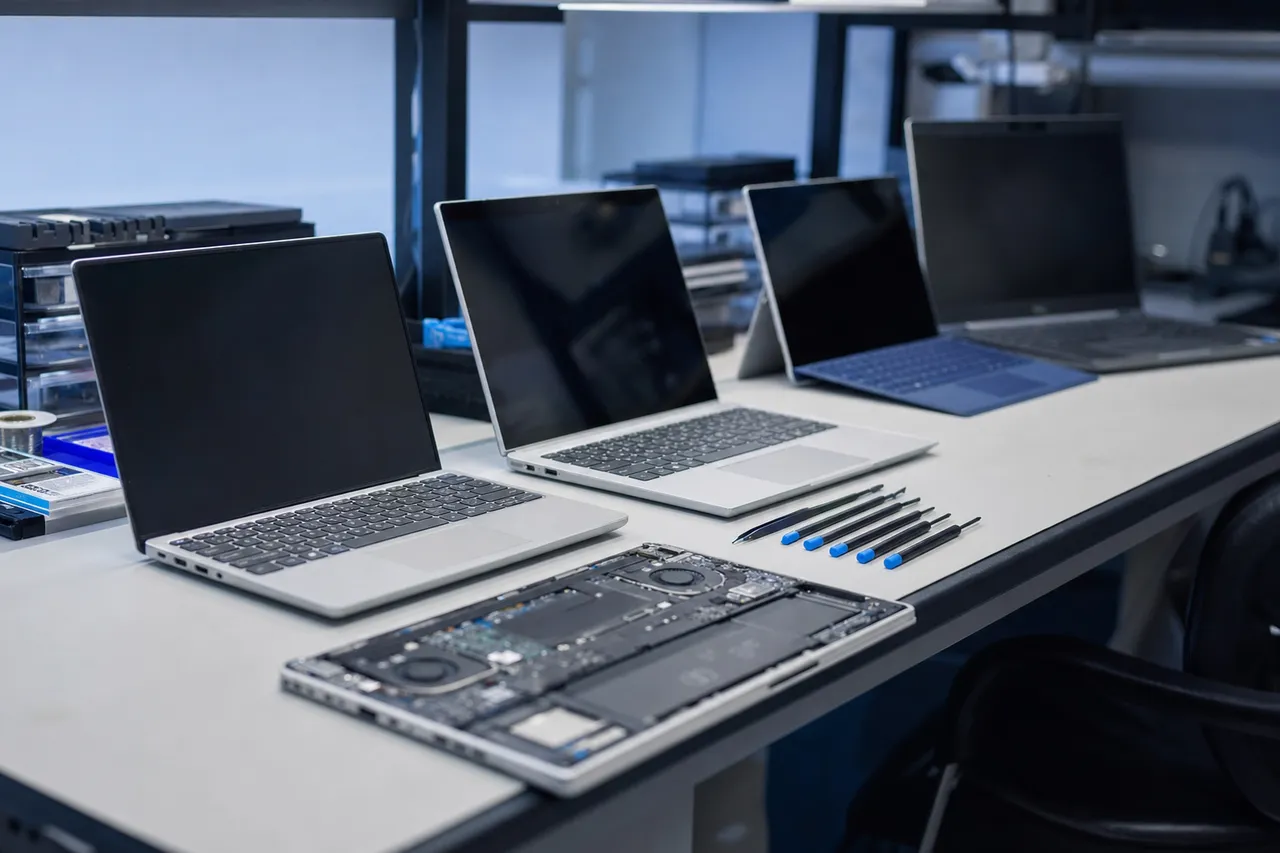
Several Windows laptops of different sizes lined up on a clean repair bench, one opened to show the battery and motherboard, with precision tools beside them

The single biggest cause of a slow laptop is an aging mechanical hard drive. Spinning drives are slow and they wear out, and Windows spends most of its time waiting on that drive. Swapping it for a solid-state drive is the most dramatic upgrade you can make to a laptop: boot times drop from a minute or more down to seconds, programs open instantly, and a laptop that felt ready for the bin suddenly feels new. We clone your existing system onto the new SSD so nothing is lost, you simply get the same laptop, only fast.

Memory is the second half of the story. If your laptop chokes with a handful of browser tabs and a program or two open, it is starved for RAM. Where the laptop allows it, adding memory lets it keep more open at once without grinding to a halt. We check what your specific model supports and fit the right modules for the smoothest result your hardware can give. An SSD and a RAM upgrade together are, dollar for dollar, the best money you can spend on an older laptop.

Software and heat finish the picture. Over the years, startup programs pile up, junk accumulates and hidden malware can quietly steal performance, so a full tune-up clears all of that and removes any infection while keeping every one of your files in place. And a laptop that overheats will throttle itself down to protect its parts, which feels exactly like a slow machine, so we clean the cooling system, re-paste the processor and replace any failed fan, letting the hardware finally run at full speed. Together these add years of useful life to a laptop you already own.

Upgrades are where keeping a good laptop beats buying a mediocre new one. A few years back, a quality business or gaming laptop often has plenty of life left in it once it has a fast SSD, enough memory and a clean cooling system. We will tell you honestly which upgrades are worth doing for the way you actually use the laptop, and which ones would not make a real difference, so your money goes exactly where it helps most. That straight advice is the whole point of bringing it to a local shop instead of a faceless chain.

Most laptops fixed in 24-72 hours, walk-ins welcome, and a 90-day warranty on every repair.

How it works

How your laptop repair goes

Four simple steps, no surprises, no pressure, and a price you approve before we lift a screwdriver.

  1. Free estimate

    Bring the laptop in and we run a full hardware and software diagnostic to pinpoint the exact fault, no guesswork and no pressure to fix.

  2. A price you approve first

    You get a clear written quote explaining the problem, the fix and the cost. Nothing happens until you say yes, and the diagnostic is credited toward the work.

  3. Expert repair

    Using professional tools and quality parts we perform the repair, from a screen or battery swap to board-level charging-port work, backing up your data first if anything is at risk.

  4. Testing & 90-day warranty

    Every laptop is tested before pickup, screen, charging, keyboard and power, and backed by our 90-day warranty, so you leave confident it is truly fixed.

Why MDrepairs

Why Middletown chooses us for laptop repair

Expert diagnostics, honest advice, and secure handling from the team trusted by millions to recover data, all from a local shop you can walk into.

  • A local Lincroft NJ shop, not a mail-away counter, drop off and talk to the tech who fixes your laptop
  • Every major brand serviced: Dell, HP, Lenovo, Acer, ASUS, MSI, Samsung and more
  • The data-recovery lab millions already watch online, so your files are in expert hands
  • Board-level charging-port and power repair most shops send away
  • Honest repair-or-replace advice with no pressure to overspend
  • Free estimate, a price you approve first, and most laptops back in 24 to 72 hours
Monmouth County NJ

Local laptop repair near you

We are right in the middle of Monmouth County in Lincroft, an easy drop-off from anywhere nearby. Find laptop repair in your town:

Don't see your town listed? We serve all of Monmouth County, just call and we'll help.

Call (732) 933-7717
Right in Monmouth County

Laptop repair you can drive to

Our lab sits at 644 Newman Springs Road in Lincroft, in the heart of Monmouth County and just minutes from Middletown, Red Bank, Holmdel, Hazlet and Tinton Falls. Because we are local, you get something the faceless chains and mail-away services can't offer: you hand your laptop to the person who repairs it, you get a real answer in plain language, and you pick it up nearby, usually within a few days. There is no shipping a laptop across the country and waiting, no call center, and no guessing what is happening to your machine.

We are open Monday through Friday, 10am to 6pm. Walk in for a free estimate, or call 732-933-7717 to talk through the problem first. Whether you are around the corner in Lincroft or coming from elsewhere in the county, you will get the same fast, honest, in-person service, backed by a 90-day warranty on every laptop repair.

FAQs

Laptop repair FAQ

Straight answers to the questions Middletown laptop owners ask us most.

How much does laptop repair cost in Middletown, NJ?

Every laptop repair starts with a flat diagnostic so you know the exact fault before you spend a dollar on the fix. Common jobs fall into clear price bands: a cracked screen replacement, a swollen-battery swap, a DC charging-port repair, a keyboard replacement, or an SSD upgrade each carry a firm written quote you approve before we begin. You only pay for the repair once you say yes, and the diagnostic is credited toward the work.

Should I repair my laptop or buy a new one?

It depends on the laptop and the fault. A simple rule: if the repair costs less than about half the price of a comparable new laptop and the rest of the machine is sound, repairing is the smart move, especially with an SSD upgrade that makes an older laptop feel new. We give you a straight recommendation either way, and if replacing is genuinely the better call, we will say so and help move your files across.

How long does a laptop repair take?

Most laptop repairs are finished within 24 to 72 hours once the part is in hand. Stocked jobs like a battery swap, a RAM or SSD upgrade, or a virus removal are often same-day or next-day. Screens and keyboards for popular Dell, HP and Lenovo models are usually quick, while a rarer panel or a board-level repair can take a little longer. We always give you the timeline up front and offer rush service when you are in a hurry.

Is my data safe during a laptop repair?

Yes. Your data stays confidential and is accessed only by our technicians when a repair requires it. Before any work that could put your files at risk, we offer to back them up first, and as the data-recovery lab trusted by millions online, protecting what is on your drive is the core of everything we do. Even if a laptop is beyond economical repair, we can recover your files through our laptop data recovery service, done in-house at the same bench.

My laptop screen is cracked. Can you replace it?

Yes, cracked laptop screen replacement is one of our most common repairs. We replace standard LCD panels, touchscreens, and high-resolution and OLED displays across Dell, HP, Lenovo, Acer, ASUS and MSI laptops. Bring the laptop in for a free estimate, we identify the exact panel your model needs, and once it is in we fit it, test the display and brightness, and back the work with our 90-day warranty.

Do you fix laptop hinges and broken lids?

We do. A loose, stiff, or broken hinge is a frequent laptop problem, and left alone it can crack the lid or tear the display cable. We repair and replace hinges, re-secure the screw bosses inside the lid that often strip out, and replace damaged bezels and back covers so the screen opens and closes smoothly and stays solid again.

My laptop will not turn on or charge. What is wrong?

A laptop that will not power on usually comes down to a dead charger, a damaged DC charging port, a failed battery, or a board-level power fault. We test the adapter and the charging circuit, repair or replace the charging port, swap a failed or swollen battery safely, and diagnose motherboard power faults that other shops send away. The diagnostic pinpoints the exact cause before any work begins.

Can you replace a laptop battery, especially a swollen one?

Yes. We replace worn-out laptop batteries that no longer hold a charge, and we handle swollen batteries with care. A puffy, bulging battery is a safety hazard that can warp the chassis and trackpad and should be replaced promptly, never punctured. We remove it safely, dispose of it properly, and fit a quality replacement so your laptop holds a full charge again.

Do you repair Dell, HP, Lenovo, Acer, ASUS and MSI laptops?

Yes, we service every major Windows laptop brand: Dell, HP, Lenovo, Acer, ASUS, MSI, Samsung, Toshiba, Microsoft Surface and more. Each brand has its own quirks, from Dell charging ports and HP hinges to Lenovo keyboards and MSI and ASUS gaming-laptop cooling, and our techs know them. Whatever the make or model, the same bench and the same warranty cover it.

Why is my laptop so slow, and can you speed it up?

A slow laptop is almost always fixable without buying a new one. The usual causes are an aging mechanical hard drive, too little memory, malware, a cluttered startup, or a clogged cooling system that throttles the processor. Upgrading to an SSD and adding RAM transforms an older laptop, and a full tune-up with malware removal restores speed for a fraction of the cost of a replacement.

Can you fix a laptop with liquid or water damage?

Often, yes, especially if you act fast. The moment a laptop takes a spill, power it off, unplug it, and bring it in. We open the machine, clean corrosion from the motherboard, treat or ultrasonically clean affected boards, and repair or replace damaged components like the keyboard or battery. The sooner we see it, the better the odds of a full recovery before corrosion spreads.

My laptop keyboard or trackpad is not working. Can you fix it?

Yes. Sticky, dead, or missing keys, a keyboard that types the wrong characters, and an unresponsive trackpad are all common laptop repairs. We replace full keyboard assemblies and trackpads across the major brands, and we also handle spill-damaged keyboards. If only the ribbon connection has come loose, the fix can be quick and inexpensive, the diagnostic tells us which it is.

Do I need an appointment, or can I just walk in?

Walk-ins are welcome at our Lincroft lab during business hours, and you are also free to call ahead or book a time so we can have the bench ready for you. Either way you get a free estimate first and a price you approve before any repair starts.

Reviews

What our customers say

  • Joe at MDrepairs was absolutely on point. Had to bring an old android of mine back to life and I know it was no easy task. MDrepairs was the 3rd company I called and the only ones that were able to get the job done. He had to go above and beyond by sourcing parts from a donor phone. The repair was done ahead of time and he communicated the entire time. Very straight forward process and I couldn't be any happier! I recommend MDrepairs for any cellphone work and will contact them first next time. Thanks again!

    Donato Guerrera Google Review
  • Lost my SSD after a hard reset and i thought the world ended. After 2 days of stress and hell, i made the trip and dropped my drive to these guys that i kept watching their insta videos and never thought that i would be one of their customers. I paid the rush fee and within 24 hours and a few extra minutes my business came back to life like tragedy never struck in the first place. They saved everything i thought i lost. Great guys, awesome communication. So if you are like me, and one day you lost your data, photos, videos and what not, take a deep breath and call these guys. Life is not over yet until you give them a chance to help you. Fairly priced for the job, definitely some money saving compare to those big companies on the internet, that quote you thousands of dollars making you question if what you lost is priceless indeed as they are ready to charge you an arm and a leg. So with all that ordeal in mind, I Would highly recommend MD anytime, to anyone!!

    miron trache Google Review
  • Thanks for the memories! We had this device for almost 10 years. It contained some of the earliest memories of our kids. My wife was devastated when it randomly stopped working. I saw an MD Repairs video and thought I'd give it a shot. Joe was great to work with, very responsive, and was able to restore pictures and videos from our family's early days. Thank you so very much!

    Rob Knight Google Review
  • Where do I start! So appreciative of MDRepairs! They not only fixed my phone, but they went above and beyond by backing up all my data and sending it too. Felt confident from the moment I started working with them! HIGHLY recommend!

    Matt Robinson Google Review
  • I brought a broken external hard drive in for repair, and had an excellent experience working with Joe. He was super accommodating and really took the time to explain everything in detail. Turned out, the drive was completely shot and required some surgery to recover the data. His work is masterful! Highly recommend if you're looking for someone who's both knowledgeable and fair.

    Sean Moran Google Review
  • Great service!!! After 3 other companies failed to fix it MDrepairs fixed my water damaged phone with years of photos on it. Worth every penny! Recommend to everyone!

    Gary Pitcher Google Review
  • I used MDrepairs to retrieve files that were lost after a hard drive failure. All communication from MDrepairs was prompt and professional. The files were sent on a flash drive and I was so impressed with how quickly they were able to complete the process and send out the flash drive. The cost was very fair. I highly recommend using MDrepirs if the need arises.

    Kathie Lange Google Review
  • Very professional and got done what we needed.

    Aaron Kasper Google Review

Cracked, dead or slow laptop? Let's fix it.

Free estimate, a price you approve first, and a 90-day warranty on every repair. Bring it to our Lincroft NJ lab or call (732) 933-7717.

(732) 933-7717