
Professional hard drive recovery service. They recovered all my data from a clicking Seagate drive in under two weeks. Transparent pricing and great communication throughout.
- 4.6 319+ Google reviews
- 2M+ followers
- Serving all 50 states
Scratched Platter Data Recovery
Scratched and contaminated platters are the most severe type of hard drive failure - and most recovery labs refuse these cases entirely. MDrepairs in Lincroft, NJ specializes in scratched platter recovery from all brands including Western Digital, Seagate, Toshiba, and HGST.
Our laminar-flow clean bench and specialized techniques let us recover data from drives with visible scoring, head crash debris, and contaminated platters. Every case starts with a $500 diagnostic deposit for scratched platter cases - controlled-environment inspection and a detailed damage assessment. We serve customers nationwide through our secure mail-in program. No data, no charge on the recovery.
Follow Our Work
Watch Scratched Platter Recoveries in Our Lab
With over 2 million followers across YouTube, TikTok, and Instagram, MDrepairs has become one of the most recognized data recovery labs in the country. Our videos take you inside our clean room to show exactly how we handle scratched platters, head crashes, and other catastrophic drive failures. You can watch Joseph Montanti inspect damaged platters under magnification, swap read/write heads from donor drives, and use specialized burnishing tools to smooth out microscopic surface damage. We believe in full transparency - when you send your drive to MDrepairs, you know exactly what happens to it because you have already seen the process on camera. Follow our work and see real recoveries in action.
Get a Free Quote- 1.1M+ YouTube Subscribers
- 400K+ TikTok Followers
- 290K+ Instagram Followers
- 470K+ Facebook Followers
Reviews
What Our Customers Say
4.6
Hard Drive Models We Recover from Scratched Platters
Scratched platter recovery requires intimate knowledge of each drive family's internal architecture, head geometry, and platter coating. At MDrepairs, we maintain an extensive donor drive library covering all major manufacturers. Below is a sample of the models we frequently recover from platter damage - if your model is not listed, contact us. We have likely worked on it before.
- WD Blue WD10EZEX
- WD Black WD4005FZBX
- WD Red Plus WD40EFPX
- WD Purple WD84PURZ
- WD Gold WD8004FRYZ
- WD Elements (USB 3.0)
- WD My Passport Ultra
- WD My Book Duo
- Seagate Barracuda ST2000DM008
- Seagate IronWolf ST4000VN006
- Seagate Exos X18
- Seagate Backup Plus Slim
- Seagate Expansion Desktop
- Seagate FireCuda SSHD
- Toshiba X300 HDWR480
- Toshiba N300 NAS
- Toshiba Canvio Advance
- Toshiba MQ Series (2.5")
- Toshiba P300 Desktop
- HGST Ultrastar DC HC550
- HGST Deskstar NAS
- HGST Travelstar 7K1000
- Samsung SpinPoint F3
- Samsung SpinPoint M8
- Maxtor DiamondMax
- Hitachi CinemaStar
- LaCie Rugged Mini
- G-Technology G-DRIVE
$500 deposit on scratched platter cases · No data, no charge · Free insured shipping
Types of Platter Damage
Not all platter damage is the same. The pattern, depth, and cause determine what we can recover - and how we approach it in the clean room.
-
Head Crash Scoring
When a read/write head makes contact with a spinning platter, it carves concentric or arc-shaped grooves into the magnetic surface. These head crash scores can be microscopic or visible to the naked eye depending on severity. The debris generated contaminates other platters and heads, creating a cascade of damage that worsens with every second the drive remains powered on.
-
Concentric Ring Scratches
Concentric ring scratches follow the circular track pattern of the platter and typically occur when a degraded head drags across the surface during normal rotation. These scratches often destroy data along specific tracks while leaving adjacent tracks intact, making partial recovery possible. The pattern and depth of the rings determine which sectors can be read and which are permanently lost.
-
Radial Scratch Lines
Radial scratches run from the inner to outer edge of the platter and usually result from physical shock - a drop, bump, or sudden jolt while the drive is spinning. Unlike concentric damage, radial scratches cross multiple data tracks simultaneously, potentially affecting thousands of files spread across different areas of the disk. Recovery requires carefully mapping which tracks are damaged and which remain readable.
-
Surface Contamination Damage
When platters are exposed to airborne particles - whether from a broken head, a cracked filter, or someone opening the drive outside a clean room - microscopic debris lands on the platter surface and gets dragged by the spinning heads. This creates irregular scratch patterns and embeds foreign material into the magnetic coating. Contamination damage requires thorough platter cleaning before any read attempts.
-
Heat-Warped Platter Damage
Drives exposed to fire, extreme heat, or prolonged thermal stress can develop warped platters that no longer sit flat on the spindle. The warping causes the heads to intermittently contact the platter surface at the high points, creating localized scratch zones. Recovery involves careful platter removal, assessment of flatness, and reading at adjusted head-to-platter distances in specialized equipment.
-
Corrosion and Oxidation Pitting
Water exposure, humidity, or long-term storage in damp conditions causes the platter's magnetic coating to corrode and develop pitted areas. While technically not scratches, corrosion pitting destroys the magnetic surface in a similar way, making affected sectors unreadable. Recovery requires chemical treatment to halt further oxidation followed by careful sector-by-sector reading of the remaining intact surface.
-
Stiction Drag Marks
Stiction occurs when heads stick to a stationary platter surface due to moisture or smooth surface contact. When the drive attempts to spin up, the stuck heads are dragged across the platter before breaking free, leaving characteristic drag marks in the landing zone or data area. These marks are typically shorter than head crash scores but can be deep enough to remove the magnetic coating entirely.
-
Debris Field Contamination
After an initial head crash or component failure, the resulting debris - metal fragments from the heads, coating particles from the platters, and filter material - circulates inside the sealed drive enclosure. This debris field acts like sandpaper, creating secondary scratches across all platter surfaces simultaneously. The longer the drive runs after the initial failure, the more extensive the debris field damage becomes.
How We Recover Your Data
A deliberate, documented sequence built for the most fragile cases - every step protects the intact data while we work around the damage.
-
Free Quote & Intake
Ship your drive to our Lincroft, NJ lab with free insured shipping or drop it off in person. We log your case, document the symptoms you reported, and assign it to our scratched platter recovery queue. You receive a confirmation email with your case number and a direct line to your technician.
-
Clean Room Inspection
We open your drive under our ISO Class 5 laminar-flow workstation and perform a detailed visual inspection of every platter surface under magnification. We photograph all damage, measure scratch depth and extent, and assess head condition. This diagnostic determines whether recovery is feasible and what percentage of data we expect to retrieve.
-
Platter Preparation & Head Swap
Depending on damage severity, we clean contamination from the platter surfaces, perform burnishing to smooth out minor scratches, and source compatible donor heads from our inventory. Each donor head set is tested for compatibility with your specific drive model and firmware revision before installation.
-
Sector-by-Sector Imaging
Using professional data recovery hardware, we create a sector-by-sector image of your platters while carefully skipping damaged zones that could cause further head degradation. Our imaging software maps good and bad sectors in real time, prioritizing the areas you need most. This process can take hours to days depending on platter condition.
-
Data Extraction & Delivery
Once imaging is complete, we extract your files from the disk image, verify file integrity, and compile a complete file listing for your review. You approve the recovery before we transfer your data to a new external drive and ship it back with free insured shipping. No data recovered means no charge beyond the diagnostic fee.
Scratched Platter Recovery Pricing
Scratched platter recovery pricing depends on the extent of platter surface damage, the number of platters affected, and the complexity of the head swap and burnishing required. Because these are the most severe cases, every scratched platter case begins with a $500 diagnostic deposit that is applied toward the final cost if you proceed. Our no data, no charge guarantee means you only pay the full recovery fee if we successfully retrieve your target files.
-
Logical / Firmware Recovery
$650 - $1,200
Data recovery from drives with logical errors, accidental deletion, formatting, file system corruption, or firmware failures. Includes PC-3000 firmware module repair and sector-level imaging.
- Accidental deletion recovery
- File system corruption repair
- Firmware module restoration
- Partition table reconstruction
- Bad sector bypass imaging
$500 diagnostic deposit applied to cost
-
Head Swap / Mechanical Recovery
$1,000 - $2,000
Recovery from clicking, buzzing, or non-spinning drives requiring clean bench work - head replacements, motor repair, stiction recovery, or spindle motor service.
- Failed read/write head replacement
- Motor failure repair
- Stiction recovery (heads stuck to platter)
- Clean bench head transplant with donor
- PC-3000 selective head imaging
$500 diagnostic deposit applied to cost
- Scratched / Contaminated Platters
Scratched / Severe Platter Recovery
$1,500 - $2,500+
Recovery from drives with platter surface damage, contamination, scoring from head crashes, or drives that failed at other labs. Includes helium drive recovery ($2,000 - $3,500+).
- Scratched platter recovery
- Contamination and debris removal
- Head crash damage recovery
- Multi-platter transplant
- Conservative imaging around damaged zones
$500 diagnostic deposit applied to cost
All pricing includes the diagnostic deposit. No data, no charge - if we can't recover your target files, you only pay the diagnostic fee.
Scored platters need honest hands - $500 deposit credited, free insured shipping, no data, no charge.
How Long Does Hard Drive Data Recovery Take?
Diagnostic turnaround depends on your selected service tier. Rush options are available when you need answers faster. Recovery time is quoted after diagnostics are complete - the tiers below are how soon we begin, not the full recovery time.
-
4 - 5 weeks
Standard
No surcharge
Full assessment with recovery options and pricing. The typical wait before your drive reaches our bench in the standard queue, measured from receipt.
-
5 - 7 days
Priority Rush
+$250
Your drive jumps to the front of the queue. Ideal for business-critical data where a few days matter.
-
1 - 2 days
Urgent Rush
+$500
Dedicated technician for time-sensitive cases, with expedited handling from the moment it lands.
-
Same Day
Emergency
+$1,000
Immediate start. Highest priority, mission-critical situations that can’t wait.
The times above are how soon we begin diagnosing your drive - not the full turnaround. Recovery time is quoted after diagnostics, and depends on the failure (see below). Mail-in adds free 2nd-Day-Air UPS each way (USA, excluding islands).
What Affects Hard Drive Recovery Time?
Once work starts, the failure type sets how long the recovery itself takes
-
Logical & Firmware
FastestAccidental deletion, formatting, corrupted partitions, and Seagate F3 / service-area faults. No mechanical intervention - typically the quickest turnaround once on the bench.
-
Electronic / PCB
ModerateBurned or shorted controller boards from power surges. We repair the PCB and transfer the unique ROM - quicker than a head swap, slower than a clean logical case.
-
Mechanical / Head Swap
LongestClicking drives, crashed heads, seized motors, and scratched-platter cases need matched donor parts, controlled-environment work, and careful imaging. Parts for Seagate, WD, Toshiba and Hitachi are typically in stock.
-
Shipping Time
Free · 2nd-day airMail-in ships free 2nd-Day-Air UPS both ways (USA, excluding islands) - you print the prepaid label right on the mail-in form. Local New Jersey customers who drop off at our Lincroft lab skip transit entirely.
Scratched Platter Data Recovery - Recovery Cases
See how our lab handles real data recovery cases - from initial diagnosis through final data delivery. Watch the scratched platter, head crash, and stiction recoveries our techs document on camera.
-

Scratched Platter Recovery - Seagate Backup Plus Slim
-

Bent Chassis Recovery - Internal Structural Damage
-

Stiction Recovery - Head Bonded to Platter Surface
-

Clicking Drive - Preventing Platter Damage from Failed Heads
Data Privacy & Chain of Custody
Your data is handled under strict chain-of-custody procedures from intake to secure destruction.
-
Intake Logging
Every drive is photographed and logged with a unique case number, serial, model, and condition on arrival.
-
Restricted Access
Only your assigned technician handles your drive. No shared workstations, no exceptions.
-
No Browsing Data
We never open or view your files. Integrity is verified through checksums and file structure only.
-
Secure Delivery
Data is transferred to a new drive and shipped back to you. All copies are purged after confirmation.
-
Drive Return
Your new drive is returned with your recovered data.
What You Receive After Recovery
-
Your Recovered Data
Your files are delivered on a new external hard drive shipped directly to you, or we send you a password-protected download link for secure retrieval. We include a file listing so you can verify everything before we purge our copies.
-
Your Original Drive
After recovery is complete, you choose what happens to your original drive - we can return it to you, hold it for a specified period, or securely destroy it. All copies of your data on our systems are purged after you confirm receipt.
-
Ongoing Support
Need help accessing your recovered files, transferring data to a new device, or setting up backups to prevent future data loss? Our team is available after delivery to help you get back on track.
Talk to the engineer who burnishes the platters - not a call center.
Everything We Know About Scratched Platter Recovery
Root Causes
What Causes Platter Scratches in Hard Drives
Hard drive platters spin at thousands of revolutions per minute - typically 5,400 or 7,200 RPM for consumer drives and up to 15,000 RPM for enterprise models. The read/write heads float on a microscopic cushion of air just nanometers above the platter surface, a distance so small that even a single particle of smoke is large enough to cause a head crash. Understanding what causes platter scratches is the first step toward understanding why professional recovery is necessary and why DIY attempts almost always make things worse.
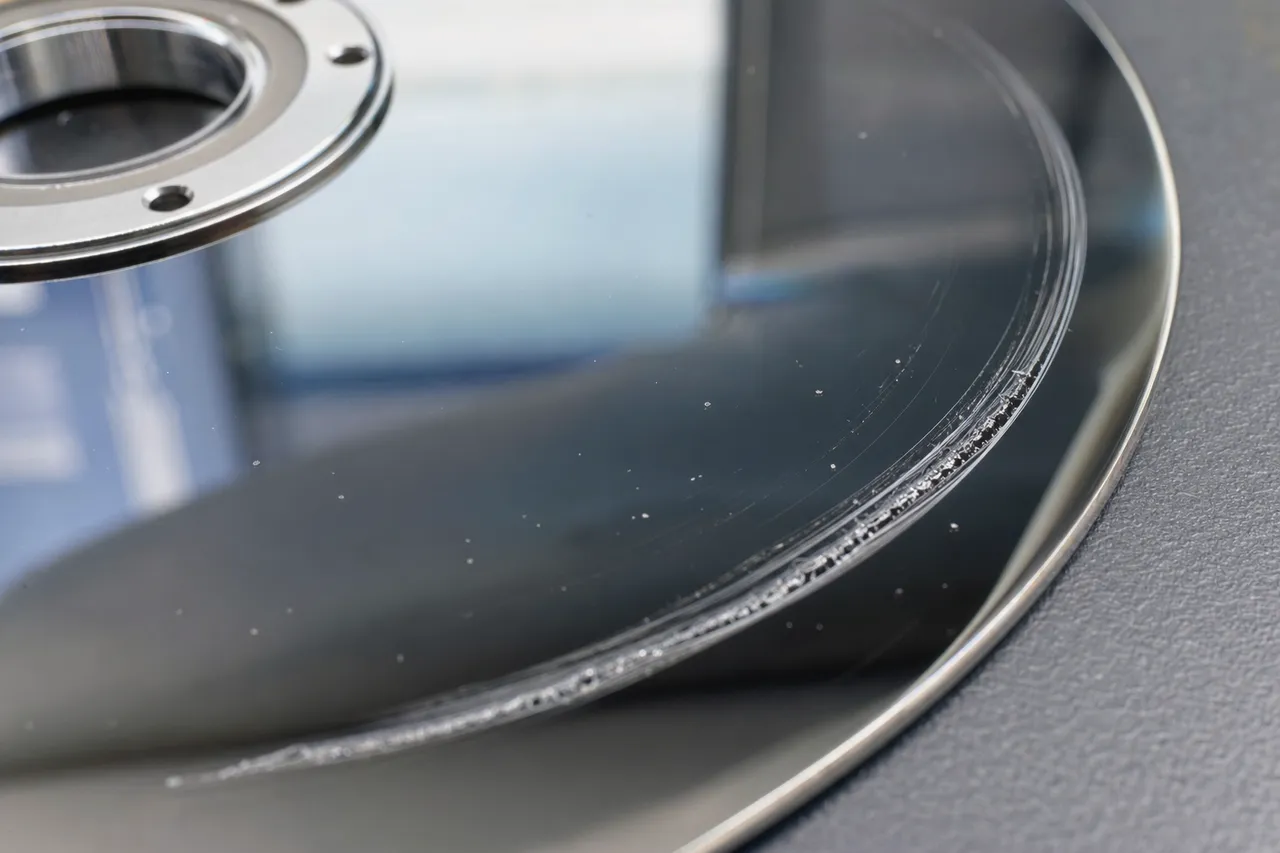
The most common cause of platter scratches is a head crash. This occurs when the read/write head, which normally flies above the platter on an air bearing, makes physical contact with the spinning surface. Head crashes can be triggered by physical shock (dropping the drive, bumping the computer), power failures that prevent the heads from parking properly, manufacturing defects in the head suspension assembly, or degradation of the air bearing surface over time. When a head contacts a platter spinning at 7,200 RPM, the relative velocity at the outer edge of a 3.5-inch platter is roughly 75 miles per hour - enough to gouge the magnetic coating and underlying substrate.
Physical shock and vibration are the second leading cause. Laptop drives are particularly vulnerable because they are frequently moved while powered on. A drop from desk height onto a hard floor can generate forces exceeding 300 G, far beyond the 60-80 G shock rating of most 2.5-inch drives. Even desktop drives can suffer platter damage from kicks to the computer case, nearby construction vibration, or being shipped without adequate cushioning. The damage from shock is often radial - the heads are flung outward across tracks rather than following concentric paths.
Contamination is another major cause. Hard drives are assembled in clean rooms and sealed with filtered breather holes that equalize pressure while blocking particles. Over time, these filters can degrade, especially in high-humidity or dusty environments. Once particles enter the drive, they get caught between the head and platter, acting as abrasives that score the surface. Opening a drive outside of a clean room almost guarantees contamination - a single fingerprint contains enough oils and particles to destroy a platter surface when the head passes over it at high speed.
Wear and age contribute to platter scratches in older drives. The lubricant layer on the platter surface gradually depletes, the head suspension loses tension, and the air bearing characteristics change. Drives that have been running continuously for 5+ years are statistically more likely to develop contact between the head and platter, leading to progressive surface degradation. This wear-related scratching often starts in the innermost tracks where the head velocity is lowest and the air bearing is weakest, then spreads outward over time.
Electrical failures can also lead to platter damage. A power surge that damages the motor driver circuit can cause the spindle motor to jerk or stop suddenly, and the resulting deceleration can fling the heads across the platter surface. Similarly, a failed preamp chip on the head stack can cause a head to output erratic signals to the voice coil motor, driving the head into the platter at unpredictable angles. These electrically-induced crashes often produce the most severe damage because they combine high-speed contact with uncontrolled head movement.
At MDrepairs, we see all of these failure modes regularly. Our diagnostic process identifies the root cause of your platter damage so we can plan the most effective recovery strategy for your specific situation.
How Data Is Stored
How Hard Drive Platters Store Your Data
To understand why scratched platters are so devastating - and why recovery is still sometimes possible - you need to understand how data is physically stored on a hard drive platter. Unlike solid-state drives that use electronic charge to store bits, hard drives are fundamentally magnetic storage devices where every file, photo, and document exists as a pattern of magnetic orientations on a thin metallic film.
A modern hard drive platter is a precision-engineered disk typically made from aluminum alloy or glass. The raw substrate is polished to a surface roughness measured in angstroms - a smoothness comparable to the best optical mirrors ever made. On top of this substrate are multiple thin-film layers deposited through sputtering, a process borrowed from the semiconductor industry. The key layers include an adhesion layer, the magnetic recording layer (typically a cobalt-platinum alloy), a protective carbon overcoat just 2-3 nanometers thick, and a lubricant layer roughly 1 nanometer thick.
Data is written by the write head, which generates a focused magnetic field strong enough to permanently flip the magnetic orientation of tiny regions called magnetic grains within the recording layer. Each grain is roughly 7-10 nanometers in diameter, and a single bit of data is stored across a cluster of 50-100 grains. The orientation of these grain clusters represents either a 1 or a 0. Modern drives using perpendicular magnetic recording (PMR) orient these grains vertically - pointing either up or down - which allows higher data density than the older longitudinal recording method.
Data is organized on the platter in concentric circles called tracks, with each track subdivided into sectors (typically 512 bytes or 4,096 bytes each). A modern high-capacity drive may have hundreds of thousands of tracks per platter surface, packed so tightly that adjacent tracks are separated by less than 70 nanometers. The tracks are grouped into zones, with outer zones containing more sectors per track than inner zones because the circumference is larger.
Reading data back requires the read head to detect incredibly faint magnetic fields from the recorded pattern. Modern drives use tunneling magnetoresistance (TMR) heads that can detect field changes as small as a few magnetic flux quanta. The head flies on an air bearing at a height of approximately 5-10 nanometers above the platter surface - for reference, a human hair is about 75,000 nanometers in diameter. This flying height has decreased with every generation of drive technology, making modern drives more vulnerable to head crashes than older designs.
When a platter is scratched, the damage removes or disrupts the magnetic recording layer in the affected area. A shallow scratch might only damage the lubricant and carbon overcoat, leaving the magnetic layer partially intact. In these cases, data recovery is often highly successful because the magnetic patterns still exist even though the protective layers are gone. A deep scratch that penetrates into the magnetic layer physically removes the recorded data - those bits are gone permanently. The severity and depth of the scratch directly determines what percentage of data can be recovered.
This is precisely why professional assessment matters: at MDrepairs, we evaluate scratch depth and extent under magnification to give you an honest recovery percentage estimate before you commit to the full recovery process. The magnetic physics of your platter determines what is possible, and we will never promise more than the science allows.
Reading the Damage
Microscopic vs. Visible Platter Damage
One of the most common misconceptions about scratched platters is that you can assess the damage by looking at the platter surface. In reality, the most destructive platter damage is often invisible to the naked eye, and some of the scariest-looking damage is actually recoverable. Understanding the difference between microscopic and visible damage is crucial for setting realistic expectations about your recovery case.
Microscopic damage refers to scratches and surface defects that are too small to see without magnification equipment. These scratches are typically less than a micrometer deep (1/1,000th of a millimeter) and may only span a few hundred tracks. Under normal lighting, a platter with microscopic damage looks perfectly clean and undamaged - mirror-smooth with no visible marks. However, when examined under a stereo microscope at 40x-100x magnification, fine scratch lines, haze patterns, or point defects become visible. At MDrepairs, we use specialized oblique lighting techniques that reveal surface defects by catching light at the scratch edges.
Microscopic damage is deceptive because it can still cause catastrophic data loss. Remember, the read/write head flies at only 5-10 nanometers above the platter. A scratch just 100 nanometers deep - completely invisible without magnification - is a towering mountain from the head's perspective, roughly 10-20 times the flying height. When the head encounters this microscopic bump, it bounces, loses its air bearing, and can crash into the platter at full speed. This is why drives with microscopic damage often work intermittently: the heads successfully read some areas but crash when they encounter the damaged zone, creating more damage with each attempt.
Visible damage includes scratches, rings, and scoring that you can see with your bare eyes when you hold the platter up to a light source. Visible damage typically means the scratch has penetrated through the carbon overcoat and into the magnetic recording layer, which is only about 15-20 nanometers thick. Common visible damage patterns include concentric rings (from head contact during normal rotation), arc-shaped scores (from head contact during seek operations), and radial lines (from shock-induced head displacement).
Contrary to what many people assume, visible scratches do not necessarily mean total data loss. A single visible scratch line might be 50-100 micrometers wide - which sounds large but represents only about 700-1,400 tracks on a modern drive. With hundreds of thousands of tracks per surface, losing a few thousand tracks means losing perhaps 1-2% of the data capacity. The data on either side of the scratch may be perfectly intact and fully recoverable. This is why sector-by-sector imaging with professional hardware is so effective: we can read around the damaged areas, skipping bad sectors and capturing everything else.
The worst-case scenario is a debris ring - a wide band of visible damage that covers a significant portion of the platter surface. Debris rings form when the initial scratch generates particles that get trapped between the head and platter, widening the damage zone with every revolution. A debris ring can grow from a single scratch line to a band several millimeters wide within seconds if the drive is left powered on. This is why we always advise customers to power off their drive immediately if they hear grinding, scraping, or clicking sounds.
At MDrepairs, our diagnostic process includes detailed photography of platter surfaces under multiple lighting conditions and magnification levels. We share these images with you so you can see exactly what we are working with, and we provide recovery estimates based on the actual measured extent of the damage - not guesswork.
Controlled Environment
Clean Room Requirements for Platter Recovery
When people hear that data recovery requires a "clean room," they often picture something from a science fiction movie. The reality is more practical but no less important: a properly equipped clean room is absolutely essential for any recovery that involves opening a hard drive and working with exposed platters. At MDrepairs, our laminar-flow workstations maintain ISO Class 5 (equivalent to the older Federal Standard 209E Class 100) conditions at the open drive, and maintaining this environment is one of our most significant ongoing investments.
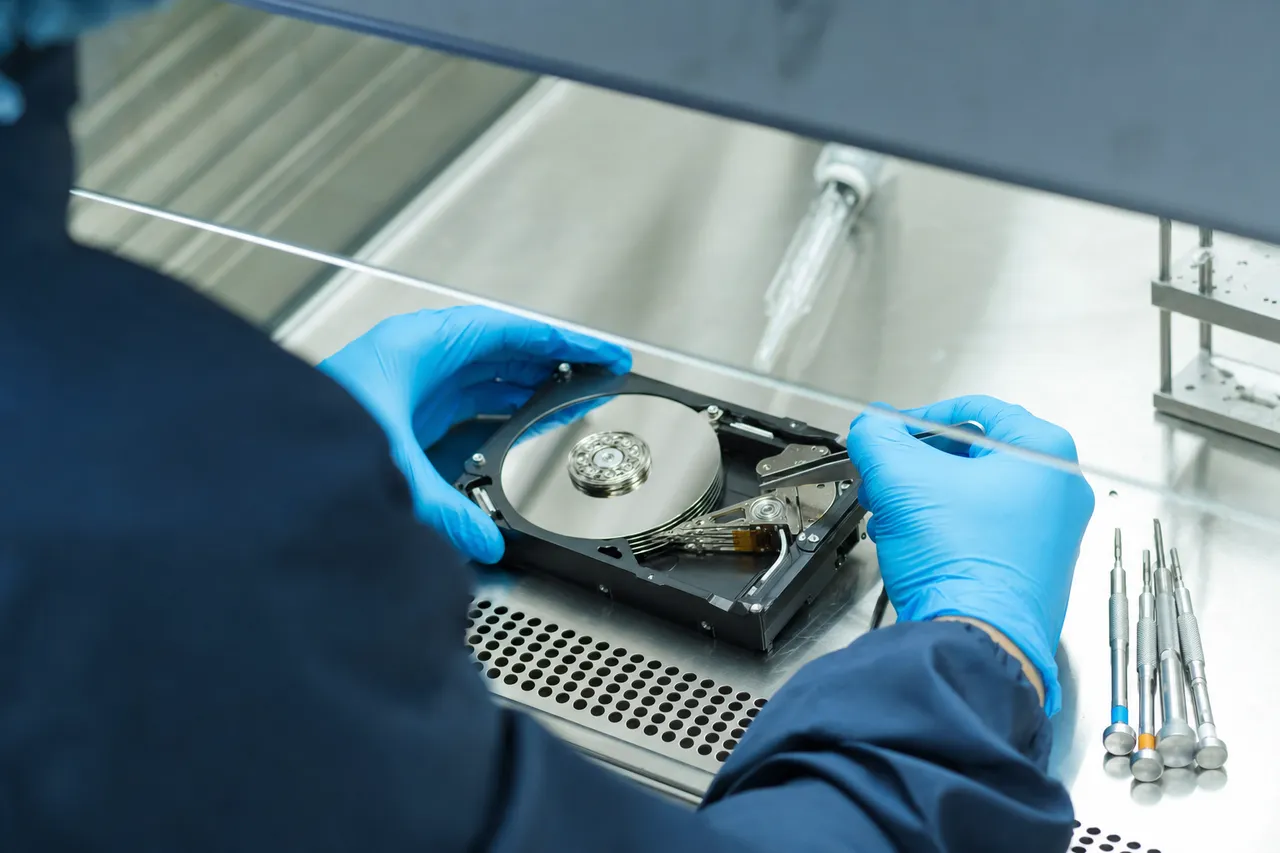
An ISO Class 5 clean room allows no more than 3,520 particles per cubic meter at 0.5 micrometers or larger. To put that in perspective, a typical office environment contains roughly 35,000,000 particles per cubic meter at the same size - nearly 10,000 times more contamination. A single particle of household dust (typically 10-50 micrometers) that lands on a platter surface is enormous compared to the head flying height, and when the head encounters it, the result is a new scratch and more debris contamination.
Our controlled work zone achieves ISO Class 5 cleanliness through several integrated systems. HEPA filtration (High-Efficiency Particulate Air) removes 99.97% of airborne particles 0.3 micrometers and larger. Air enters the room through ceiling-mounted HEPA filter units and exits through floor-level returns, creating a laminar downflow pattern that continuously sweeps particles away from the work surface. The room maintains positive pressure relative to the surrounding space, so when a door opens, clean air flows outward rather than contaminated air flowing inward.
Technicians working in our clean room wear full clean room garments including lint-free coveralls, shoe covers, bouffant caps, and nitrile gloves. Human beings are surprisingly prolific particle generators - normal skin shedding produces hundreds of thousands of particles per minute, and each produces millions more when moving. The garments contain these particles, and the laminar airflow whisks away anything that escapes.
The work surface itself is a clean room bench with its own integrated HEPA filter and laminar flow hood. This creates a localized zone of even cleaner air directly above the opened drive, providing an additional layer of protection during the most critical phases of platter work - head swaps, platter cleaning, and platter transplants. All tools used inside the clean room are specially designated, regularly cleaned, and stored in sealed containers to prevent cross-contamination.
Some recovery companies claim to use "clean room equivalent" workstations - essentially HEPA-filtered laminar flow hoods sitting in a regular office. While these provide some particle control at the immediate work surface, they do not provide the same level of protection as a fully enclosed clean room. The surrounding air is still contaminated, and any disturbance - a door opening, someone walking by, the technician adjusting their position - can introduce particles. For routine head swaps on drives with intact platters, a flow hood may be adequate. For scratched platter work, where the protective overcoat is already compromised and the exposed magnetic surface is vulnerable to even the smallest contamination, a proper clean room is not optional.
MDrepairs monitors our clean room particle counts continuously using a laser particle counter. We log readings multiple times per day to verify that filtration systems are operating correctly and that cleanliness levels remain within specification. This monitoring data is available for customers who want verification that their drive was handled in a properly controlled environment. When your scratched platter recovery requires the highest level of care, our facility delivers it.
Advanced Procedure
Platter Transplant Techniques for Severely Damaged Drives
A platter transplant is one of the most advanced and delicate procedures in data recovery. It involves physically removing the platters from a damaged drive and reinstalling them in a donor drive chassis with known-good components. At MDrepairs, platter transplants are reserved for cases where the original drive's spindle motor, bearings, or chassis are too damaged to support normal imaging, or when the platters need to be cleaned and reinstalled in a contamination-free environment.
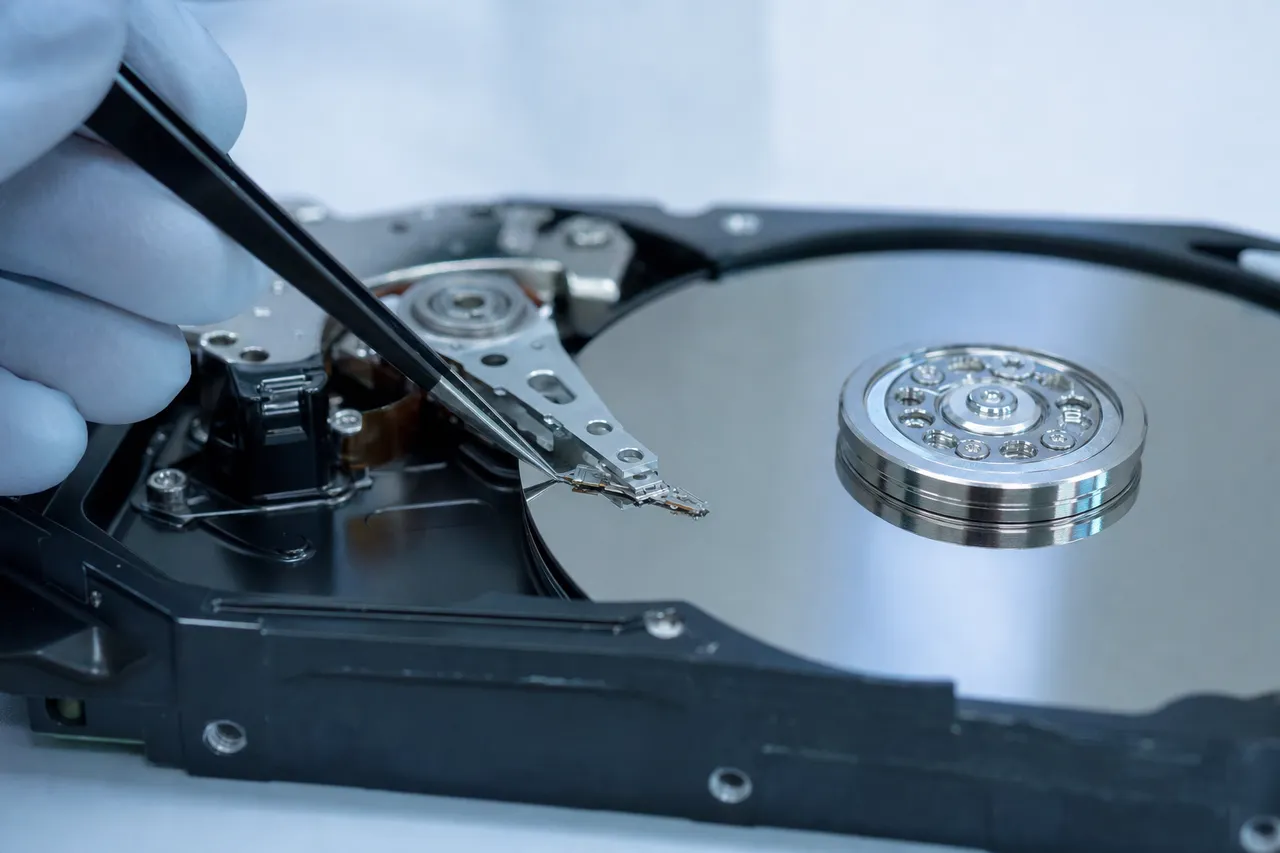
When is a platter transplant necessary? The most common scenarios include spindle motor failure (the motor seizes and the platters cannot spin), bearing damage that causes wobble or vibration, chassis damage from physical impact or fire, and severe contamination where the platters need to be removed for cleaning before reinstallation. In scratched platter cases, a transplant may be needed when the debris from the scratch has contaminated the drive's internal air filtration system beyond cleaning, or when the head stack assembly mounting points are damaged.
The platter transplant process begins with donor drive selection. The donor must be the same model, same firmware revision, and ideally from the same manufacturing batch as the patient drive. This ensures that the platter geometry, spindle height, head alignment, and servo pattern are compatible. At MDrepairs, we maintain an inventory of over 500 donor drives spanning all major manufacturers and model families. When we do not have a match in stock, we source one within 24-48 hours from our network of parts suppliers.
Before the transplant begins, both the patient and donor drives are opened in our clean room. We document the exact angular position of each platter relative to the spindle and to each other. Modern drives use a technique called "spiral servo writing" where the servo patterns on each platter surface are aligned to precise angular relationships. If the platters are reinstalled with even a fraction of a degree of rotational error, the heads will not be able to lock onto the servo tracks and the drive will not function. We use alignment marks, fixtures, and in some cases custom-machined platter clamps to maintain exact angular registration throughout the transplant.
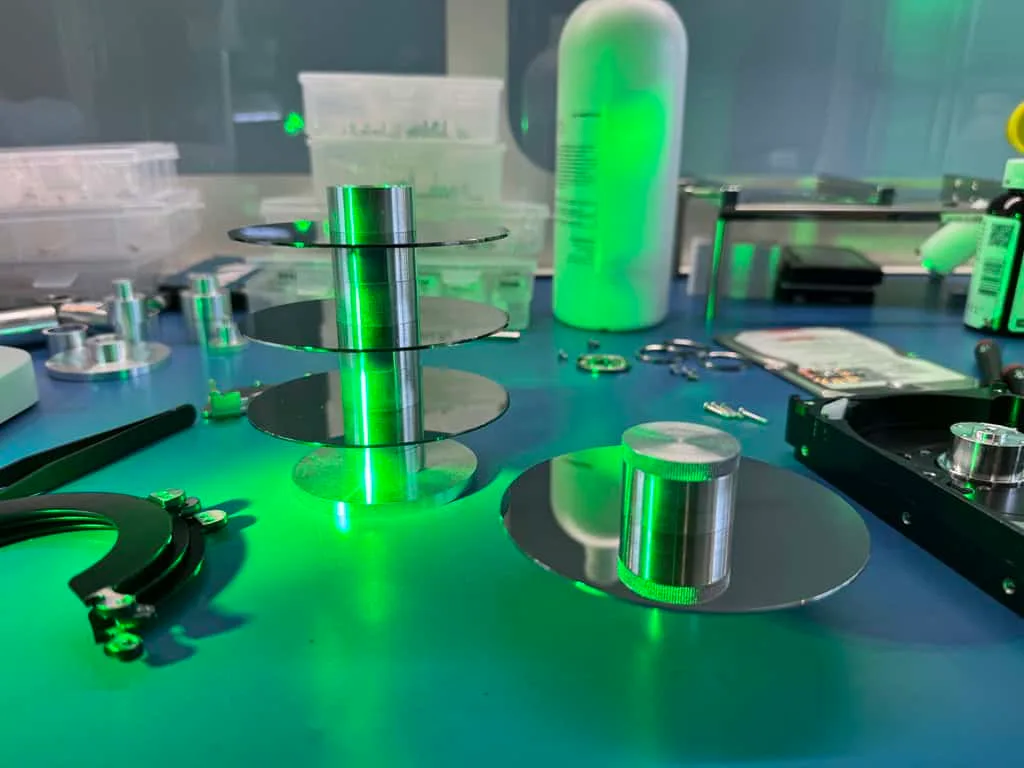
The physical transfer process involves removing the platter clamp (the ring or cap that holds the platters onto the spindle), carefully sliding each platter off the patient drive's spindle, and installing them onto the donor drive's spindle in the correct order and orientation. Each platter must be handled only by its edges or hub - touching the data surface would deposit oils and particles that could cause additional damage. For multi-platter drives, spacer rings between platters must also be transferred in the correct sequence and orientation.
After the platters are installed in the donor chassis, we install the compatible head stack assembly - either the donor drive's original heads or, more commonly for scratched platter cases, a separate set of tested donor heads. The head alignment is verified by monitoring servo lock performance during initial spin-up. If the heads cannot achieve a stable servo lock, we may need to micro-adjust head position or try a different head set.
Once servo lock is confirmed, we connect the drive to our imaging hardware and begin the sector-by-sector cloning process. The imaging software is configured to handle the expected bad sectors in the scratched zones, skipping damaged areas and returning to them with multiple retry attempts at different head positions and read parameters. This careful approach maximizes recovery while minimizing the risk of further head or platter damage.
Platter transplants add complexity and cost to a recovery case, but they are sometimes the only path to recovering data from severely damaged drives. At MDrepairs, Joseph Montanti has performed hundreds of platter transplants and has developed specialized techniques and fixtures that increase success rates even for the most challenging cases.
Surface Repair
Burnishing and Polishing: Smoothing Damaged Platters
Burnishing is a specialized technique used in data recovery to smooth out minor surface damage on hard drive platters, making it possible for replacement heads to fly over previously scratched areas without crashing. While the term might conjure images of aggressive polishing, platter burnishing in data recovery is an extremely delicate process - removing material measured in nanometers rather than micrometers. At MDrepairs, burnishing is one of the most critical skills in our scratched platter recovery toolkit.
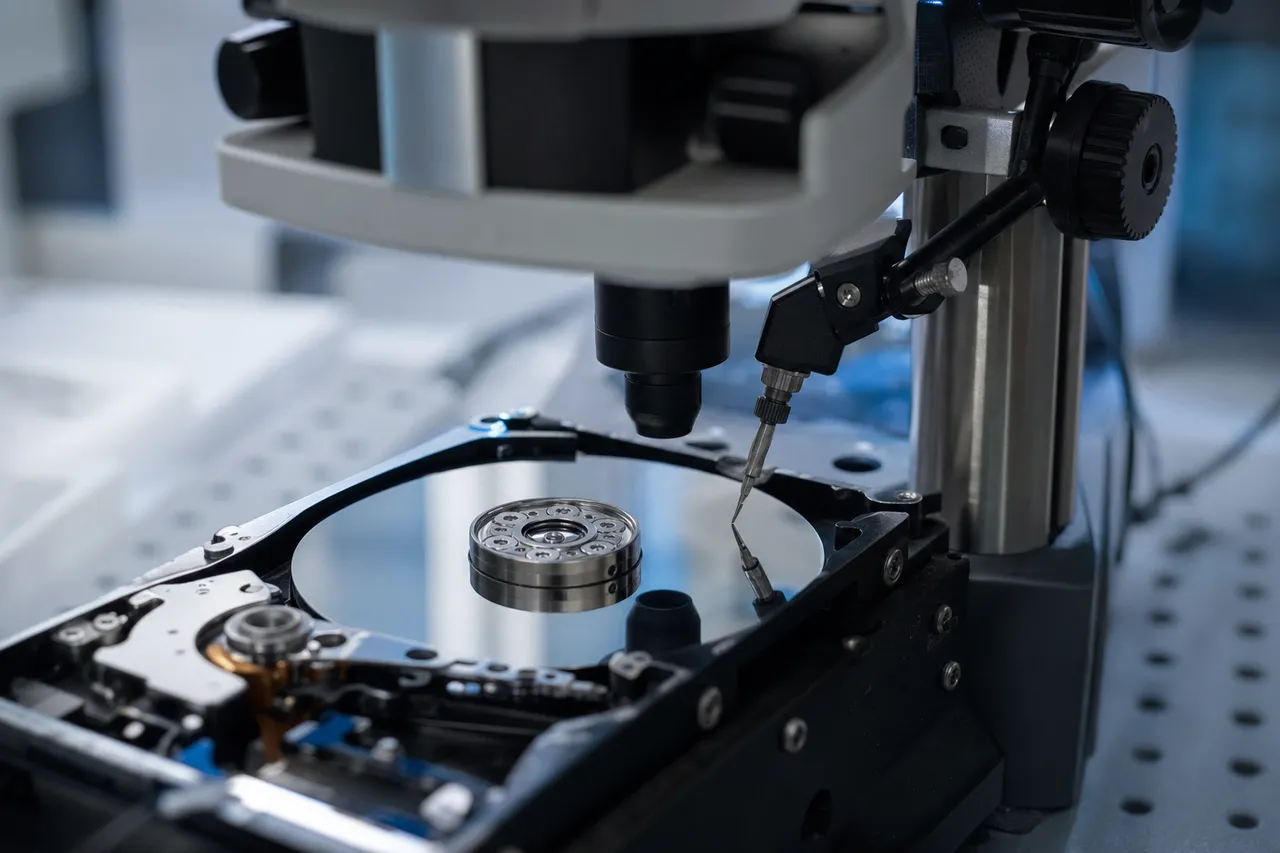
How burnishing works: A burnishing head is a specially designed tool that rides on the platter surface - intentionally making contact, unlike a normal read/write head that flies above it. The burnishing head has a smooth, hardened contact surface that gradually wears down raised edges of scratches and debris deposits as the platter spins beneath it. Think of it as microscopically sanding down the rough edges around a scratch so that subsequent read/write heads can fly over the area without catching or crashing.
The critical distinction is that burnishing does not repair the data in scratched areas - it makes the surrounding intact areas accessible. The edges of a scratch are often the most dangerous zones for a flying head: the ridge of displaced material along the scratch boundary can be higher than the scratch is deep, creating a "lip" that catches the head and causes secondary crashes. Burnishing removes these ridges, creating a smoother transition between damaged and undamaged areas. This allows the imaging head to safely traverse the damaged zone and reach the data on the other side.
Burnishing technique matters enormously. Too aggressive, and you risk removing intact magnetic coating adjacent to the scratch, destroying data that was otherwise recoverable. Too light, and the scratch edges remain dangerous to fly over. The pressure, duration, and number of burnishing passes must be calibrated to each specific case based on the scratch depth, width, and the type of magnetic coating on the platter. At MDrepairs, Joseph uses a combination of visual inspection under magnification and head-flight monitoring to determine the optimal burnishing parameters for each case.
In some cases, we use a technique called chemical-assisted burnishing, where a small amount of specialized cleaning solution is applied to the platter surface before burnishing. This solution helps dissolve debris deposits and lubricant buildup that contribute to surface roughness, reducing the amount of mechanical burnishing needed. Less mechanical burnishing means less risk to the adjacent intact data areas.
Polishing is a related but distinct process used when the platter surface has contamination that is bonded to the magnetic coating - fingerprint oils, adhesive residue, or oxidation products that cannot be removed by solvent cleaning alone. Polishing uses an even finer contact element and specialized compounds to remove the contaminant layer without disturbing the magnetic recording beneath it. Polishing is particularly important for drives that were opened outside a clean room, where the contamination from handling has adhered to the platter surface.
After burnishing and polishing, we perform a final cleaning pass to remove any residual particles generated by the process. The platter surface is then inspected under magnification to verify that the scratch edges have been adequately smoothed and that no new damage has been introduced. Only after this verification do we install fresh donor heads and begin the imaging process.
Not every scratched platter case requires burnishing - drives with very shallow scratches or scratches confined to non-data areas may be imageable with just a head swap. But for cases with moderate scratching across data zones, burnishing is often the difference between a 50% recovery and a 90%+ recovery. It is one of the techniques that separates a professional lab like MDrepairs from companies that simply swap heads and hope for the best.
Maximizing Recovery
Partial Recovery Strategies: Getting the Most from Damaged Platters
When a platter has significant scratch damage, 100% recovery may not be possible. But that does not mean the situation is hopeless - far from it. Partial recovery strategies allow us to maximize the amount of data recovered from damaged platters by prioritizing critical files, optimizing imaging parameters, and using advanced techniques to extract data from marginal sectors. At MDrepairs, our approach to partial recovery has saved countless customers from losing everything when full recovery was not achievable.
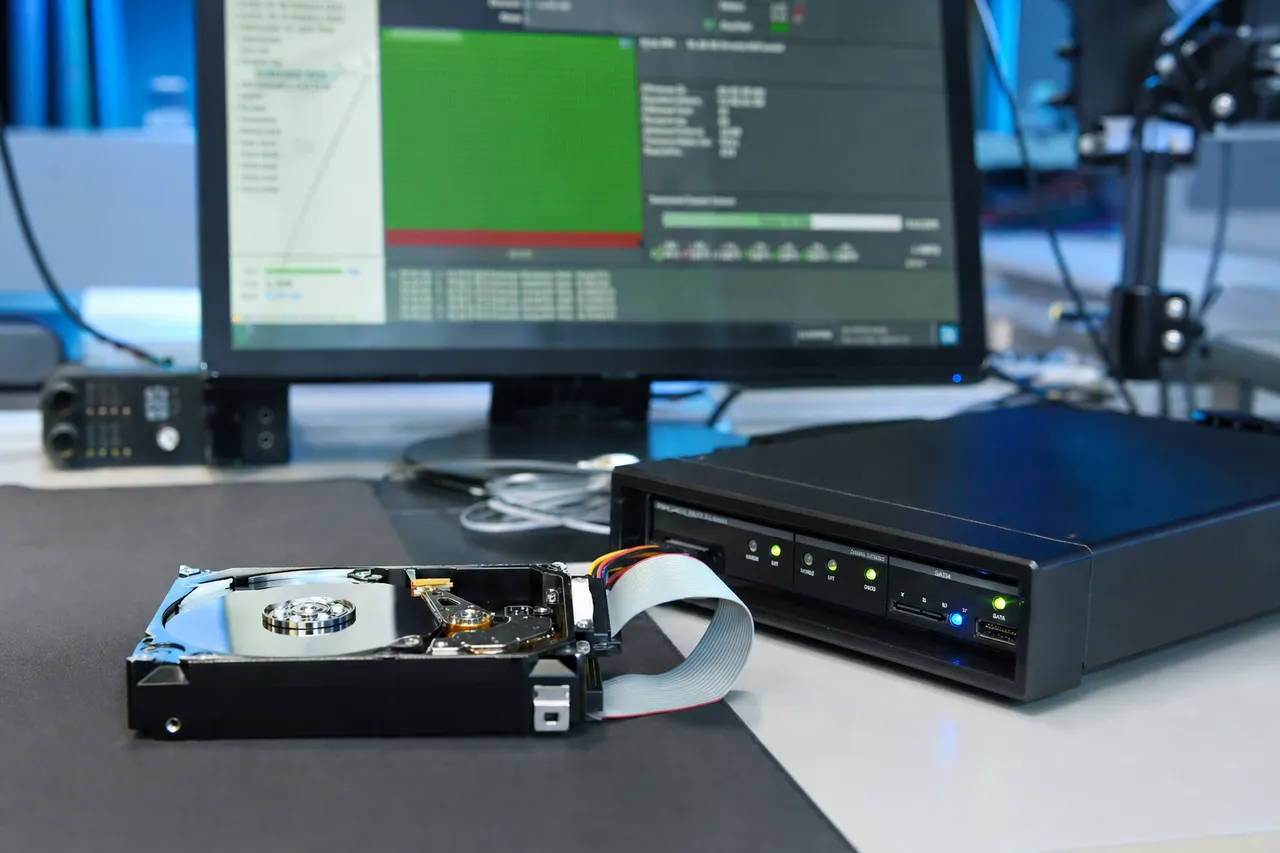
Prioritized imaging is the foundation of our partial recovery strategy. Rather than imaging a damaged drive sequentially from sector 0 to the last sector (the default approach for most consumer recovery software), we use professional imaging hardware that allows us to target specific areas of the platter first. If you tell us your most important files are in your Documents folder, we identify which sectors on the platter contain that folder's data and image those sectors first, before the heads have a chance to degrade from contact with damaged areas. This priority-based approach means that even if the heads fail partway through imaging, we have already captured your most critical data.
We work closely with customers to create a priority list before imaging begins. Common priorities include business documents and financial records, family photos and videos, email archives, creative project files, and database files. By understanding what matters most to you, we can structure the imaging process to maximize the chances of recovering the files you care about most, even if some lower-priority data is lost.
Multi-pass imaging is another key technique. On the first pass, we configure the imaging hardware to make only a single read attempt on each sector, with very short timeouts. This captures all the easy-to-read sectors quickly and with minimal head wear. On subsequent passes, we revisit sectors that failed on the first attempt, using longer timeouts, different read parameters, and sometimes different head sets to coax data from marginal sectors. Each pass typically recovers additional data from sectors that were borderline on previous attempts.
For severely damaged platters, we may use head-per-platter imaging - reading each platter surface independently rather than using all heads simultaneously. This allows us to optimize read parameters for each platter surface based on its specific damage pattern. One platter surface might have minimal damage and image quickly with aggressive settings, while another might have significant scratching and require slow, gentle read parameters. Head-per-platter imaging is more time-consuming but can significantly increase total recovery from multi-platter drives where damage is unevenly distributed.
File system reconstruction plays a critical role when imaging is incomplete. Even if we can only image 70% of the platter surface, the recovered data may still contain enough file system metadata (directory entries, file allocation tables, MFT records) to reconstruct the logical structure of the drive. Our technicians use specialized forensic tools to parse incomplete file systems, identify recoverable files, and piece together fragmented data. In many cases, files whose data spans both damaged and undamaged sectors can still be partially recovered - you might get 95% of a large video file or all but the last page of a document.
At MDrepairs, we provide customers with a detailed file listing showing exactly what was recovered, what was partially recovered, and what could not be recovered due to platter damage. This transparency allows you to make an informed decision about whether the recovery meets your needs before you commit to the final payment. Our no data, no charge policy applies to cases where we cannot recover any meaningful data - if we can only recover a small percentage, we discuss the results with you and let you decide whether the recovered files are worth the cost.
Drive Care
Preventing Platter Damage: Best Practices for Hard Drive Care
While MDrepairs specializes in recovering data from damaged platters, we would rather you never need our services. Prevention is always better than recovery, and most platter damage is preventable with proper drive handling, storage, and backup practices. Here are the best practices we recommend based on years of seeing what goes wrong.
Never move a drive while it is powered on. This is the single most important rule for preventing platter damage. When a hard drive is spinning, the heads are flying nanometers above the platter surface, and any sudden movement can cause a head crash. This applies to external drives, laptops, and desktop computers. If you need to relocate a running computer, shut it down completely first and wait for the drives to spin down (you can usually hear them stop). For external drives, always use the "safely remove hardware" option before unplugging and moving the drive.
Handle drives gently. Even when powered off, hard drives can be damaged by rough handling. Most drives are rated for 300-400 G of non-operating shock, which sounds like a lot but can be exceeded by dropping a drive from desk height onto a hard floor. When shipping drives, use adequate cushioning - we recommend at least 2 inches of bubble wrap or foam on all sides, packed in a rigid box. Never ship a drive in a padded envelope.
Maintain stable temperatures. Hard drives are designed to operate between 5C and 55C (41F to 131F). Prolonged exposure to high temperatures accelerates lubricant evaporation on the platter surface, increasing the risk of head-platter contact. Ensure your computer has adequate ventilation, clean dust filters regularly, and do not place external drives near heat sources. Conversely, very cold temperatures can cause condensation when the drive warms up, leading to corrosion and stiction issues.
Use a UPS (Uninterruptible Power Supply). Sudden power loss is a common trigger for head crashes. When power is cut abruptly, the drive may not have time to park the heads in the safe landing zone before the platters stop spinning. A UPS gives your computer enough power to shut down gracefully during an outage, allowing the drive to park its heads properly. Even an inexpensive UPS providing 5-10 minutes of backup power is sufficient for a controlled shutdown.
Monitor drive health. Modern hard drives support S.M.A.R.T. (Self-Monitoring, Analysis, and Reporting Technology), which tracks internal drive parameters like reallocated sector count, spin retry count, and temperature. Free tools like CrystalDiskInfo (Windows) or DriveDx (Mac) can read S.M.A.R.T. data and alert you to early signs of drive degradation before a catastrophic failure occurs. If you see increasing reallocated sectors or current pending sectors, back up immediately and replace the drive.
Back up your data. No prevention strategy is perfect - drives can fail without warning due to manufacturing defects, random component failures, or environmental events beyond your control. The 3-2-1 backup rule remains the gold standard: keep 3 copies of your data, on 2 different types of media, with 1 copy stored offsite (or in the cloud). If your primary drive suffers platter damage, a current backup means you lose nothing except the cost of a replacement drive.
Replace aging drives proactively. The annual failure rate of hard drives increases significantly after 3-5 years of use. If you have drives that are approaching this age and contain important data, consider replacing them preemptively and migrating your data to fresh drives. The cost of a new drive is a fraction of the cost of data recovery from a failed one.
At MDrepairs, we want our customers to succeed in protecting their data. If you have questions about drive health, backup strategies, or storage best practices, call us at 732-933-7717. We are happy to provide advice even when you do not need a recovery.
Honest Limits
When Recovery Is Impossible: Understanding Total Data Loss
MDrepairs has a strong recovery success rate, but we also believe in honesty and transparency. There are situations where scratched platter damage is so severe that data recovery is genuinely impossible, and we think it is important for customers to understand what those situations look like so they can set realistic expectations.
Complete surface destruction is the most obvious case of unrecoverable damage. When a head crash generates enough debris to strip the magnetic coating from the entire platter surface, there is physically no magnetic data left to read. This typically happens when a drive runs for an extended period after the initial crash - minutes or hours of a damaged head grinding against a spinning platter can progressively sand away the entire recording layer. The platter surface changes from its normal mirror-like appearance to a dull, foggy, or powdery texture. At this point, the data does not exist anymore in any form that could be recovered by any technology.
Severe multi-platter damage can make recovery impractical even if not technically impossible. A drive with scratches across 80% of all platter surfaces might have recoverable data scattered in small islands between damaged zones, but the file system metadata needed to reassemble those fragments into usable files may be entirely destroyed. Without directory structures, file names, and allocation tables, the recovered sectors are just raw binary data that cannot be organized into identifiable files. While forensic carving techniques can sometimes extract recognizable file types (JPEG headers, PDF markers, etc.) from raw sector data, the results are often incomplete and disorganized.
Platter substrate damage occurs when scratches penetrate through the magnetic recording layer and into the underlying aluminum or glass substrate. These deep gouges generate large metallic or glass particles that cause cascading damage to other areas of the platter. Even if data exists in the undamaged zones between the gouges, the debris from substrate-level scratching makes it extremely difficult to fly replacement heads without causing additional crashes. Each attempt to image the drive risks destroying more of the remaining data.
Shattered glass platters represent a complete loss scenario. Some 2.5-inch drives (particularly Seagate, Samsung, and Toshiba laptop models) use glass platters instead of aluminum. Glass platters can shatter from severe impact, and once a platter is in pieces, the data is unrecoverable. There is no technology that can reassemble shattered glass platter fragments and read the magnetic patterns from them. If you have a drive that was dropped hard and produces a rattling sound when gently tilted, glass platter fracture is a possibility.
Fire damage above 800C can destroy the magnetic recording layer itself. The Curie temperature of most cobalt-alloy recording media is between 400C and 600C - above this temperature, the magnetic domains that store data lose their orientation and the recorded information is permanently erased by the laws of physics. Drives recovered from structure fires may have intact-looking platters that hold zero recoverable data because the heat has degaussed the entire recording surface. However, many fire-damaged drives were protected enough by surrounding equipment or building materials that their platters remained below the Curie temperature, so fire damage does not automatically mean total loss.
At MDrepairs, our diagnostic process is designed to identify these total-loss scenarios early, before you invest significant money in a recovery attempt. If we determine during the diagnostic that your drive's damage falls into one of these categories, we will tell you honestly and explain exactly why recovery is not possible. We would rather give you an honest no than take your money for a recovery that cannot succeed. That integrity is why our customers trust us and why we have maintained a 4.6 rating across thousands of cases.
Mythbusting
DIY Data Recovery Myths Debunked
The internet is full of advice on how to recover data from a failed hard drive at home. Some of this advice is well-intentioned but outdated. Some of it is dangerously wrong. And all of it, when applied to a drive with scratched platters, is almost guaranteed to make things worse. At MDrepairs, we regularly receive drives that were damaged further by DIY recovery attempts, turning recoverable cases into partial or total losses. Here are the most common myths and why they are wrong.
Myth 1: "Put the drive in the freezer." This is perhaps the most widespread and most harmful piece of DIY advice. The theory is that cooling the drive causes metal components to contract, temporarily freeing stuck parts and allowing the drive to spin. In reality, putting a hard drive in a freezer introduces moisture and condensation that causes corrosion on the platter surface, contaminates the head-platter interface, and can cause stiction when the condensation freezes between the head and platter. For a drive with existing platter scratches, the moisture accelerates oxidation of the exposed magnetic layer, permanently destroying data that a professional lab could have recovered. Do not freeze your drive.
Myth 2: "Tap or shake the drive to unstick the heads." If your drive is clicking or not spinning, some sources recommend tapping the drive firmly on a hard surface to "free" stuck components. This can cause a head crash on a drive that does not yet have platter damage, or worsen existing scratches by slamming heads into the platter surface. The forces generated by tapping a drive exceed the shock ratings of the internal components and can also damage the spindle bearings, crack glass platters, or dislodge debris into the head-platter gap. Never apply physical force to a hard drive.
Myth 3: "Open the drive and clean the platters." We have seen customers open their drives in their kitchens, garages, and offices, attempting to wipe platter surfaces with tissues, cotton swabs, or alcohol wipes. Opening a drive outside a clean room immediately introduces millions of airborne particles per cubic meter - dust, fibers, skin cells, pet dander - onto the exposed platter surface. Wiping the platter with any household material deposits lint fibers and creates microscopic scratches from abrasive particles in the material. The fingerprints left from handling deposit oils that bake onto the surface when the drive heats up during operation. We have seen drives that were recoverable before opening become total losses after a DIY cleaning attempt.
Myth 4: "Swap the PCB board from another drive." While PCB (printed circuit board) swaps can work for certain types of electronic failures, they are dangerous for drives with platter damage. Modern drive PCBs contain calibration data specific to the individual drive - head fly height parameters, servo timing offsets, and defect maps. A PCB from even the same model drive will have different calibration values, which can cause the heads to fly at the wrong height and crash into a platter that they would have safely cleared with the original calibration. PCB swaps also do not address the mechanical cause of platter scratches.
Myth 5: "Data recovery software can fix scratched platters." Software recovery tools like Recuva, TestDisk, or R-Studio are excellent for logical data loss - accidental deletion, formatting, or partition corruption. They are completely useless for physical platter damage because they rely on the drive's own heads to read the platter surface, and if the heads cannot fly over scratched areas without crashing, no software can force them to. Running recovery software on a drive with platter damage typically causes the drive to repeatedly attempt to read damaged sectors, generating more head crashes and more debris with each retry.
Myth 6: "Any clean area with a box fan is a clean room." A laminar flow hood or a room with a HEPA-equipped box fan is not a clean room. ISO Class 5 clean rooms control particle counts to 3,520 per cubic meter. A room with a box fan and HEPA filter might achieve ISO Class 7 or 8 at the immediate filter output, but the rest of the room - where you are sitting, breathing, and shedding skin cells - is standard indoor air quality at millions of particles per cubic meter. One sneeze in a "DIY clean room" deposits more particles on an exposed platter than the platter would encounter in years of operation inside its sealed enclosure.
Myth 7: "If the drive clicks, keep trying - it might work eventually." Clicking indicates the heads are repeatedly failing to read servo data and resetting, or that the heads are physically damaged and hitting the platter during seek operations. Every click is potentially another scratch. Power the drive off immediately if you hear clicking, grinding, beeping, or any unusual mechanical noise. The more you run a drive with platter contact issues, the less data will be recoverable when it reaches a professional lab.
The best thing you can do for a drive with suspected platter damage is power it off and contact MDrepairs at 732-933-7717. Every minute of operation on a damaged drive can reduce your recovery chances. Our diagnostic will tell you exactly what is wrong and what can be recovered, with no obligation to proceed.
The Physics
The Science Behind Magnetic Data Storage and Scratch Recovery
For those who want to understand the deeper science behind why scratched platter recovery works - and why it sometimes does not - this section explores the physics and engineering that make hard drive data storage possible and the scientific principles that govern what happens when that storage medium is physically damaged.
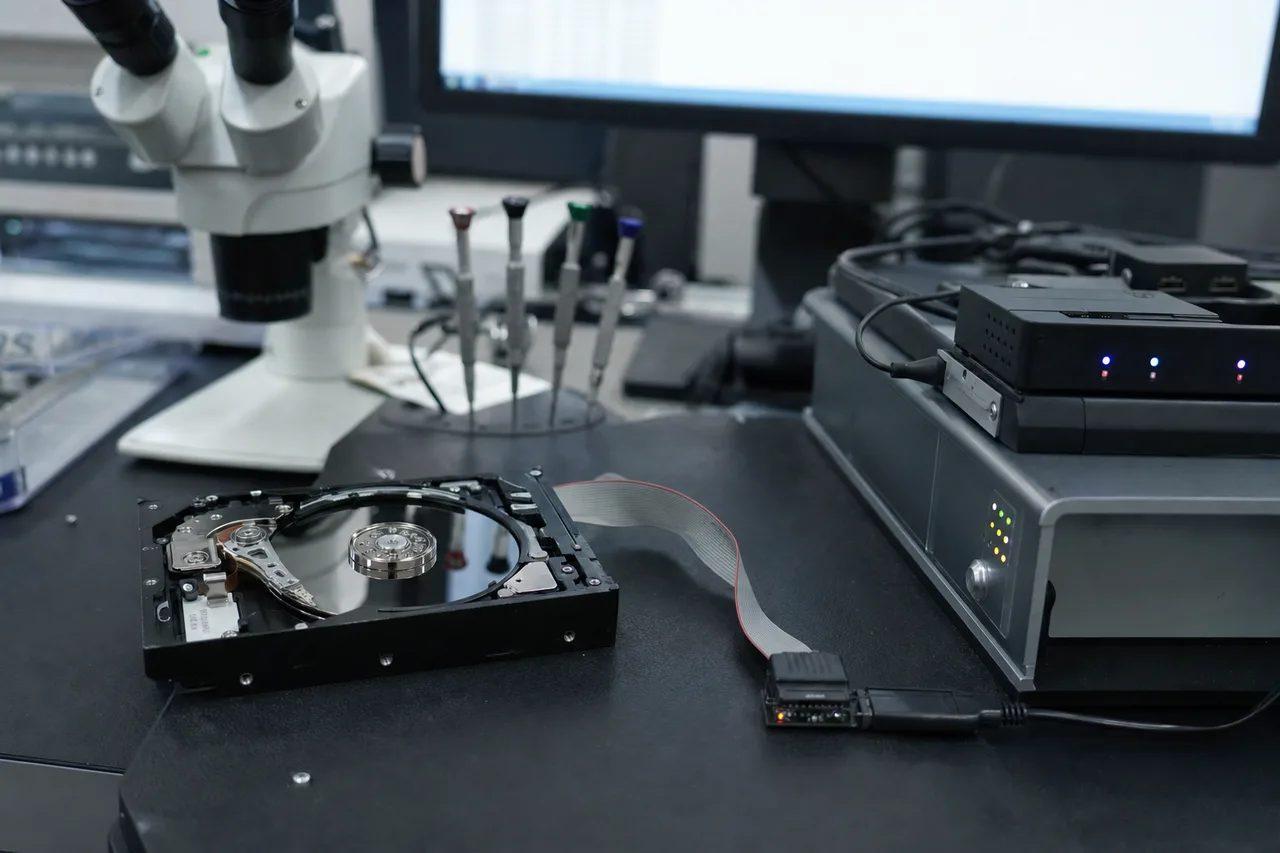
Magnetic recording fundamentals: Hard drive data storage relies on the phenomenon of magnetic remanence - the ability of certain materials to retain a magnetic field after the external magnetizing force is removed. The recording layer on a hard drive platter is a thin film of cobalt-platinum-chromium alloy, chosen because it has high coercivity (resistance to demagnetization), high remanence (strong residual field), and a grain structure that supports tiny magnetic domains. Each bit of data is stored as the magnetic orientation of a cluster of grains - the north-south axis of these grains is flipped by the write head's magnetic field to point either "up" or "down" (in perpendicular recording), representing a 1 or 0.
The signal-to-noise ratio (SNR) of the read-back signal determines data integrity. The signal comes from the organized magnetic pattern (the data), while noise comes from random grain boundary effects, thermal fluctuations, and adjacent track interference. In a healthy drive, the SNR is high enough that the read channel electronics can perfectly reconstruct the original data stream. When a platter is scratched, several things happen to the SNR in and around the damaged area.
What happens to data at a scratch boundary: The physical impact of a head crash or abrasive particle does several things simultaneously. First, it removes material - the lubricant, carbon overcoat, and possibly the magnetic layer itself are displaced or ejected from the impact zone. Second, it mechanically deforms the surrounding material, creating raised edges (burrs) and compressed zones around the scratch. Third, the impact energy locally heats the magnetic layer, potentially disrupting magnetic orientations near the scratch edge. Fourth, the displaced material creates debris that can cause secondary damage elsewhere.
The key scientific insight for recovery is that magnetic data is remarkably resilient. Even in areas where the carbon overcoat has been stripped away by a scratch, the underlying magnetic recording layer may still be intact with its data patterns preserved. The cobalt-platinum alloy has a Curie temperature of approximately 500C - far above the temperatures generated by a mechanical scratch. Unless the scratch physically removes or severely deforms the magnetic layer itself, the recorded magnetic patterns survive the mechanical damage to the layers above them.
This is why shallow scratches are highly recoverable. A scratch that penetrates only the 1nm lubricant layer and 2-3nm carbon overcoat leaves the 15-20nm magnetic layer essentially untouched. The data is all there, perfectly intact. The challenge is purely mechanical: getting a read head to fly safely over the area without crashing into the scratch edges. This is exactly what burnishing accomplishes - smoothing the mechanical damage so the head can access the intact magnetic data beneath.
Deep scratch physics are different. A scratch that penetrates into or through the magnetic recording layer physically removes the magnetic material that holds the data. In the scratch groove itself, the data is gone - the magnetic grains have been either ejected as debris or so severely deformed that their magnetic orientation is randomized. However, even a deep scratch has finite width. A typical head crash score might be 20-50 micrometers wide, while the track pitch on a modern drive is about 70 nanometers. This means a single scratch destroys roughly 300-700 tracks - significant, but only a tiny fraction of the hundreds of thousands of tracks on the platter. The data on either side of the scratch is unaffected.
Advanced read techniques can sometimes extract partial data from the edges of deep scratches. The magnetic transitions at the scratch boundary are distorted but may still contain enough signal for the read channel to decode with error correction. Modern drives use powerful Reed-Solomon and LDPC (Low-Density Parity-Check) error correction codes that can reconstruct complete sectors from partially corrupted read-back signals. Professional imaging hardware can be configured to apply maximum error correction and multiple read retries with varying head positions to maximize recovery from these marginal zones.
Temperature and time considerations: The magnetic data on a platter is subject to thermal decay - random thermal energy gradually destabilizes the magnetic orientations of individual grains, eventually causing them to flip and corrupting the stored data. At room temperature, this process takes decades for modern recording media, so it is not a concern for drives that are months or even years old. However, thermal decay is accelerated exponentially by elevated temperatures. A drive that has been through a fire or stored in a hot environment may have weakened magnetic signals even in areas without physical damage, making recovery from adjacent undamaged zones more challenging.
At MDrepairs, our understanding of these scientific principles informs every decision we make during a scratched platter recovery - from the burnishing parameters we choose to the imaging strategies we employ. Science guides our process, and that is why our results consistently exceed industry averages for scratched platter cases.
Frequently Asked Questions
Straight answers on scratched platter recovery - cost, the clean room, burnishing, recovery odds, and how we protect what's left of your data.
-
Can data be recovered from a scratched hard drive platter?
Yes, data can often be recovered from scratched platters depending on the depth and extent of the damage. Shallow scratches that only affect the protective overcoat leave the magnetic data layer intact, allowing high recovery rates. Even drives with visible scratches often have 80-95% of their data on undamaged platter areas. At MDrepairs, we assess every scratched platter case in our clean room and provide an honest recovery estimate before you commit. -
How much does scratched platter data recovery cost?
Scratched platter recovery at MDrepairs runs $1,500 - $2,500+ depending on damage severity - the number of platters affected and the complexity of the burnishing and head swap involved. Because these are the most severe and labor-intensive cases, they begin with a higher $500 diagnostic deposit (most other drive failures start at $100). The deposit is applied toward your recovery cost if you proceed. Our no data, no charge guarantee means you only pay the full recovery fee if we recover your target files. -
What percentage of data can typically be recovered from scratched platters?
Recovery rates vary widely based on damage severity. Light scratching confined to small areas typically yields 90-100% recovery. Moderate scratching across data zones yields 60-90%. Severe damage with heavy debris contamination yields 20-60%. In rare cases of complete surface destruction, recovery may not be possible at all. MDrepairs provides an honest recovery estimate during the diagnostic before you commit to the full recovery. -
Should I keep trying to run my hard drive if I hear scratching noises?
No. Power off the drive immediately if you hear grinding, scraping, or clicking sounds. Every second a damaged head contacts a spinning platter creates more scratches and generates more debris, which causes cascading damage. The longer you run a drive with platter contact, the less data will be recoverable. Power off, unplug, and contact MDrepairs at 732-933-7717. -
Will the freezer trick work on a drive with scratched platters?
No. The freezer trick is one of the most harmful DIY myths in data recovery. Putting a hard drive in a freezer introduces moisture and condensation that causes corrosion on exposed platter surfaces, contaminates the head-platter interface, and can cause stiction. For a drive with existing scratches, the moisture accelerates oxidation of the exposed magnetic layer, permanently destroying data that a professional lab could have recovered. -
What causes platters to get scratched inside a hard drive?
The most common causes are head crashes from physical shock (dropping or bumping the drive while powered on), power failures that prevent heads from parking safely, worn head suspension assemblies, contamination from degraded internal air filters, and age-related lubricant depletion. External forces like vibration, heat, and electrical surges can also trigger head-to-platter contact that results in scratching. -
What is a head crash and how does it damage platters?
A head crash occurs when the read/write head, which normally flies nanometers above the platter on an air bearing, makes physical contact with the spinning platter surface. At 7,200 RPM, the outer edge of a 3.5-inch platter moves at roughly 75 mph, so contact carves grooves into the magnetic coating. The impact also generates metallic debris that contaminates other platters and heads, often causing secondary damage. -
Can you recover data if the platter has visible circular scratches?
In most cases, yes. Visible circular scratches typically destroy data along specific tracks, but the data between the scratch lines remains intact. A visible scratch might be 50-100 micrometers wide, representing only about 700-1,400 tracks out of hundreds of thousands on the platter. Our sector-by-sector imaging reads around the damaged areas and captures everything else, often achieving 80-95% recovery rates. -
Do you need a clean room to recover data from scratched platters?
Yes. A clean room is essential for scratched platter recovery because the protective overcoat is already compromised, leaving the exposed magnetic surface vulnerable to contamination. A single dust particle landing on a damaged platter can cause additional scratches when the heads pass over it. MDrepairs works under ISO Class 5 laminar-flow workstations that maintain fewer than 3,520 particles per cubic meter at the work surface - about 10,000 times cleaner than normal office air. -
How long does scratched platter recovery take?
Standard turnaround for scratched platter cases is 4-5 weeks because the process requires careful platter cleaning, burnishing, and slow imaging to maximize recovery without causing further damage. Rush options are available: Priority Rush (5-7 days, +$250), Urgent Rush (1-2 days, +$500), and Emergency Same-Day (+$1,000). Contact MDrepairs at 732-933-7717 to discuss your timeline. -
Can you recover specific files from a partially damaged platter?
Yes. Our imaging hardware allows us to prioritize specific areas of the platter, so we can target your most important files first. If you tell us which files matter most - family photos, business documents, a dissertation - we image those sectors before the heads have a chance to degrade. Even if total recovery is limited, prioritized imaging maximizes the chances of getting your critical files back. -
Is scratched platter recovery covered by the no data, no charge guarantee?
Yes. Our no data, no charge guarantee applies to all recovery cases including scratched platters. If we cannot recover your target files, you pay only the diagnostic deposit. If we achieve a partial recovery, we discuss the results with you and let you decide whether the recovered files justify the cost. You are never charged the full recovery fee unless you approve the results. -
What is platter burnishing and how does it help recovery?
Burnishing is a technique where a specialized tool smooths the raised edges around platter scratches so replacement heads can fly over damaged areas without crashing. It does not repair the data in the scratched zone itself - instead, it makes the surrounding intact areas safely accessible. Burnishing removes the ridges of displaced material along scratch boundaries that would otherwise catch and crash a flying read head. -
What happens during the diagnostic for a scratched platter case?
During our diagnostic, we open your drive in our clean room and inspect every platter surface under magnification. We photograph all damage, measure scratch depth and extent, and assess head condition. Based on this inspection, we provide a recovery estimate (percentage of expected data recovery), a firm price quote, and an explanation of the damage. You decide whether to proceed with no obligation. -
What is a platter transplant and when is it needed?
A platter transplant involves removing platters from a damaged drive and reinstalling them in a donor drive chassis with working components. It is needed when the original drive's spindle motor has seized, bearings are damaged, the chassis is physically warped, or internal contamination is too severe to clean in place. The platters must be transferred with exact angular alignment to preserve servo track registration. -
Can I open my hard drive to check for platter damage myself?
No. Opening a hard drive outside a clean room immediately introduces millions of airborne particles onto the exposed platter surfaces. Dust, fibers, skin cells, and other contaminants will land on the platters and cause additional damage when the heads pass over them. We regularly receive drives damaged further by DIY opening attempts. Leave the drive sealed and send it to MDrepairs for professional assessment. -
Do all hard drive brands have the same type of platters?
No. Different manufacturers use different platter substrates (aluminum alloy vs. glass), different magnetic coatings, and different numbers of platters. Glass platters (common in some Seagate, Samsung, and Toshiba laptop drives) are smoother but can shatter on impact, resulting in total data loss. Aluminum platters are more resilient to shock but can develop deeper scratches. MDrepairs has experience with all platter types across all major brands. -
How do I ship my hard drive to MDrepairs for scratched platter recovery?
We provide free insured shipping labels for all recovery cases. Pack your drive in at least 2 inches of bubble wrap or foam on all sides inside a rigid box - never use a padded envelope. Do not place the drive in an anti-static bag with sharp corners that could dent the enclosure. Ship to our Lincroft, NJ lab and we will begin the diagnostic within 24 hours of receipt. -
Can power surges cause platter scratches?
Yes. A power surge can damage the motor driver circuit, causing the spindle motor to jerk or stop suddenly. The abrupt deceleration can fling the heads across the platter surface. Additionally, a failed preamp chip from surge damage can send erratic signals to the voice coil motor, driving the head into the platter at unpredictable angles. Using a surge protector or UPS can prevent this type of damage. -
What is the difference between a clicking drive and a scratched platter?
Clicking indicates the heads are failing to read servo data and repeatedly resetting - this can occur with or without platter scratches. A drive can click due to a failed head without any platter damage, or the clicking can be caused by heads hitting scratched areas and losing servo lock. A grinding or scraping sound is a stronger indicator of active platter contact. In either case, power off immediately and contact MDrepairs for diagnosis. -
Do you recover data from external hard drives with scratched platters?
Yes. External hard drives contain the same internal mechanisms as internal drives and are actually more prone to platter damage because they are moved more frequently, often while powered on. We recover from all external drive brands including WD My Passport, Seagate Backup Plus, Toshiba Canvio, LaCie Rugged, and G-Technology drives. The recovery process is identical to internal drive recovery. -
Can water-damaged drives with scratched platters be recovered?
Often yes, but water damage adds complexity. Water causes corrosion and oxidation on platter surfaces, which compounds any existing scratch damage. Recovery requires chemical treatment to halt corrosion, thorough platter cleaning, and careful imaging with specialized parameters. The sooner you get a water-damaged drive to us, the better - active corrosion progressively destroys the magnetic coating over days and weeks. -
What tools does MDrepairs use for scratched platter recovery?
We use professional-grade data recovery hardware for sector-by-sector imaging, ISO Class 5 laminar-flow workstations, stereo microscopes for platter inspection, specialized burnishing tools, donor drive inventory for head swaps, and custom alignment fixtures for platter transplants. Our equipment represents a significant investment that allows us to handle cases other shops cannot. -
How do I know if my hard drive has scratched platters without opening it?
Common symptoms include grinding or scraping sounds during operation, the drive spinning up but not being recognized by the computer, clicking followed by the drive powering down, or the drive working intermittently with very slow read speeds. However, these symptoms can also indicate other failures. The only way to confirm platter damage is through clean room inspection, which is part of our diagnostic at MDrepairs. -
Does MDrepairs offer a warranty on recovered data?
We provide your recovered data on a new external drive and verify file integrity before shipping. We keep a backup copy of your recovered data for 30 days after delivery in case you need a re-transfer. We recommend immediately backing up your recovered data to a second location - another drive, cloud storage, or both - as the recovered drive is your only copy until you create backups.
Talk To A Technician
Ready to Recover Your Hard Drive Data?
Every recovery starts with a free quote and our no data, no charge guarantee. Call us directly at 732-933-7717 or get started online - we provide free insured shipping both ways.
Transparency
Sources & References
The statistics, specifications, and claims on this page are sourced from publicly available data. We cite our sources so you can verify independently.
- Backblaze Hard Drive Stats
Annualized failure rate data from a monitored fleet of 340,000+ drives. Model-level reliability data referenced for general manufacturer failure trends and the ~1.5 - 1.6% average annualized failure rate cited on this page.
- ACE Lab PC-3000 Portable III
Industry-standard data recovery hardware and software used by professional labs worldwide including DriveSavers, Ontrack, and Rossmann Repair Group. Manufacturer specifications referenced for tool capabilities described in our recovery process.
- DeepSpar Disk Imager
Professional sector-level imaging tool with controlled retry and timeout features. Used in conjunction with PC-3000 for forensic-grade imaging of failing drives.
- ISO 14644-1:2015 - Classification of Air Cleanliness
International standard for classifying air cleanliness in cleanrooms and clean zones. ISO Class 5 (max 3,520 particles ≥0.5µm per cubic meter) and ISO Class 4 (max 352 particles) referenced in our clean room vs. clean bench comparison.
- NIST Special Publication 800-88 Rev. 1 - Guidelines for Media Sanitization
U.S. National Institute of Standards and Technology guidelines confirming that a single-pass overwrite is sufficient for modern magnetic media. Referenced in our FAQ on overwritten data recovery.
- Magnuson-Moss Warranty Act, 15 U.S.C. §§ 2301-2312
Federal law prohibiting manufacturers from voiding warranties solely because an independent service provider performed repair or recovery. Referenced in our FAQ on whether data recovery voids your warranty.
- Backblaze Blog - Hard Drive Failure Rates by Model
Quarterly reports breaking down failure rates by manufacturer and model. Referenced for Seagate, WD, Toshiba, and HGST failure trends discussed in our manufacturer sections.